Sync blocks library fail

Hello,
I have 3 Brizy Pro WP licenses installed on 3 different environments:
1) published WP website silversnakemichelle.com
2) published WP website snake-machine.com.
3) localhost for development with a replica of website 1)
All environments have the same PHP version (8.1.0), the latest updated version of Brizy and Brizy Pro, the same WP latest version (6.3.1), the same plugins (always updated), and an Astra Child theme (also updated to the latest version).
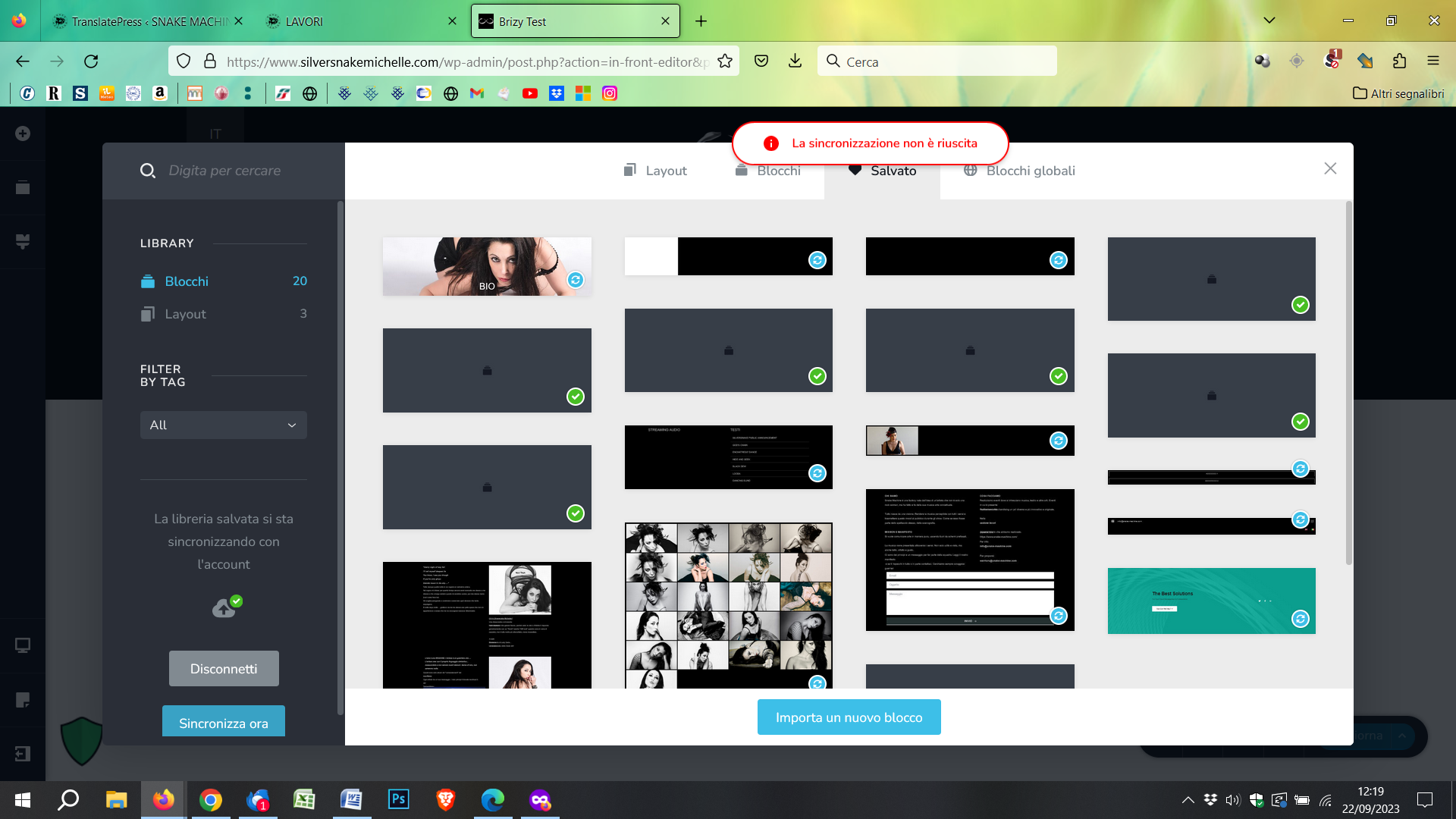
I can't understand why ONLY in silversnakemichelle.com and localhost the synchronization of blocks library FAILS (when I click on "sync now" a red popup say "sync failed") as well as downloading a block ("could not download the saved block").
However on snake-machine.com everything works perfectly.
I have also tried from multiple browsers, always clearing the cache, but the problem remains.
It was so useful for me to transfer blocks from localhost to the published environment, but unfortunately for silversnakemichelle.com I can no longer do that.
Thank you in advance for your kind support
Dan
-

Hi Dan,
In the silversnakemichelle.com live project or in your localhost can you try changing your theme from 'Astra Child for Silversnake Michelle' to Astra temporarily and check if you continue to face this issue?
0 -
Hello George,
I've activated parent Astra Theme on both live and localhost project, but I face the same issue.
In fact, at the moment I used child theme only for a custom PHP tag manager for Google Analytics.
Best regards.
Dan
0 -
Hi Dan,
We will need access to your WordPress Dashboard for https://silversnakemichelle.com/ to offer further help. Please add a new user to your WordPress Dashboard and send the following details to our email: communitysupport@brizy.io
- Community Post link: https://support.brizy.io/hc/en-us/community/posts/13745177095826
- WordPress Admin URL:
- Username
- Password
Please let us know here when you send us the email.
0 -
Hi George,
just now send you the email as requested.
Thank you and best regards
Dan
0 -
Hi Dan,
I checked your WordPress Dashboard. While the 'Sync Now' button shows error message, I was able to download your saved blocks and layouts. Please have a look at this screen recording https://jmp.sh/9VkvFvKf You can import the downloaded block or a layout to another project by clicking on the 'Importa un nuovo blocco' button.
WordPress uses the /wp-admin/admin-ajax.php file to refresh a page's content without reloading it, to provide a better user experience. When requesting this file, your server returns a 500 Internal Server error. Please see this screenshot https://jmp.sh/F15VaGId This seems to be reason why 'Sync Now' option does not work. You may want to check with your hosting provider why the server returns a 500 Internal Server Error when your website requests admin-ajax.php file.
0 -
Hi George,
Indeed, I have seen that download button on blocks works fine from the online site, but unfortunately does not work from localhost. I will try to recreate a new localhost environment starting from the online site to check this problem, because I need a lot to transfer blocks from the test and development environment to the online one and not vice versa.
Regarding the error 500 issue on admin-ajax.php, I can tell you that both online sites (silversnakemichelle.com and snake-machine.com) are on the same server at the same provider. The only difference is that snake-machine.com has a cache enabled while silversnakemichelle.com does not. Could this be the point?
In any case I will do some testing over the weekend, asking to the hosting provider, and then I will update you this Monday. Possibly I will also provide you credentials to the snake-machine.com dashboard, where everything works perfectly, so you can figure out where the fault lies.I'll keep you updated. Thank you very much for your assistance and best regards.
Dan
0 -
Hi George,
Here I am again after a few more tests.
Unfortunately, I can't figure out what could be the cause of the error.
Both sites are set up similarly and are hosted by the same provider with the same settings.
I have tried deactivating all plugins, but nothing.
On snake-machine.com the library block sync works, on silversnakemichelle.com it does not.I have set up for you an access to snake-machine.com and sent you another email to communitysupport@brizy.io with this credentials.
I would be thankful if you could run a check on both sites to see if you can find out why it works on one and doesn't on the other.
Thank you very much and best regards.Dan
0 -

Hi Dan,
Thank you for your cooperation.
Please also provide us temporary access to FTP. This will allow us to directly access your WordPress files and investigate the problem more effectively. To get your FTP credentials, please contact your hosting provider and ask for the information. Once you have the FTP credentials, please send them again to our community support email address.
Best regards,
Ariel H0 -
Hi Ariel,
I have just sent you, all the credentials to access via FTP the WP files, for both sites, as requested.
Thank you and best regards.
0 -
Hi Dan,
Thank you for your cooperation.
I tried to reproduce the issue; however, the error no longer appears after hitting the sync button - https://i.imgur.com/7eTRmV8.png
In my local test environment, I was able to download one of your layouts and a block successfully and import them onto a page. - https://youtu.be/dkGOrUnIAr8
The sync function also worked properly in my local test environment - https://i.imgur.com/nuLLF3A.png
Please try clicking on the sync button again and see if it works this time. If the issue persists, I recommend trying a different browser to see if that makes any difference.
Additionally, in your local test environment, before syncing (or importing your layouts / blocks), please temporarily disable all other plugins except for Brizy and Brizy Pro. This might help resolve any potential conflicts.
Please try this and let me know how it goes.
Best regards,
Ariel H.0 -
Hi Ariel,
I noticed that tests in your last comment were run on the snake-machine.com site, which is the one that has always worked fine.
As I wrote in previous comments, it is the silversnakemichelle.com site where the sync fails.
Have you tested on this site as well?
My question was actually regarding the fact that I have 2 web sites very similar in settings and hosting, and one works and the other does not.
I just tried the silversnakemichelle.com site again, but I cannot sync the blocks library.Thank you for helping me and best regards.
Dan
 0
0 -
Hi Dan,
Sorry about that.
After reviewing the details, it appears that the error you're facing is specifically linked to the CORS (Cross-Origin Resource Sharing) configuration on your server. CORS is a security mechanism that restricts cross-origin requests in web browsers.
Please see screenshot on this link: https://i.imgur.com/wyJadYn.pngTo address this issue, I recommend reporting it to your hosting provider. They have the expertise to investigate the CORS configuration on your server and assist you in resolving the problem.
Please contact your hosting provider regarding this issue and keep me updated on their response.
Best regards,
Ariel H.0


Please sign in to leave a comment.
Comments
12 comments