Brizy Wordpress - cant edit website

Dear Team,
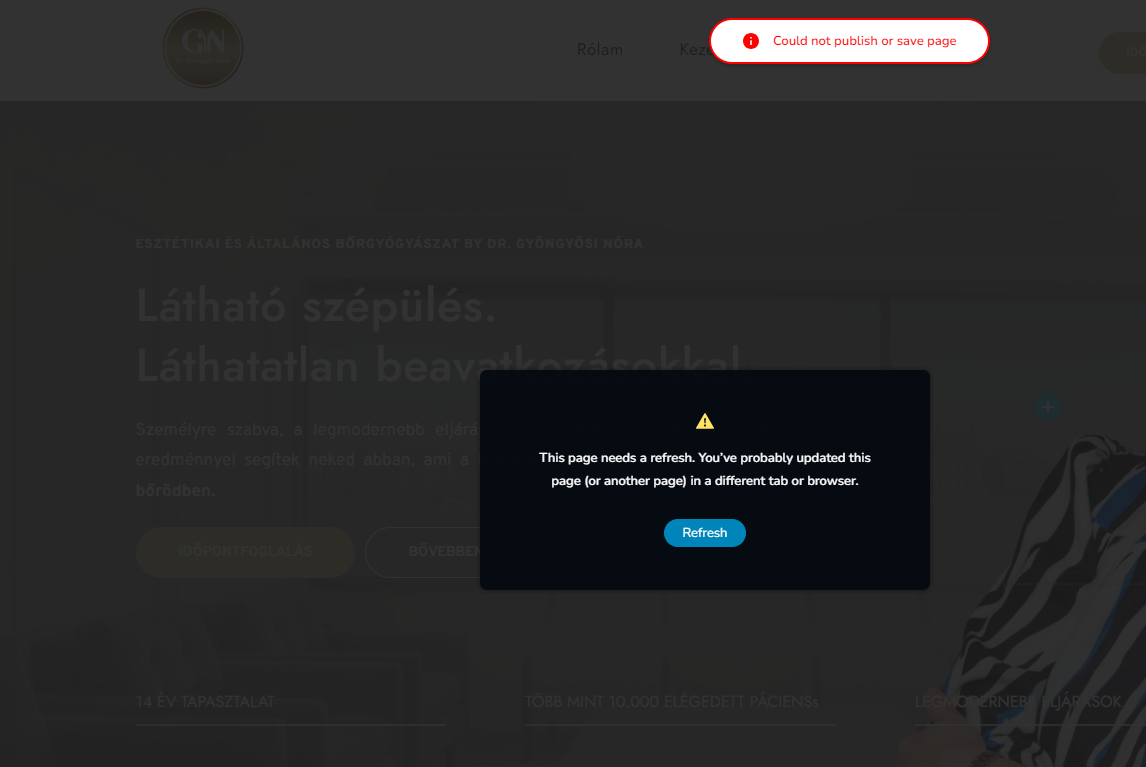
I've just published one of my clients website via Brizy WP, however, right now I am not able to edit any page on the website (tried to change links and texts), every time I click on update the attached screenshot appears.
Could you please help me to fix this problem ASAP?
The website is: http://gyongyosinora.hu/
Bests,
Mate
-

Hi,
Thank you for reaching out to us.
Please try the following steps and see if this will help:
1. Deactivating one plugin at a time and checking if the problem resolves.
2. Temporarily switch to another theme and check if the issue goes away.
3. Also, try raising the PHP memory limit to at least 256MB or higher.
https://www.wpbeginner.com/wp-tutorials/fix-wordpress-memory-exhausted-error-increase-php-memory/If all the above didn't help, please provide us temporary access to your WP Admin credentials, so we can further check the issue. Add us as a user to your WordPress Dashboard and send the following details to: communitysupport@brizy.io
Community Post link: https://support.brizy.io/hc/en-us/community/posts/13742557488146
WordPress Admin URL:
Username:
Password:Please make a full backup of your website as a precaution.
I am looking forward to your response.
Best regards,
Ariel H.0 -
Hi Ariel,
Tried everything but didn't work out, I've sent the credentials to the given email.
Bests,
Mate
0 -
Hi,
Thank you for your cooperation.
Upon checking, it appears that the page in question has too many revisions. This can lead to various issues, including problems with saving changes - https://imgur.com/Yw4XPOq.png
To address this issue, I recommend clearing the unnecessary revisions on your website by following the steps suggested on the below link:
https://www.wpbeginner.com/beginners-guide/complete-guide-to-wordpress-post-revisions/
Please scroll down to the section titled "How to Delete Old Post Revisions in WordPress" for detailed instructions.After completing this process, I suggest making the changes again and checking if the issue has been resolved.
Best regards,
Ariel H.0 -
Hi Arial,
I've removed all the revisions with the mentioned wp-optimize plugin (as described), however, I still can't modify anything and have the same error message.
Could you check please as soon as you can?
Bests,
Mate
0 -
Hi,
Thank you for the update.
Could you please try updating your Web Address URL and Site Address to use HTTPS and check if this resolves the issue? - https://i.imgur.com/qWpWyw5.png
Best regards,
Ariel H.0 -
Hi Ariel,
The url has been modified, the problem still occours...
Bests,Mate
0 -
Hi Mate,
Thank you for the update.
Upon checking, the WordPress Address (URL) is not yet updated - https://imgur.com/yP7Xewc.png
As a result, it’s generating the mixed-content errors in the console - https://i.imgur.com/ZDV1H9p.pngI see that you are unable to edit the WordPress Address URL, you can fix this by adding the following directives in the wp-config.php file.
define( 'WP_HOME', 'https://gyongyosinora.hu' );
define( 'WP_SITEURL', 'https://gyongyosinora.hu' );
This is best explained in this article:
https://wordpress.org/documentation/article/changing-the-site-url/If this doesn’t help, please also provide us temporary access to cPanel/FTP so we will have direct access to your WordPress files, you may send the credentials to communitysupport@brizy.io and inform us here if you have already sent the details.
Best regards,
Ariel H0 -
Hi Ariel,
My team just made this config but the problem still occours. I've sent the cpanel details to the given email address.
Bests,
Mate0 -
Hi Mate,
Thank you for your cooperation.
Unfortunately, the credentials are not working - https://i.imgur.com/ADzVe54.png
Please check this again and send us the correct credentials so that we can proceed with the necessary actions.
Kind regards,
Ariel H.0 -
Hi Ariel,
Sent it again now, however, they were right (just tried it) Be careful with the spaces (there's no spaces in the username, nor the password)
Bests,
Mate0 -
Hi Mate,
Thank you for your cooperation.
Unfortunately, I have been unable to determine the cause of the problem.However, I have escalated the issue to one of my colleagues through a private ticket so they can further investigate the issue. They will reach out to you as soon as possible.
Best regards,
Ariel H.0 -
Hi Ariel,
Okay, keep me posted please.
Bests,
Mate0 -
Hi Mate,
My colleague already replied to you in a separate private ticket. They have identified that the issue is originating from ModSecurity.
If you have any further questions or need additional assistance, please let us know.
Best regards,
Ariel H.0


Please sign in to leave a comment.
Comments
13 comments