Regarding annual renewal

I plan to renew the Freelancer plan one year after signing the contract on September 26th. Do I need to make the credit payment in advance?
-

Hi Masakazu,
Manual payments for your subscription are not supported by our payment processor Paddle. Therefore, it is not feasible to make a payment in advance. Paddle only accepts automated payments. Your payment method on file will be charged on the day of renewal.
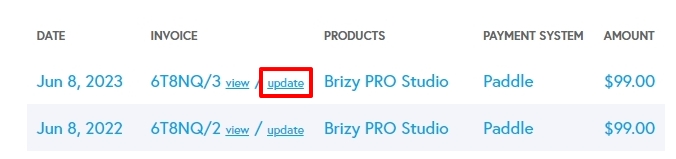
Please update your payment method before the renewal date. Sign into your brizy.io account and under Account - Payments, scroll down to the bottom of the page. You will see a list of invoices. Click on the 'Update' option next to your last invoice to update your payment method.
 0
0 -
Thank you for your response. I have a question I'd like to clarify. Currently, under "Account - Payments," it is stated as of September 26, 2022. If I wish to renew from September 26, 2023, to September 26, 2024, do I need to manually select "update" in the September 26, 2022 history and make a manual payment through "Paddle" before the deadline? Alternatively, will it be automatically charged to my credit without any action required on my part?
0 -
Hi Masakazu,
Clicking on the 'Update' option takes you to a page where you can update your payment method (credit/debit card). This page does not allow you to make a manual payment to renew your subscription.
If you have updated your payment method, Paddle will renew your subscription on the date of renewal automatically.
0 -
Thank you for your response. I completed the renewal and payment on September 29th, but as of October 3rd, all the 'EXPIRES' dates for the previously issued 'LICENSE KEY' in 'WP Licenses' still show 'Sep 26, 2023.' What's going on? Please advise urgently! The 'BrizyPro' plugin is activated, but when I try to access the editing interface, I see several red key icons, and it displays 'Upgrade to PRO to use this *** element,' preventing me from editing! Please provide assistance.
0 -
Hi Masakazu,
We regret your inconvenience. This is because the automatic license validity updates based on subscription renewals have broken down. We are working on fixing this bug. We have manually updated the validity of your licenses. You should be able to make use of all your licenses now.
0 -
I have confirmed that the 'EXPIRES' for the 'LICENSE KEY' previously issued in 'WP Licenses' has been updated. However, among multiple licenses, only one displayed my server name in the 'ACTIVATION,' and one site did not get updated. Why did only one have my server name in 'ACTIVATION'? So, I replaced the 'LICENSE KEY' for the site where BrizyPro was not displaying with a 'LICENSE KEY' containing my server name, and it updated successfully. However, in the 'WP Licenses' list, two 'ACTIVATION' entries appeared where my server name had been automatically inserted. Therefore, I clicked the 'disable' link for the entry where the server name was in 'ACTIVATION,' and the two 'ACTIVATION' entries merged into one. I could then edit normally in Wordpress with BrizyPro. It's mysterious why the server name appeared in 'ACTIVATION.' It's a bit unsettling.
0 -
Hi Masakazu,
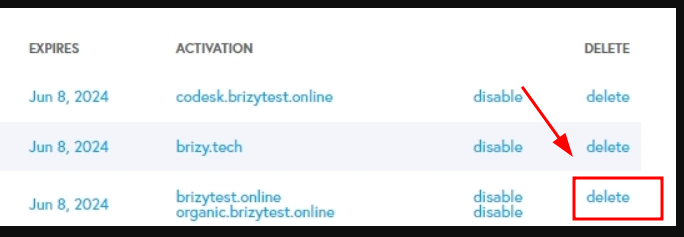
The domain names connected to each of your licenses are visible when I look at your account. You should also be able to see the domain names associated with each of your license. It should look like this.

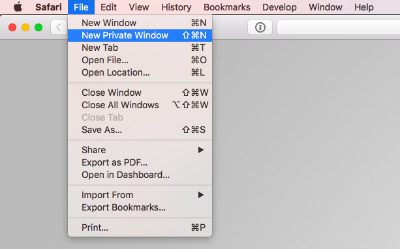
If you are not seeing domain names associated with all your licenses, please sign into your brizy.io account from a private (incognito) window of your browser and check again.
If you install the same license on two subdomains, (for example, brizytest.online and organic.brizytest.online) both will be visible next to your license as in the above screenshot. You can disable a Brizy license from a domain by clicking on the 'Disable' option next to your license.
0 -
Thank you for your response. I've already understood the meaning. My question was, why was my server name in 'ACTIVATION' instead of the previously displayed domain name for one of the licenses, and why did only one site not get updated? I have another question. After manually updating yesterday, when I checked 'WP Licenses,' I noticed that 'You have 81 licenses left.' had changed to 'You have 181 licenses left.' Please explain why the number increased. Thank you in advance.
0 -

Hi Mazakazu,
Thank you for keeping in touch.
I apologize for any inconvenience this may have caused. If you happen to encounter this problem again, my suggestion is to delete the license and create a new one.
Regarding the issue with the inconsistent number of activations displayed, please know that we are actively addressing this and working on a solution. We are also aware of the glitches in the accounts dashboard, and we're committed to resolving them.
If you have any more questions, feel free to reach out.
Best regards,
Ariel H.0
Please sign in to leave a comment.
Comments
9 comments