Brizy Blog Category Menu

Hi!
I set up a blog on a website like in this video: https://www.youtube.com/watch?v=cWJEetL4f-s Problem is, that the category menu is not working. I made everything exactly as in the video. The blog posts are all in the category "blog" and some are in the category "gesundheitstipps" and others are in "zeitungsberichte". But if you select a category in the category menu always all blog posts are displayed. You can have a look here: http://www.doktor-schittenhelm.de/category/blog/
-

Hi Martin,
Thank you for reaching out to us.
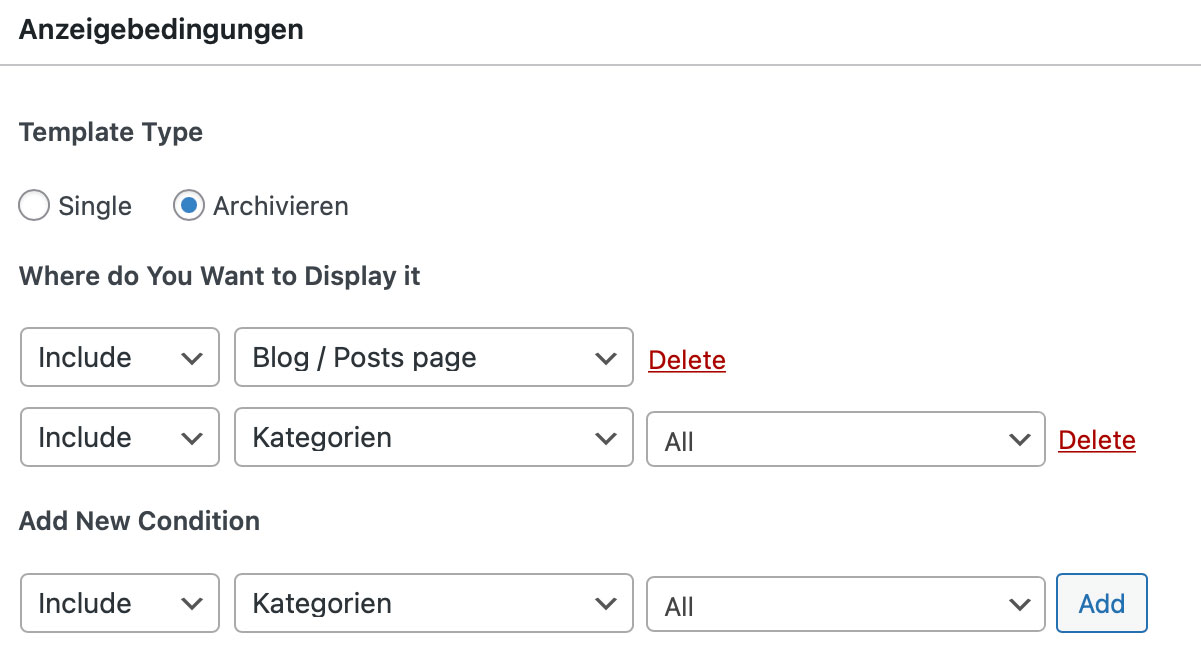
In your Blog Archive Template, please ensure that you also include conditions for Categories as shown in this screenshot: https://prnt.sc/Ighh5EXHZyCd
Please try this and let me know how it goes.
Best regards,
Ariel H.0 -
Ok, I've done that as you can see and I've cleared all caches. Unfortunately it still doesn't work...
 0
0 -

Hi Martin,
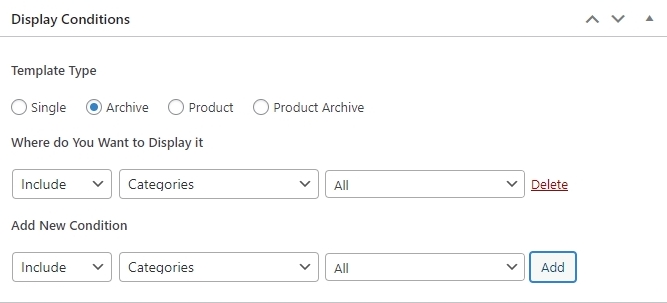
If you need to setup blog category pages, you need to add an additional Brizy Template. Please follow these steps
- Delete the display condition "Include - Categories - All" from the Blog Template
- Create a new Brizy Template and call it Category Archive and set the Display Condition as given below
- Click on 'Edit with Brizy' and use the Brizy Archive element to display the blog posts within the specific category
- Add the category menu to the Category Archive Template
 0
0 -
Thank you, this works fine!
0
Please sign in to leave a comment.
Comments
4 comments