Why does the posts building block not automatically links to those posts?

Ik have made a index page with the posts buildingblock. But i only just found out that it doesnt automatically link to the post you click on. Now I have to basically insert all the url links manually.
-

Hi Anouk,
Thank you for reaching out to us.
In order to better understand and address the problem, could you kindly provide us with more details or screenshots? This will help us to reproduce the issue.
I am looking forward to your response.
Best regards,
Ariel H.0 -
Hi,
Thank you for your reply.
I have added the posts block to a page. I've tried to printscreen it but i can't send it in this form.
Anyhow the posts block shows the picture and the title. But they do not link to the actual posts when you click on it aka it doesn't link to the pages.
The reason I set this up so i have an index page of all posts. I would love it when does picturs/titles link automatically so that whenever a post or page is added it comes up automatically in the index page.
Furtermore question two is the search bar. How can I set this up?
0 -

Hi Anouk,
To link the Featured Image to the appropriate blog post, please
- Click on the Featured Image
- Select the 'Link' icon
- Choose the Database icon
- Select "Post URL" option from the drop down list
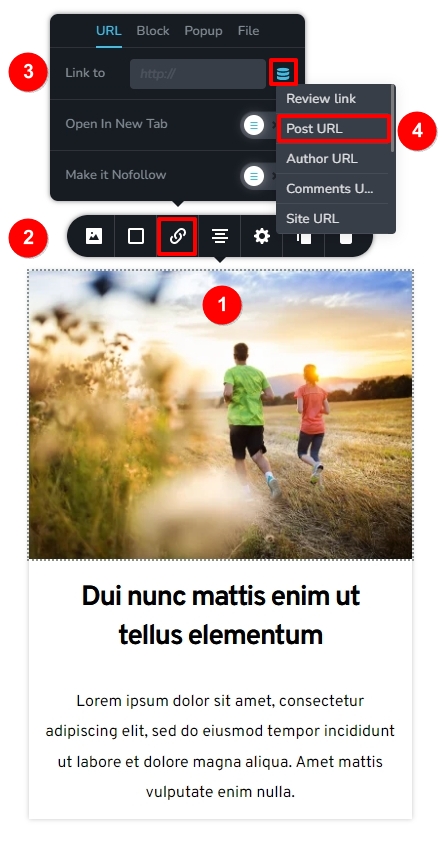
To link the Post Title to the respective blog post, you can follow a similar procedure.
- Click on the Post Title
- Select the 'Link' icon
- Choose the Database icon
- Select "Post URL" option from the drop down list
You can drag the Brizy Search element to your a page to add a search bar
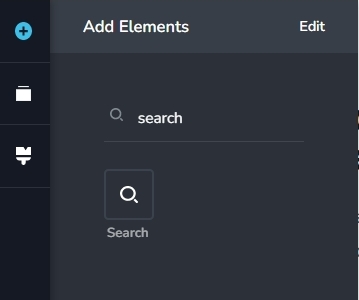
If you would like to design your search results page using Brizy, you must setup a Brizy Search Template.
0
Please sign in to leave a comment.
Comments
3 comments