Page updating issues

Hi,
After I looked on the forums, I have a common issue with Brizy about updating a specific page (homepage) of my website, it does not update and tells me to refresh the page.
What I'm doing, but nothing change. I have no other tab open or neither, someone else working on the website. When I'm updating another page, it is working well. But not on my homepage.
I saw that a several persons had this issue, but I could not find the way to fix this.
Thanks in advance for your help,
Maxence
-

Hi Maxence,
This normally happens when a software in the hosting environment interferes with the functioning of Brizy. Any of these software on the server side or in the WordPress Dashboard can interfere with Brizy.
- Firewall
- DDOS
- Malware Protection
- Other Security systems
If you have enabled any such system in your server admin software like cPanel, please disable it one by one and check if the problem persists. You could also check the same in your WordPress Dashboard.
If you are not able to identify the interfering software, please get back to us. We will need access to your WordPress Dashboard to help you with this.
0 -
Hi Kc George,
The updating is working on all other pages, only not on the one specific the homepage.
I also deactivate Malcare to see if it has any impact on it.
Thank you for your help.
Maxence
0 -
Hi Maxence,
Please try these
- If you are using any embed code on your homepage, please try removing the code and see if that helps save the page.
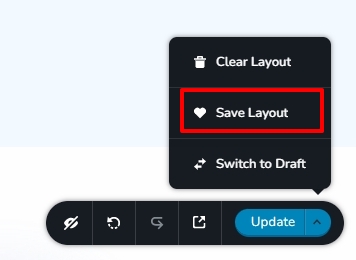
- Please save the homepage as a layout and and import the layout to a new page and see if you are able to save the new page. If this works, delete the homepage and set the new page as your homepage.
 0
0
Please sign in to leave a comment.
Comments
3 comments