HTML Tags

Sehr geehrtes Brizy Team,
meine Frage richtig sich an die richtige Platzierung und Anwendung der HTML Tags.
Um mir einen Eindruck verschaffen zu können, habe ich zunächst ein fertiges Template von euch importiert. Dort arbeitet ihr ausschließlich mit Nav, Foster und Sections. Nun wird jedoch oft im Internet von einem <main> Tag gesprochen, der einmal auf der Seite plaziert werden soll und die <sections> einschließen soll.
Können Sie mir eine richtige Platzierung der HTML Tags zu den jeweiligen genannten "Blocks" nennen?
Hier meine Übersicht der Blöcke:
1. Block = Header
2. Block = Willkommensbanner
3. Block = Leistungen
4. Block = Über uns
5. Block = Stellenanzeige
6. Block = Footer
Oder hätte ich aus Leistungen, Über uns, Stellenanzeigen einen Block machen sollen den ich dann mit sections unterteile?
Vielen Dank im Voraus!
PS: Ich bin sehr zufrieden mit dem Builder, macht einfach Laune und ist effizient ins der Umsetzung. Danke für Ihr Produkt!
-

Hi Noah,
Thank you for reaching out to us.
Unfortunately, I am unable to fully understand your concern. Are you trying to create a one-page website where the navigation menu links to different sections of the same page? It would be greatly appreciated if you could provide further details, or perhaps share an example of a website that showcases the functionality you require.
I am looking forward to your response.
Best regards,
Ariel H.0 -
Vielen Dank für die schnelle Rückmeldung. Es geht um die HTMl Tags von Blocks
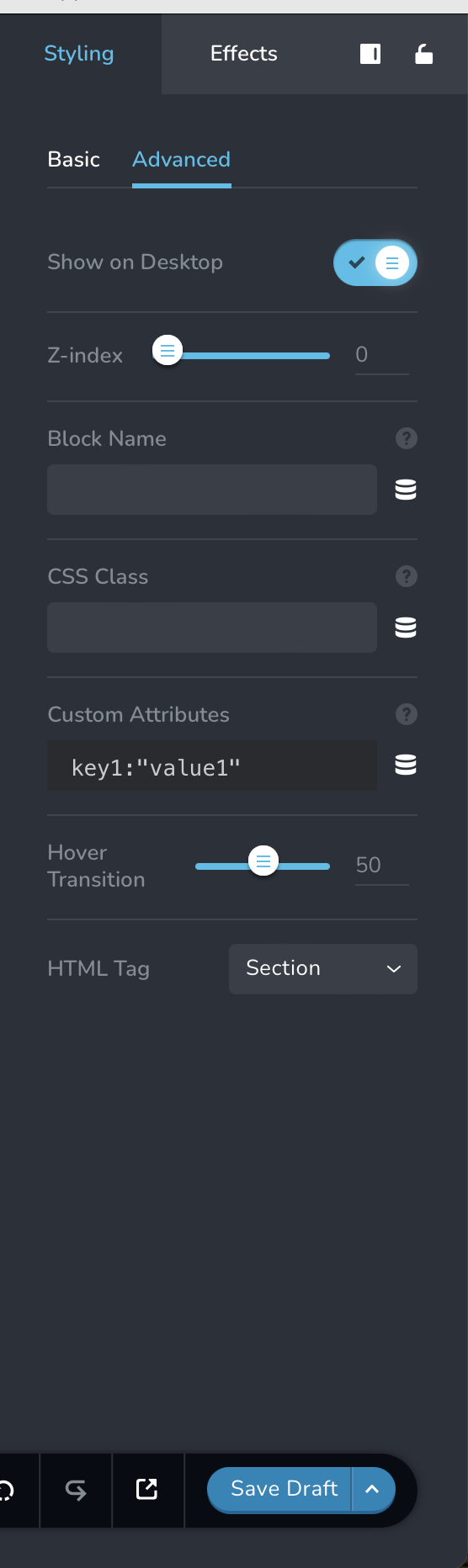
Hierbei bin ich mir unsicher, wie ich meine Blocks / Abschnitte auf meiner Webseite richtig benenne mit HTML Tags. Kennen tue ich es von der SEO Analyse so, dass man ein <main> Tag hat und in dem <main> tag weitere <sections> Tags. Nun kann hab man je beim Pagebuilder immer Abschnitte (Blocks) die man ja nicht mit einem <section> Tag verbinden kann. Somit muss man jeden Abschnitt (Block) einzelne mit HTMl Tag ausstatten.
Meine Webseite hat folgende Abschnitte:
1. Block = Header
2. Block = Willkommensbanner
3. Block = Leistungen
4. Block = Über uns
5. Block = Stellenanzeige
6. Block = Footer
Können Sie mir eine richtige Platzierung der HTML Tags zu den jeweiligen genannten "Blocks" nennen?
Bsp:
2. Block = Willkommensbanner = <main>
3. Block = Leistung = <section>
u.s.w.
Ich bin mir einfach unsicher ob ich alle einfach mit <sections> Tags ausstatten, da laut SEO auch ein gesamtheitlicher <main> Tag notwendig ist.0 -
Hi Noah,
Thank you for the update.
To structure your webpage, you can follow the following guidelines:
Header - use the <header> tag for the top section of your webpage, which typically includes the site logo, site title, and navigation menu.
Welcome Banner - use the <section> tag, it's inappropriate to use the <main> tag in this case, as it is only used to draw attention to your core content.
Services - use the <section> tag to create a section dedicated to showcasing the services your website offers.
About Us - again, use the <section> tag to define a section that provides information about your organization or website.
Job Advertisement - if you have a section specifically for job advertisements, you can use the <section> tag.
Footer - use the <footer> tag at the bottom of your webpage to include information like copyright notices, contact details, and links to relevant pages.
If you have any further questions, please let us know.
Best regards,
Ariel H.0
Please sign in to leave a comment.
Comments
3 comments