Translating Brizy dynamic templates with Polylang

Hello Brizy team!
I need your help figuring out something regarding website translations (or perhaps this is a feature request). :)
I have seen and been involved in plenty of discussions regarding the translation of websites built with Brizy. Not only that, but I researched and explored the 3 most spoken options: Polylang, TranslatePress, and WPML. And they all seem to have their unique set of problems. Being in Europe, multilingual websites are almost mandatory so I believe this should be high on the priority list.
WPML I didn't personally try because I've read a lot of feedback of users saying blogs don't work, menus don't connect and more... so from the looks of it, it's going to be less useful that the others.
With TranslatePress the issues I had seem to be more about TP itself and not related to Brizy, but unfortunately, it was not usable. I might try it again in the future, but for this project I couldn't waste any more time so I deleted TP and went back to Polylang, which I had used in the past and has never given me any problems.
If I may add, I would love to see Brizy work with them (Polylang) on a deeper level in the future as I do think the two work exceptionally well together. Polylang is simple to use and integrates very well with Brizy, following the same kind of simplicity in the workflow :)
However, what I think I am missing at the moment and would need your help figuring out where or how to do this, is translations for the Brizy dynamic templates.
So under Brizy > Templates > Display Conitions, I saw that the layout of blog posts can be made per language so I think I can create one layout for each language and assign it accordingly (image below).
I say "I think" because today I haven't been able to open any of my Brizy templates so I couldn't edit them (I will create a separate ticket for that).
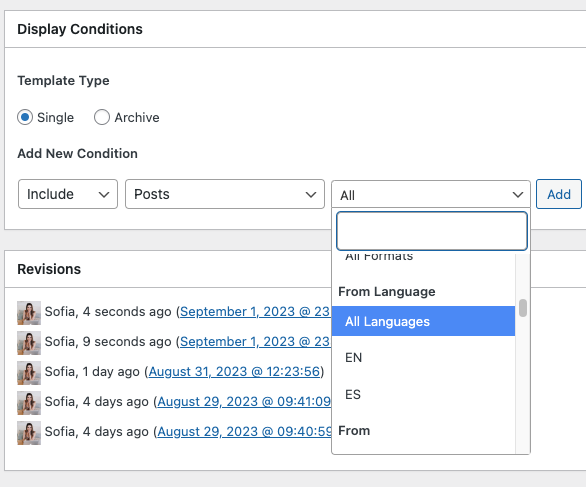
But it seems like the blog posts are the only thing that can be assigned per language. So, none of the template types "Archive" have the option to be applied per language (them don't have the third dropdown window at all under "Add New Condition".
The 404 page and the Search page for instance are critical in my opinion, and it would be good to find a quick solution to have the ability to translate these as well. Do you have any suggestions?
I am writing with this because I thought that if the solution is there for "posts", why not implement the same thing for all the other dynamic templates?
Thank you for your time! Sofia
-

Hi Sofia,
I wanted to confirm that your observations are correct. Only the blog options have the capability to be assigned a specific language. You might want to consider using Weglot instead to translate your page. I made a short screencast on the below link to show you how easy it is to use it with Brizy:
https://youtu.be/ZHml_a-ImMABest regards,
Ariel H.0 -

Hi Sofia,
I have escalated your request to work out more thorough integration with Polylang and other translation plugins.
As you correctly noted, you do not have option to create unique Archive templates for each language. Here is a potential workaround you can consider to setup blog archive templates for Spanish and English.
- Have one set of blog categories for Spanish blog posts and another set for its English translations. For instance, if you have a category called 'Noticias', for Spanish blog posts, add another category called 'News' for English blog posts.
- Assign Spanish blog posts to Spanish categories and English categories to English blog posts
- Create one Category archive template for Spanish and add all Spanish categories to its Display Conditions
- Create another Category Archive Templates for English and add all English categories to this template's Display Conditions.
Please check with Polylang if they allow you to translate search page and 404 page in Gutenberg. If they do, you can add a Brizy header and a Brizy footer to these pages by adding a Page Template.
0 -
Hi Ariel and KC George,
Thank you for your feedback. George, I'll also reply to you about my other ticket ("Multilingual Blog - Posts Page") here, as it was also related to translations, and so we can keep it all together :)
It's quite unsettling that every time I speak with Brizy about translations you come up with a new plugin suggestion. Over a few months I have tried them all (Polylang, WPML and TranslatePress), spent money for nothing, and now I'm surprised to see yet another suggestion. The time I've been spending on deleting translations and starting all over again makes the work really inefficient too.
Are you suggesting that I use Weglot on top of Polylang or switching it altogether? It seems to be the most expensive option for website translations.
Besides the waste of money this entails, I cannot keep deleting translations and starting over again. I am starting a business and as you may understand, sticking with a set of plugins is best. Not only to get to know how those work but also because each plugin has costs, so ideally I'd like to find one solution for translations as most of my clients will need them.
After experimenting with all the mentioned plugins (except Weglot), Polylang (even the free version) is definitely the one that has given me the least problems, and it's really user-friendly. Well, actually I haven't had any issues with Polylang and I understand the limitations I found are related to Brizy and not Polylang itself, since it works with other page builders in the same way too.
I have now found a way to filter blog posts per language, so I can show Spanish posts in the Spanish archive and English posts in the English archive. And I have also created a blog archive under "pages" instead of under "Brizy > Templates", so that worked well too for having a translated version. George, if you want I can show you what I did so you can advise other people like me in the future :)
So now I believe the only thing I'm missing is the search page and the 404 page. This seems to make Polylang the most compatible translation plugin for Brizy and I think it wouldn't necessarily be very difficult for Brizy's developers to find a way to work with Polylang on those few details :) Please don't take this the wrong way, I am just trying to help the community. I really want to continue working with Brizy and I believe that focusing on the plugin that seems to work best would be beneficial to the entire community and, therefore, to Brizy as well :)
Besides some of the Brizy templates, I saw that I can't translate Custom Post Types if I use the ACF+CPT plugins but I belive this wouldn't be related to Brizy as I saw on Polylang's website that's a feature of their Pro version. So it might be that I need to buy the Pro version to get it.
This to say that everything that is needed for a simple website with a blog seems best archived with the combination of Brizy + Polylang.
KC George, on another message you mentioned creating the 404 and the search as a page instead of as a template… I've always done these with Brizy, so I don't really know how to make that work. How would I “tell” my website that my 404 page is a certain page? I always used Brizy templates because it has those "conditions" underneith, but I would appreciate if you could share more about this solution :)
Thank you both so much for your time and, again, if you'd like I can share a recording to show you exactly what I've been able to achieve so far and the minor limitations.
Have a great afternoon, Sofia
0 -
Hi Sofia,
We are sorry that a suggestion from Ariel was causing distress to you. His suggestion was purely from a technical solution point of view without considering the implementation hurdles you have gone through in the current project. He did not imply that you should delete translations or start over again.
You said "I have also created a blog archive under "Pages" instead of under "Brizy > Templates", so that worked well too for having a translated version" I am curious to know how you did it. Please share with us your innovative solution
You can create your custom 404 error page just like you add regular pages in Gutenberg using the plugin Smart Custom 404 error page. If the custom page can be translated, you may have a solution. Once you have a Gutenberg page for 404 error, you can give it a Brizy design by adding Brizy Page Template using the following Display Condition.
At the moment, I am unsure if you can setup unique search results pages for Spanish and English using Polylang. This is something to be explored.
 0
0 -
Hi KC George,
Thank you very much for your reply :)I will definitely try that option for the 404 pages.
I have also created a short video for you about the blog: https://www.loom.com/share/7895c088f996484da197122eb148fe43?sid=87002e0e-232c-4a5f-991c-b1ce4a8ea9cc
I look forward to your feedback. Thanks again, Sofia
0 -
Hi Sofia,
Have you added English translations to your categories using Polylang? Did this help you to filter blog posts using the category names?
This is a good solution.
0 -
Yes, so the same way that the flags appear next to the pages when you install Polylang, the same happens with categories and tags, so I simply translated those category names. :) I'm not sure if that's what brought up this language selection option in the Brizy builder, but I did that first, indeed.
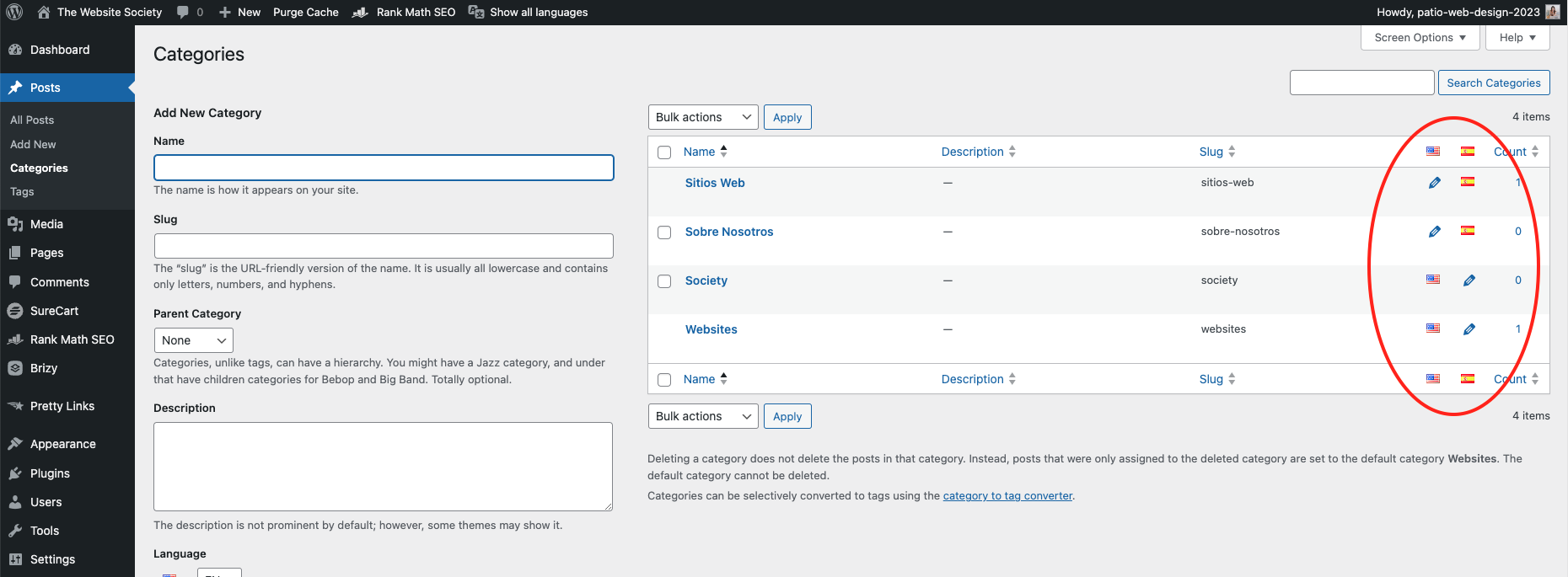
However, as you saw on the video, I didn't filter by category name, I filtered by language. So I believe that as I add more posts to other categories, they'll all show up according to their language :)
0 -
Hi Sofia,
You are right; the Posts element gives you an option to filter blog posts based on languages. I tested this feature at my end it worked well. Thanks for sharing your finding. It is new for me.
0
Please sign in to leave a comment.
Comments
8 comments