Swopping domains - same site, different domain in Brizy Club

Hi,
I have been asked to swap the domains from https://www.visitdunfermline.tv around instead to make https://www.visitdunfermline.com the main domain we host the website on.
Currently,
The DOT TV is our main domain that the site in Brizy Cloud sits on.
However,
We wish to change this so would I just add the DOT COM domain name into Brizy Cloud where the DOT TV domain is currently?
Yet also change the DNS settings to match the Brizy Cloud settings for the DOT TV domain currently? (See DOT TV IMAGE below)
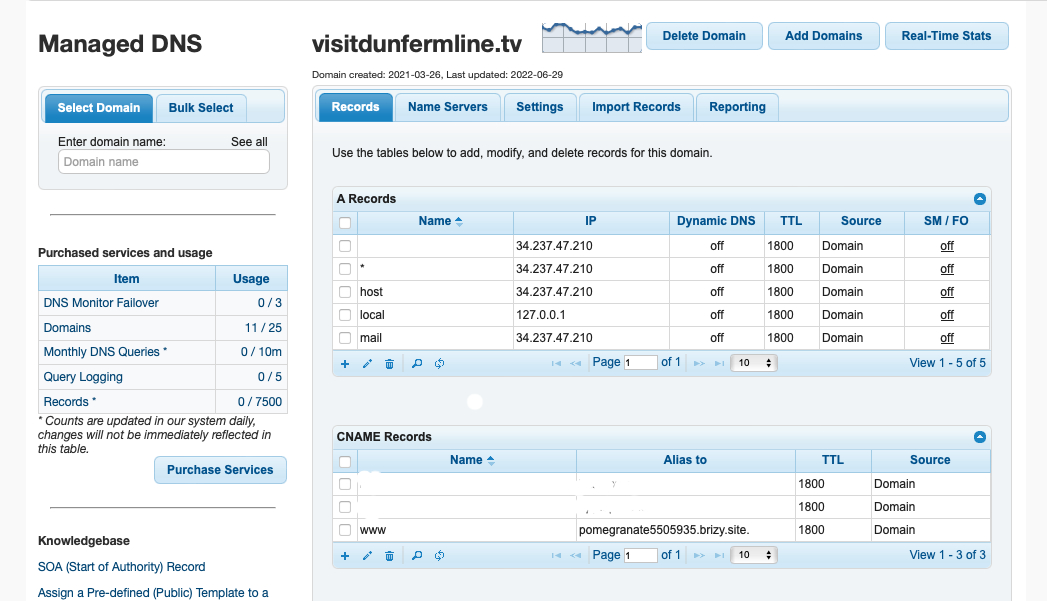
If I do those two things would it mean that the pages for the site currently inside the site in Brizy Cloud will automatically start to reside on https://www.visitdunfermline.com ?
(At the moment the DOT COM version is just a redirect over to the DOT TV site itself. We want to change this to the other way round. So the DOT COM site is the main site in Brizy. Then we will do a 301 Redirect of the DOT TV domain to the DOT COM site. Is that the best way to do it?)
I am conscious that we don't want to lose the 120 pages we have in Google listings when we make this change. We want this to switch over as smoothly as possible.
Please share best steps for me and any advice you feel is helpful to watch for.
Many thanks for your help.
Dave.
-

Hi David,
Thank you for contacting us.
You are right, when you update the DNS of your .com domain, it should point to you Brizy Cloud site.
Doing a 301 redirect from the .tv domain to the .com domain is the best way to migrate your website from one domain to another, while preserving the SEO value of your current site. This way, any links that point to the old .tv domain will be redirected to the new .com domain, and any search engine rankings and traffic that you have built up over time will be transferred to the new domain.
After updating the DNS for your .com domain to point to Brizy Cloud, you will need to point the DNS of the old domain (.tv) to point to your hosting account, so you can set up a 301 redirect. Before doing so, I suggest that you contact your hosting provider, so they can assist you, as the process of setting up a 301 redirect may differ slightly between servers.
For more information, please refer to this link: https://www.tutorialspoint.com/how-to-create-301-redirection-on-nginxI hope this helps,
Best regards,
Ariel H.0
Please sign in to leave a comment.
Comments
1 comment