Redirect from Google form

Hello,
I have embedded a Google form in my website and once someone complete the form i want to be able to redirect the user to a "thank you page", someone has idea of how to do this?
I watched this video online https://www.youtube.com/watch?v=oJbzU65nxF4 i used the script but it's not working.
this is my website where is present the form -> https://www.aspnote.com/get-early-access
Also, i noticed that if someone goes to the form without being sign-in in Google the form asks to sign in but after that it re-directs the user to the Google form website instead of just let the user finishes the form in my website... how can i avoid this?
-

Hi Giuseppe,
If the redirect fails, the JavaScript redirect code likely requires some adjusting or fine tuning. Helping with JS code is outside the purview of the support we offer.
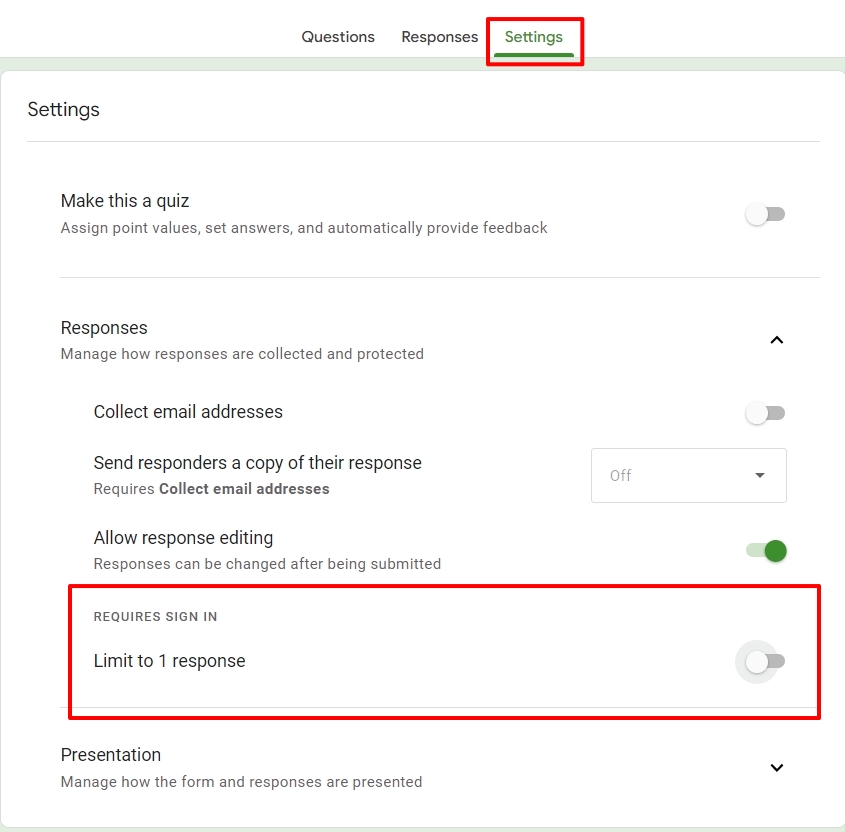
Only users who are logged into Google are permitted to submit the form if you enable the option "REQUIRES SIGN IN Limit to 1 response" in your Google Form's Settings - Responses section. If you do not want Google to have your users sign in, turn off this option.
 0
0 -
Hello George,
Thanks for replying i confirm you that now the Google form is working correctly without the obligation to sign-in.
About the code, is it possible to find a way to talk with one of your engineers? and complete the job as gig or something similar?
In the alternative, do you know someone in your community with who I can get in touch with and ask for help?0 -

Hi Giuseppe,
Thank you for waiting.
We were able to get the script to work with some small changes, as shown on this screencast.
https://youtu.be/AomL0TwGSYoThis is the actual page where we tested it.
https://www.arielh.server001.xyz/en/google-formHere is the modified script:
<iframe id="redirect" src="https://docs.google.com/forms/d/e/1FAIpQLSeBTbYmZZ1HL97S8jr8CvachWTlEDmbTLn95UKRPaX36BVi0g/viewform?embedded=true" width="800" height="1500" frameborder="0" marginheight="0" marginwidth="0">Loading…
</iframe>
<script type="text/javascript">
var load = 0;document.getElementById('redirect').onload = function(){
/*Execute on every reload on iFrame*/
load++;
if(load > 2){
/*Second reload is a submit*/
document.location = "https://www.aspnote.com/thank-you-page";
}
}
</script>Please follow the steps in the above screencast to embed it into your page.
Please try it at your end and let us know how it goes.
Best regards,
Ariel H.0 -
Hello Ariel,
I checked the video you uploaded on Youtube and did a few tests, the code is working :)
Thank you for the support!0 -
Hi Giuseppe,
Thank you for the update.
We are glad to hear that we were able to help you resolve this issue.
Kind regards,
Ariel H.0
Please sign in to leave a comment.
Comments
5 comments