メールフォームが設定できない。

I have an email form set up, but the emails are not flying.
The only places where I have set up a submit button are the "Email To" and "Reply To" fields in the email wordpress.
The email address is my own domain, and when I press send, only "0" is shown on the page.
I want to be successful.
The user fills in his/her email address and when he/she submits, an auto-reply is sent to the email with the URL to download the ebooks.
Please check if there is a mistake in the way you are setting this up or if it is on the wordpress side.
We have included Japanese in the success and failure of the email.
-

Hi Wataru,
Your email will be sent out through WordPress' PHP Mail feature, when you select the WordPress option to send out email notifications using a Brizy form. Few webhosts like GoDaddy do not support PHP Mail. Please confirm that PHP Mail is supported by your web hosting provider.
Email notifications can be easily suspected as spoof, so these messages may not reach the recipient. Please follow these best practices to avoid having your mail rejected by mail servers.
- Subject: Give a meaningful subject. You can include a subject, such as "Contact Form."
- From Email: Make sure the 'From" Email' you use has the same domain as your website. The 'From Email' field on a form hosted at CNN.com can be form@cnn.com or info@cnn.com
- From Name: This field must not be left empty. Give a meaningful 'From Name'
If you are unable to send out form email notifications after following the above guidelines, please get back to us again. To assist you further, we will require access to your WordPress Dashboard.
0 -
Hello, George.
Regarding the contents you have given us
1, PHP support is possible, as it was successful on another site on the same server.
2, I also included the subject line.
3, The site domain and the email domain are the same.
4、The sender's name is the site name.Also, the form I created outside of Brizy (Contact Form 7) received the email.
It also succeeds when used directly as an email address.We would like you to check this in your wordpress dashboard, how can we contact you?
0 -
Hi Wataru,
Please add me as a user to your WordPress Dashboard and send the following details to our email: communitysupport@brizy.io
- Community Post link: https://support.brizy.io/hc/en-us/community/posts/13197099302034
- WordPress Admin URL:
- Username
- Password
Please let us know here when you send us the email.
0 -
We have replied to you by e-mail.
Thank you for your cooperation.0 -
Hi Wataru,
Are you facing the issue with the contact form at https://love-divination.com/inquiry/? The page appears developed using the block editor and not using Brizy. Are you looking for help on this page?
 0
0 -
Thank you for contacting us.
We have added the following authority.The target page is the fixed page
https://love-divination.com/homepage/
The top and one above the bottom "Everyone's Love Stories" and the bottom "Contact Us".
Thank you in advance for your cooperation.0 -
Hello, sir.
No, sir.
The relevant page is here as described in my previous email.The target page is the fixed page
https://love-divination.com/homepage/
The top and one above the bottom "Everyone's Love Stories" and the bottom "Contact Us".
Thank you in advance for your cooperation.0 -
Hi Wataru,
I imported two forms to my website. Please have a look at this page. https://brizytest.online/iconbox/ Both are working fine.
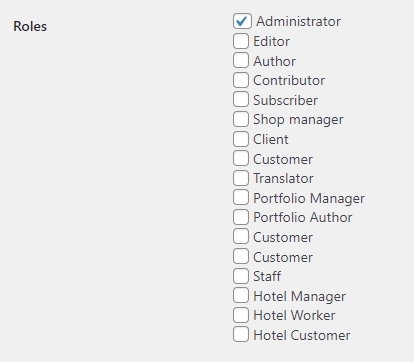
However the form does not work on your project. I would like to check your Plugins and also the Appearance - Customize menu for further troubleshooting. With the current role you have assigned to the user brizy001, I cannot do these investigations. Can you please review the role you have assigned to this user?
 0
0 -
Hi KC George
I have changed the permissions of the site to "Administrator".
Could you please confirm this?
Thank you for your cooperation.0 -
Hi Wataru,
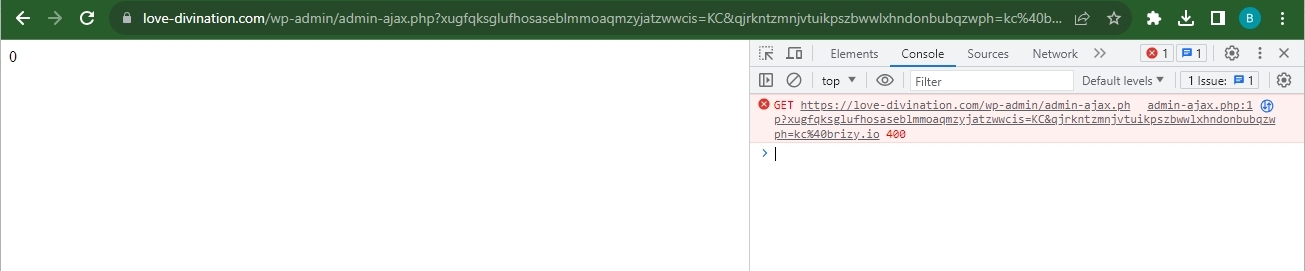
When filling up the form on the homepage, a blank page opens up. When inspecting the blank page by right clicking and selecting the 'Inspect' option, I see a browser console error. It returns a 400 Bad Request error when requesting the /wp-admin/admin-ajax.php file.
admin-ajax.php file's purpose is to establish a connection between the client and the server using Ajax. WordPress uses it to refresh the page's contents without reloading it, thus making it dynamic and interactive to the users
Can you please report this error to your hosting provider and check with them why the server returns a 400 Bad Request error when requesting admin-ajax.php file?
 0
0 -
Hello KC George
Thank you for the email form survey.
I contacted the server company immediately.
I hope this will work and thank you very much for your patience.Please wait for our reply.
Wataru
0 -
Hello KC George This is a message from the server company. First of all, when "wp-admin/admin-ajax.php" is accessed, a 400 error is returned, which is a specification of WordPress and a normal operation. Even on another domain that says it works correctly, 400 error is output when accessing "wp-admin/admin-ajax.php". Is there a plugin/theme interfering with the forms built with Brizy that is not working? Sorry for the repetition, but thank you in advance for your help. wataru 2023年9月7日(木) 9:06 C S : Hello KC George Thank you for the email form survey. I contacted the server company immediately. I hope this will work and thank you very much for your patience. Please wait for our reply. wataru
0 -

Hi Wataru,
Thank you for the update.
Could you also please provide us temporary access to FTP or cPanel, so we will have direct access to your WordPress files? Also, make a full backup of your website as a precaution.
I am looking forward to your response.
Best regards,
Ariel H.0 -
Hello. Ariel H. Sorry for the delay in getting back to you. Currently the server is being investigated by the company. We have been told to wait. However, there has been no progress at all and we are having trouble getting the form delayed due to the slow communication. We are planning to issue FTP information on our system. We would like to set up an email address, which email address should we use?
0 -
Hi Wataru,
Please send it to communitysupport@brizy.io.
Please include this reference in the subject line of your email 13197099302034.
Best regards,
Ariel H.0 -
Hello. Ariel H. This is our FTP server, please use this one.
0 -
Hi Wataru,
Thank you for your cooperation
Upon checking, it seems that the problem is originating from your current theme.
To demonstrate, I tested the form submission feature using the Twenty-Twenty-Two theme, and it worked successfully. In this screenshot, you would see that my latest form submission was captured in Leads - https://prnt.sc/ypw3uYYemVS0I kindly recommend reaching out to your theme developer for assistance in resolving this issue. They should be able to provide guidance specific to your theme.
Alternatively, you may also consider switching to one of the themes available on this link: https://www.brizy.io/theme-partners
If you have any further questions or need additional support, please let us know.
Best regards,
Ariel H.0 -
Hello. Ariel H. As you have informed us, the theme was the cause of the problem. We have moved the jQuery loading from header to footer in the theme settings and I unchecked the "Register jQuery in wp_footer" in the "SWELL Settings > jQuery tab" in the WordPress menu, and I confirmed that it works correctly. We apologize for any inconvenience this may have caused. Thank you very much. Also, I'm sorry to hear about the same page. https://love-divination.com/homepage/ Princess Fortune Telling Latest Articles." but the image is cut off, as in the attached screenshot. I am trying to adjust it in Brizy, but I am not able to adjust it properly. Can you please tell me how to do this if you don't mind?
0 -
Hi Wataru,
Thank you for keeping in touch.
To solve this issue, please try increasing the height of the block as demonstrated on the below screencast and see if this works for you - https://youtu.be/-bbdeaCENtg
If you have any further questions, please don't hesitate to reach out to us.
Kind regards,
Ariel H.0 -
Thank you very much. This is static content, not dynamically extracted content. In this case, the height can be changed. If you add the latest blog post, as in this case, both sides of the image will remain cut off. Could you please confirm this?
0 -
Hi Wataru,
Thank you for the update.
I apologize for the confusion, but I'm not entirely clear on the issue. However, setting a fixed height for the block should maintain the size of the background image and prevent it from appearing cut off. Additionally, the size of the block should not be affected by adding blog posts.
If this doesn't address your concerns, please provide us with more details as well as steps to reproduce the issue.
Kind regards,
Ariel H.0
Please sign in to leave a comment.
Comments
21 comments