Contact form is not sending messages

I am reaching out becasue I am having issues with the contact form (again) on another website.
I have tried using the Wordpress option for sending email and it does not work. I tried the gmail option because this client uses gmail and it does not work. I am currently trying to SMTP option and it does not work.
When we were trying to use Wordpress opntion i would receive the green notification that the email had been sent but it was not sending. You would even see it under 'leads'. Yes, I checked the email spam.
But when we tried the Gmail option and the SMTP option we only get red lights.
If somebody will send me an email address I will gladly give you access to the site to review it.
-

Hi Jonathan,
I can setup the Gmail option using my Gmail credentials. I will also explain how you can change to your client's Gmail credentials. (Gmail address and Google App Password)
Please add me as a user to your WordPress Dashboard and send the following details to our email: communitysupport@brizy.io
- Community Post link: https://support.brizy.io/hc/en-us/community/posts/13162188294418
- WordPress Admin URL:
- Username
- Password
Please let us know here when you send us the email.
0 -
I just emailed you
0 -
Hi Jonathan,
I have setup the email notification for your Contact form at https://www.liveoakcomanche.com/contact/ using the Gmail option. I have received an email notification from my test. Your client also would have received the same email.
In the Brizy form, I have used my personal Gmail address and my Google App Password as credentials to sign into Gmail SMTP server. Please request your client to generate the Google App Password and then replace my Gmail address and App Password with his Gmail address and App Password. Please see this screen recording for the procedure. https://jmp.sh/5fly7C5C
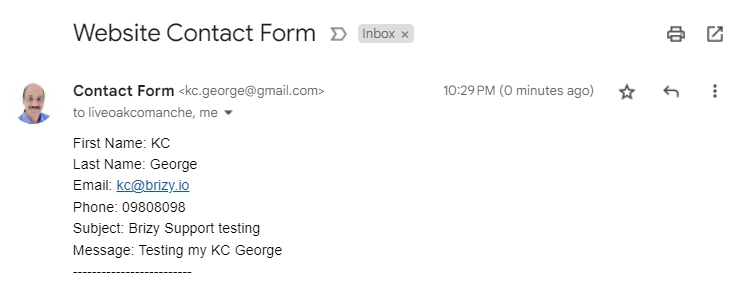
Please also follow the above procedure to setup email notification for the form at https://www.liveoakcomanche.com/connect/
0 -
Thank you KC
0 -
KC,
How can I accomplish this with a client that uses Outlook? I have been using the WP app option for all my sites and apparently, that option has not been working for any of them. Honestly, that's really frustrating. It makes me look really bad.
How can I fix this for a client who uses Outlook?
0 -
Hi Jonathan,
The following settings have worked for me for sending out email notifications using the Outlook SMTP server. Please use the client outlook email in place of the email given below. Use Outlook email password for password. Please test initially without changing any other setting. Once you receive the test email, you can try changing other settings.
For Outlook SMTP to send out the email the 'Username' and the 'From Email' must be the same. These settings should not be changed
- Host: smtp-mail.outlook.com
- Port: 587
- Encryption: TLS
- Authentication: Enabled
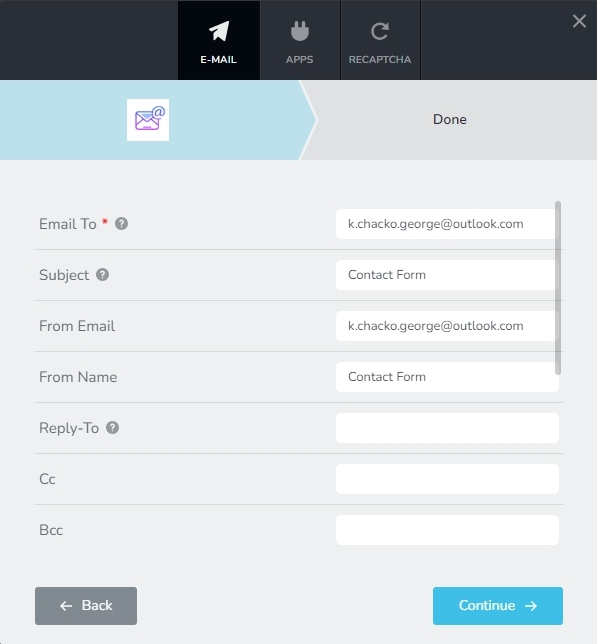
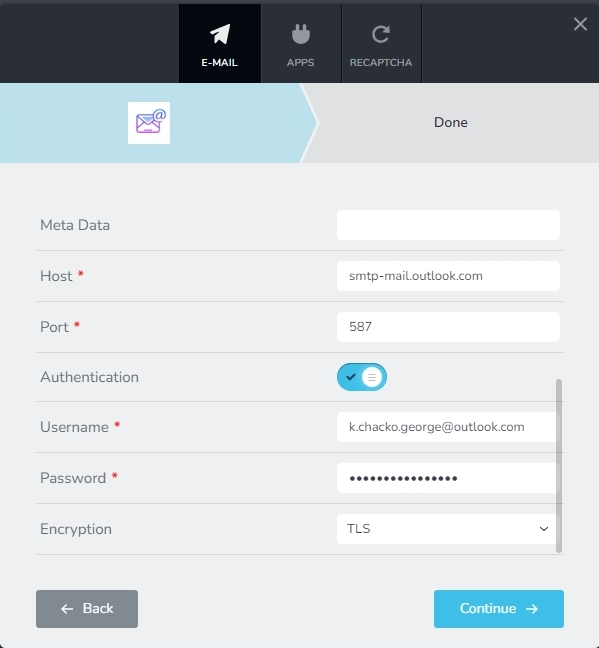 0
0 -
This is not working for me.
0 -
Hi Jonathan,
Can you please test your SMTP settings using this service and get back to us with your findings? https://www.gmass.co/smtp-test When you click on 'Test It' button, error messages will in highlighted in red. If you see any text in red, please let us know the error message.
0 -
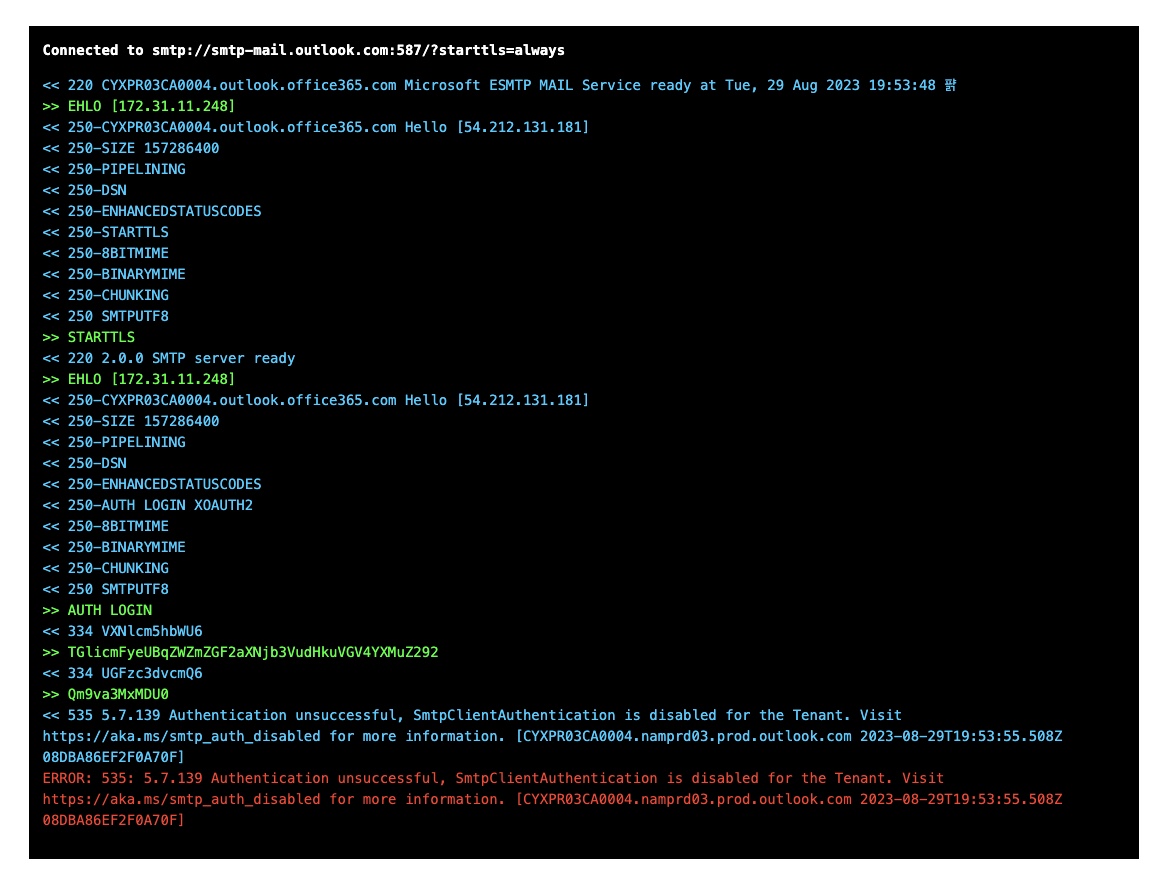 0
0 -
Hi Jonathan,
To fix this issue, your client needs to enable SMTP authentication in his email account following this procedure.
- Open the Microsoft 365 admin center and go to Users > Active users.
- Select the user, and in the flyout that appears, click Mail.
- In the Email apps section, click Manage email apps.
- Enable the Authenticated SMTP setting
- Click Save changes
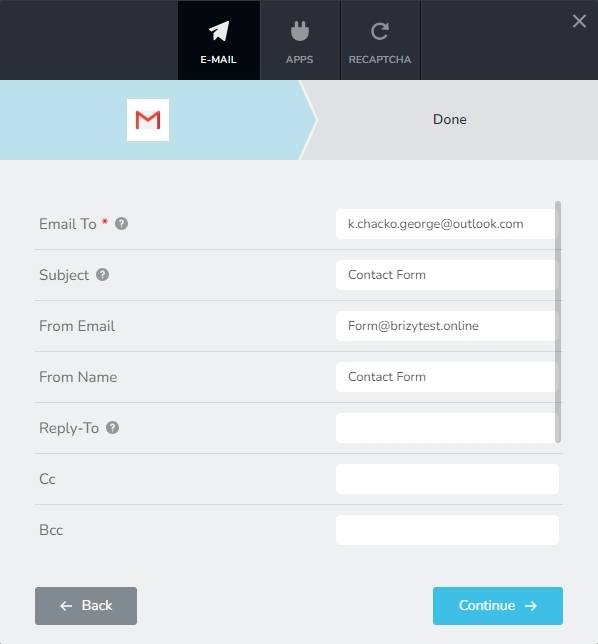
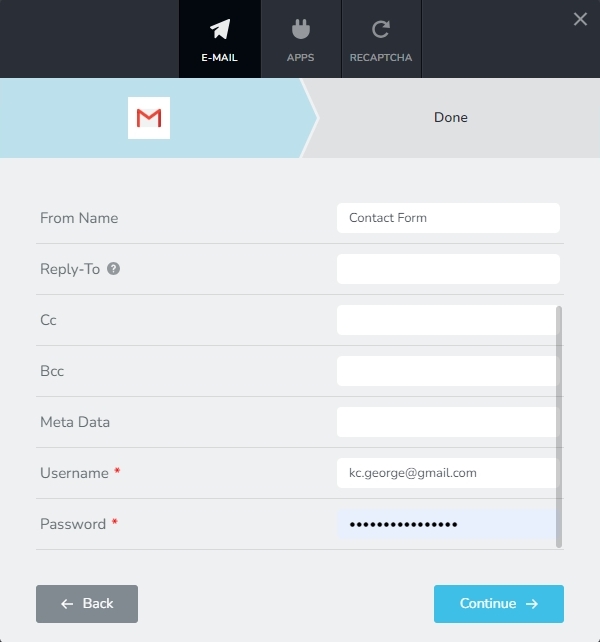
You can also consider setting up email notification using the Gmail option following the procedure here. Email notification via Gmail The settings in the attached screenshots have worked for me.
- Email To: Use the client outlook email
- From Email: form@clientwebsite.com
- Username: Any Gmail address
- Password: Google App Password generated from the above Gmail
 0
0 -
I finally heard back form the client and this client does not have admin access to their 365 account, this website is for a local government website and the email address is managed by a centralized group, its complicated. Is there another way we can find a solution here without needing admin access to this email account?
0 -
Hi Jon,
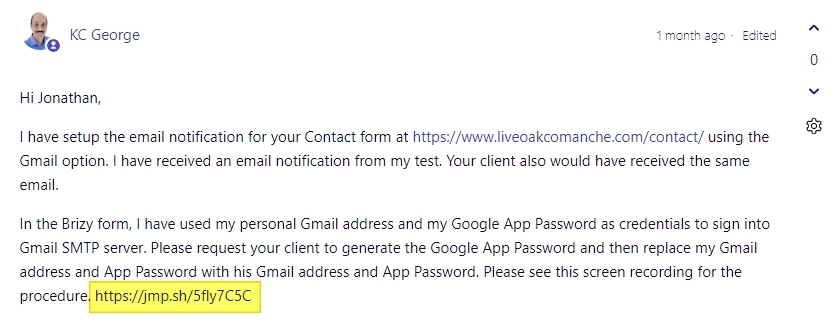
You can send out email notifications to an Outlook email address using the Gmail option as well. If you look at my second comment in this forum post, you will see a hyperlink to a screen recording which explains the procedure to send email notifications using Gmail SMTP server. You can follow the same procedure and in the 'Email To' field instead of the Gmail address, please type the Outlook email address.
 0
0 -
I cannot figure out what the Microsoft equivalent is of the Google App password.
0 -
Hi Jon,
You may not need a Microsoft equivalent of the Google App Password. Please let us know what you are trying to accomplish. We will suggest the appropriate steps.
- Are you trying to receive email notifications in an email address hosted with Microsoft 365?
- Or are you attempting to send out email notifications through the Microsoft 365 SMTP server?
- Or are you thinking about something else?
0 -
Im trying to follow the steps that you recommended. I’m trying to set up our contact forms on our clients website. They use outlook for their email. You recommended using the gmail option for our forms. But the gmail option requires that username and password for their google app.
0 -
Hi Jonathan,
Please follow the process in this screen recording https://jmp.sh/5fly7C5C including the Google App Password. You can send email notifications to an outlook email address through Gmail SMTP server.
You need a Gmail address to send out the email notification through Gmail SMTP server. If you/ the client do not have a Gmail address, please signup for a free Gmail account.
0 -
There seems to be some kind of miscommunication going on here. Our client, their organization, uses Outlook (365) for their email communication. They do not use Gmail or any Google apps for any of their communication. I need to set this contact form up so that the submissions are going to their Outlook account, not a Gmail account.
0 -
Hi Jonathan,
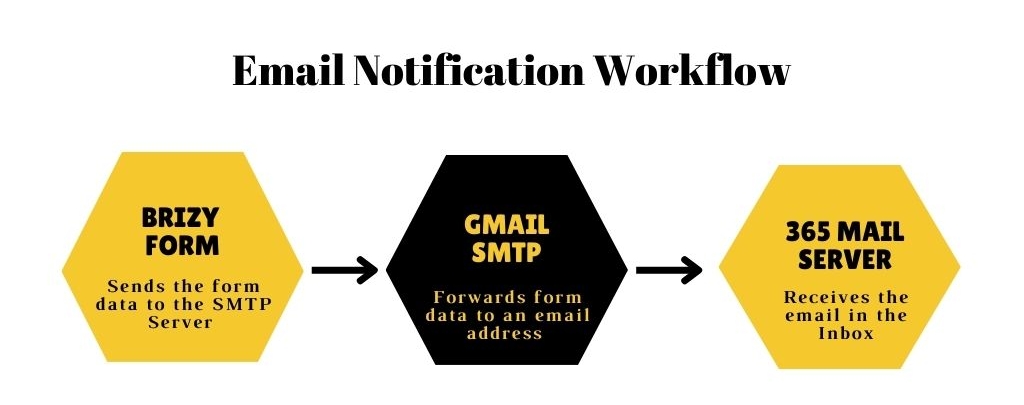
You can use the Gmail SMTP Server to send data from a Brizy Form to an Outlook email address. Please have a look at the attached image for the workflow. Please signup for a free Gmail account if you or your client does not already have one so that you can send the email notification using the Gmail SMTP server. Please also watch this screen recording https://jmp.sh/U4ijRNRR
 0
0 -
KC,
I don't even know where to begin. I know this is not your fault. I know that you're an employee and you're doing your best to provide the best support that you can and I appreciate that.
With that being said, this is not a good solution. This is really frustrating. This is incredibly unprofessional and it makes Brizy look like a half-baked idea. I have to go back to my client with this after I have vouched to them about how awesome this builder is and how its going to be great for their organization. How is it that Brizy is not properly compatible with Outlook (365)? Thats unthinkable. Outlook has over 400 million active users.
Why is there a WordPress option for forms when it doesn't even work properly? I have had a number of clients come to me angry that their forms are not working and blaming it on me. Why doesn't this work correctly? Why doesn't Brizy make these issues a priority? What is going on here?
I'm really furious right now. I bought the LTD back in 2018 or 2019, I have built around 100 websites using Brizy, and I am really concerned and angry about how glitchy this build still is, how so many essential things (like forms) do not work correctly and so much more.
I hope that Brizy is paying attention to these forms and the Facebook group with the consistent amount of frustration and anger from current loyal customers about how poorly this builder is being managed and how it's not being maintained.
Again, this is a poor, terrible, crappy solution for forms. I cannot believe that I'm being told to create a Gmail account so that my client can receive submissions to their Outlook account. I mean, what the hell? This is serious? I can't believe it.0 -
Hi Jonathan,
Why is there a WordPress option for forms when it doesn't even work properly? The WordPress option of sending out email notifications use WordPress' default mail sending feature called PHP Mail. This is a built-in function for sending emails in PHP, but it has some limitations and drawbacks that make it less popular than other email sending options.
- Deliverability issues: The PHP mail relies on the local mail server configuration, which can result in emails being flagged as spam or rejected by some email providers. This can cause deliverability issues and make it difficult to ensure that emails are being delivered to recipients.
- Lack of authentication: This function does not support SMTP authentication.
- Security concerns: This function can be vulnerable to email injection attacks, where an attacker can inject additional headers into the email message, potentially compromising the security of the email system.
If you dislike the Gmail SMTP server option of sending out email notifications, you could consider sending it out through any other SMTP server. You have attempted to send it out using Outlook SMTP server. You could not make it work because your client did not have administrative access to their 365 account and they could not enable SMTP authentication.
You have mentioned that sending out email notification through Gmail SMTP is not a good solution, it is incredibly unprofessional, it is poor, terrible, crappy solution for forms. What would be your reason for feeling this way? What would you consider as a good solution, which is professional, rich and superior? Please let us now. We will guide you on how to set up email notifications following your preferred method.
0 -
You're employed by Brizy so i understand that you have to say what you have to say. I dont have anything else to say about this that others haven't already expressed.
0 -
I honestly hope that Brizy is paying attention to the dissatisfaction with the product that is expressed here in brizy support, in the facebook group, and other spaces. I hope that brizy knows that means that we're looking at other builders as well.
0 -
Hi Jonathan,
We represent the customer voice to the rest of the company as the support team. We fight to make product development more user-centric. In order to complete users' tasks, we occasionally escalate issues even to the CEO.
In this specific case, email sending options are governed by third parties.
- WordPress option is handled by PHP Mail function of WordPress
- Gmail option is managed by Google
- SMTP option is managed by respective SMTP server hosts
We are required to follow the guidelines established by the third party servers regarding how we are to send emails using their SMTP servers. The operation of these servers is outside of Brizy's control.
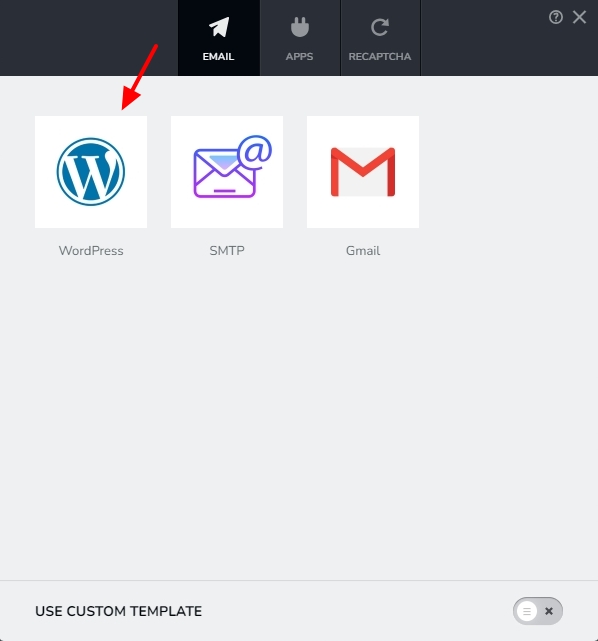
If you come across a more effective method of sending form email notifications, please record a video from a competitor and send it to us. We will make an effort to follow their best practices if they have a superior implementation.You could also explore the possibility of using the WP Mail SMTP plugin along with Brizy. This plugin allows you more options to send out email notifications. If you use this plugin, you must select the WordPress option of sending out email notifications in Brizy.
0 -
I have been using this really weird create a Gmail workaround so our clients can get an email sent to their Outlook accounts but something I have noticed is that when i enter an email address into the "from email" field, it doesn't show the email address i enter in. It shows the Gmail account when the submission goes to the inbox, which is obviously very unprofessional and concerning to our clients. How can I fix this?
0 -
Hi Jonathan,
You are right; Gmail SMTP server uses the Gmail address as the 'From Email' when sending email notifications; it disregards the user-specified 'From Email' address. This is how the Gmail SMTP server currently operates.
For more options to send out email notifications, kindly consider the using the WP Mail SMTP plugin. Other SMTP providers may have the flexibility to set your own 'From Email' address.
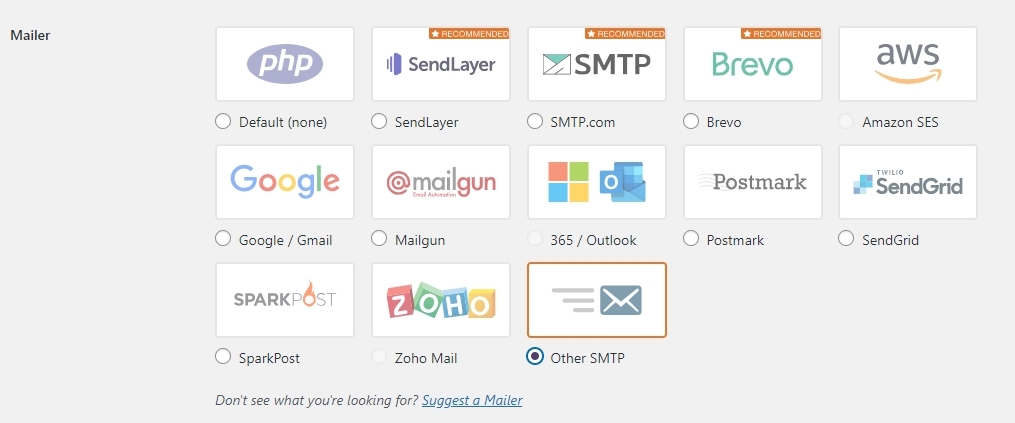
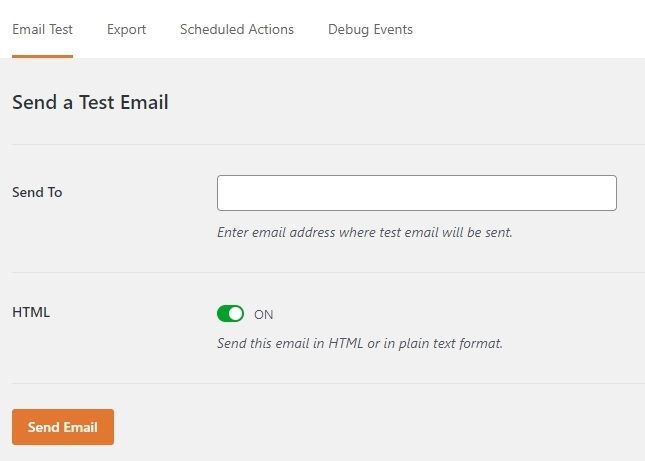
After setting up one of the above options, kindly send a test email and check if you received it
In your Brizy form, kindly select the 'WordPress' option to send email notifications when using the above plugin.
 0
0 -
I'm trying to set up a contact form using Google and the steps are not outdated as Google has updated. I tried posting about this on the facebook group, but nobody responded. Can you share updated steps?
0 -
Hi Jonathan,
Based on the recent changes made by Google, I have revised our Knowledgebase article at https://support.brizy.io/hc/en-us/articles/360044216151-Email-notification-via-Gmail
You could also look at this screen recording for the revised procedure to create a Google App Password. https://jmp.sh/n8VSNQdm
0 -
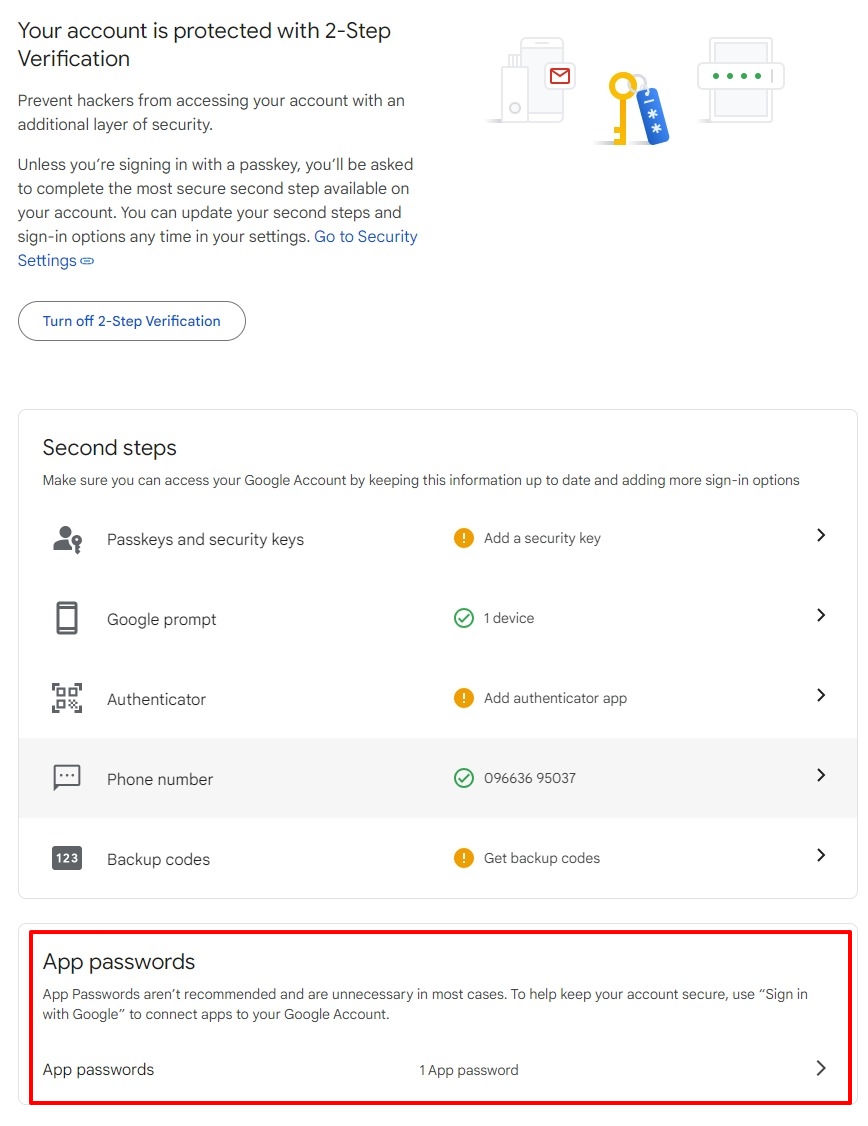
As you can see from my screenshot the option for an app password is not there.
This is what I hate about this type of communication being forced as the main form of communication. This interaction should've only taken 15-30 minutes tops but now it is taking days and it's stalling our efficiency and our effectiveness.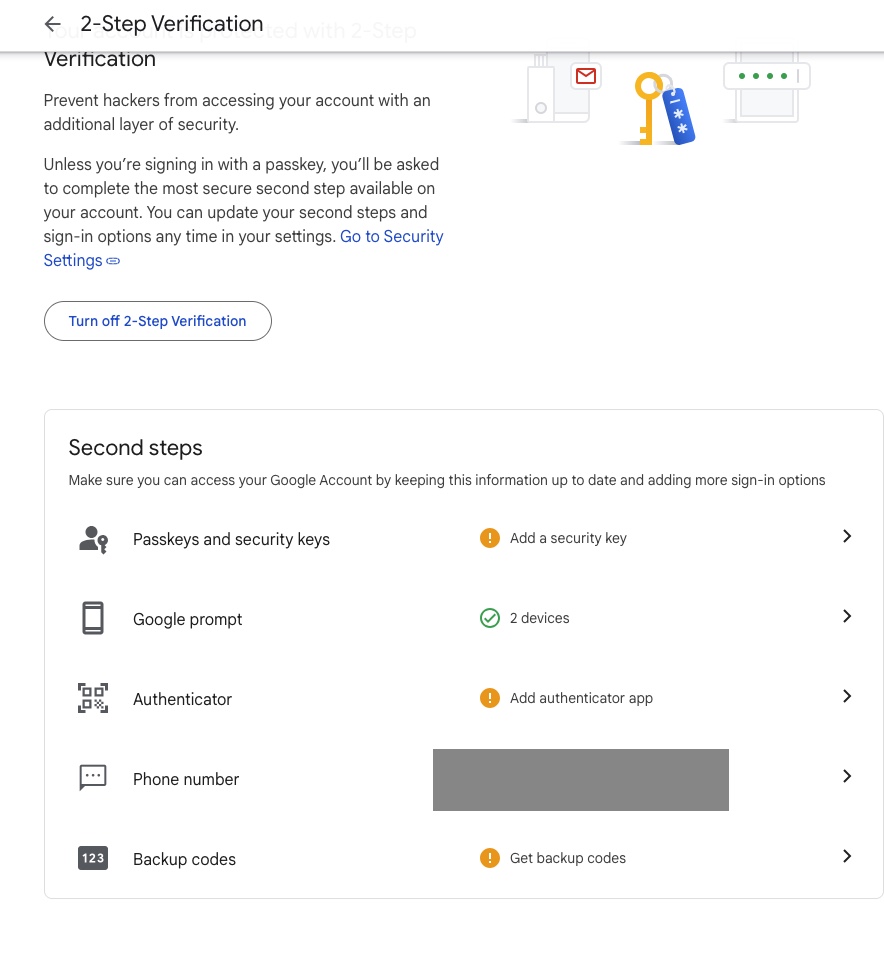 0
0 -
Hi Jonathan,
Do you mean that you don't see the App Password section at the very bottom? Try accessing the URL https://myaccount.google.com/apppasswords when you are signed into Google.
 0
0 -
Correct, that is what i was trying to show you in the screenshot. I scrolled to the bottom and its not there.
0
Please sign in to leave a comment.
Comments
33 comments