Brizy Cloud: How to download a static website

Hello. Is there a way to download a Brizy Cloud project just as a static HTML website for SFTP upload to another server? I see options for GitHub and Server Sync, but I don't see one for a basic HTML download.
-

Hi Phil
In the publishing options page, at the bottom, you can find an option to Export HTML files. Click on the 'Download Now' option to initiate the HTML Export process.
For big projects, the export process may take a 30-40 minutes. A ZIP file will be downloaded when the export completes. Before its completion if you click somewhere or do something else, the process may get aborted. Please do not interact with the browser window during the HTML export.
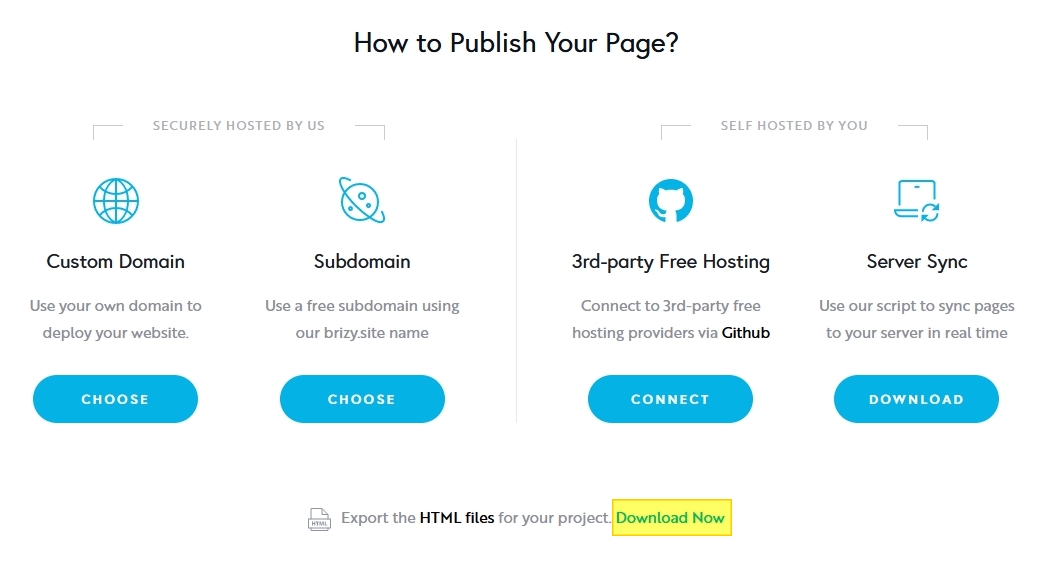 0
0 -
Thank you! Quick question regarding Server Sync: Is there a cloud provider that does this successfully? I've been struggling with Cloudways to get this to work on their PHP servers. Any suggestions where this function would work successfully?
0 -

Hi,
Thank you for reaching out to us.Unfortunately, we are experiencing ongoing issues with server sync.If you are encountering problems with server sync on your end, we recommend following these steps:
- Clear the files within the /cache and /var subdirectories on your server.
- After clearing the files, update all your pages and allow some time for the changes to sync. Please note that this process may take longer for larger websites.
Alternatively, you can try using the Export HTML feature as a workaround. You can find more information on how to use this feature in our support article:https://support.brizy.io/hc/en-us/articles/360026945332-Export-HTML
If you have any further questions, please let us know.Best regards,
Ariel H.0
Please sign in to leave a comment.
Comments
3 comments