Form is not displayed in mobile view

Form embedded with code is not displayed in mobile view. On desktop view everything normal. What can I do to get the form displayed in mobile view as well? Here is the URL: https://www.energiezentrummitte.de/photovoltaik-solar-goettingen/
-

Hi Stefan,
On a mobile device, I looked at the form at https://www.energiezentrummitte.de/photovoltaik-solar-goettingen/. It appears to work well on my end. Please have a look at this screen recording.https://jmp.sh/5ewfyVpF
What happens when you try to access the form from a mobile device at your end?
0 -
Hi,
thanks for the quick feedback. There is an embedded form to the right of the video, you can see it in desktop view but not in mobile view. Please watch it in desktop view first and then switch to mobile view. Then you will know what I mean. Many thanks...
0 -
Hi Stefan,
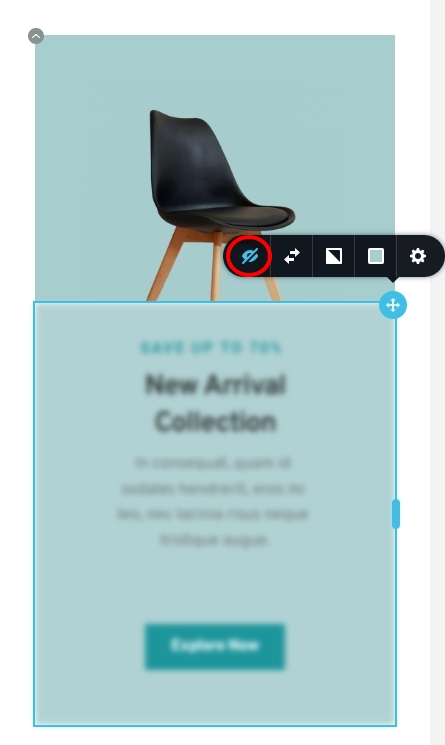
Please open the above page in the Brizy Editor, switch to the mobile design view and click on the 'Show Hidden Elements' icon at the bottom right corner. Please check if you see the embedded form.

If you have hidden the column/embed element, the hidden elements will appear blurred. Please click on the Eye icon to unhide the columns/ element
 0
0 -
Thank you, I have already done all that and is also set correctly. Unfortunately, the problem persists :(
0 -

Hi Stefan,
It seems that the embedded form has been hidden by a plugin that performs JS/CSS minification. Would you mind locating the corresponding option in your optimization plugin and temporarily disabling it? This will help us determine if it is the cause of the issue.
Best regards,
Ariel H.0 -
Hi Ariel,
I will check it. Thank you...
0
Please sign in to leave a comment.
Comments
6 comments