Brizy WordPress on mobile view, cannot add image after updating domain

im not able to update images on the brizy website, not sure if its been happening since I added domain to site. (it multi site using white label).
marybethsellarscoaching.com - I'm trying to fix main header block in mobile view, but it won't accept any image as a cover image.
-

Hi Edgar,
Can you please give us more information about this problem?
- Are you trying to add a different background image for the mobile?
- Are you facing the image upload issue only when working with the mobile design?
- Are you using a plugin which optimizes images? Try disabling any such plugin
- Are you using a CDN which optimizes your images? Try disabling the CDN and check again
- Are you using an antivirus software on your computer? Please disable it and check again
- If your regular browser uses extensions, please try using an alternate browser with no extensions.
0 -
Hi KC,
I am on brizy multisite, I was working on a new site. once I added the domain Im no longer to edit or change images. ( I do see them in the media library but they just won't load after they are chosen).
it's happening for all version desktop tablet and mobile.
no on all the rest.
I pointed domain for go daddy over, but created the ssl in cloudways for that domain. after sending site live I cannot change images in image picker it wont load it I have tired in multiple browesers. If I disconnect the domain alias, I can add images. I thought maybe it just needed time to propagate. but still not working. the images url do seem to updated, but for some reason after choosing the image in brizy picker, it just show blanks.
thanks
0 -
Hi Edgar,
Please check if you have enabled the Cloudflare CDN in your Cloudways account following this procedure How to Use Cloudflare CDN on Cloudways
Cloudflare CDN has a few image optimization features: Cloudflare Image Optimization These features can interfere with Brizy Image upload. Please try disabling the Cloudflare image optimization features and check if you are able to upload images. If this is not possible, you may have to disable Cloudflare CDN to upload images.
0 -
hello I'm on cloudways but I do not have cloud flare enabled as it is an add on. any other ideas on why this my be happening.
0 -
quick question is site setting I have alias set to marybethsellarscoaching.com
in settings site url and home are set to https://www.launchstudioshq.com/marybethsellarscoaching
do I need to change those to marybethsellarscoaching.com
or is that correct.
thanks
0 -
I think the url is correct. Im not sure why it stopped working the ability to add images, in that past I've been able to do it no problem.
0 -
Hi Edgar,
We have no experience with WordPress Multisite Domain Mapping. Could you please ask the Cloudways support staff to check and ensure that your multisite domain is correctly mapped?
If they are not able to offer meaningful help, we can take a look at your WordPress Dashboard to try and troubleshoot this issue for you.
0 -
I've checked with cloudways they say it's at the application level.
I did notice something, I have a another install of multisite and images are working fine there, I noticed with domain live on subsite for when uploading images the url uses alias domain and the media library also shows Alisas domain as url path for image.
In the install for Marybeth site the url when loading images shows alias domain in url path but in the media library it shows old path launchstudioshq/Mary... instead of the alias domain. when I preview images they are under old domain of the subsite not using new domain. - Nor sure how to fix that? would you know?
url when trying to upload via builder: https://marybethsellarscoaching.com/wp-content/uploads/sites/17/2023/08/mary-beth-sellars-coaching.jpeg
url in media library: https://www.launchstudioshq.com/marybethsellarscoaching/wp-content/uploads/sites/17/2023/08/mary-beth-sellars-coaching.jpeg
0 -
actually never mind on the urls If I log in in her account the urls look fine, but for some reason it still wont let me load images. frustrating...
0 -
Hi Edgar,
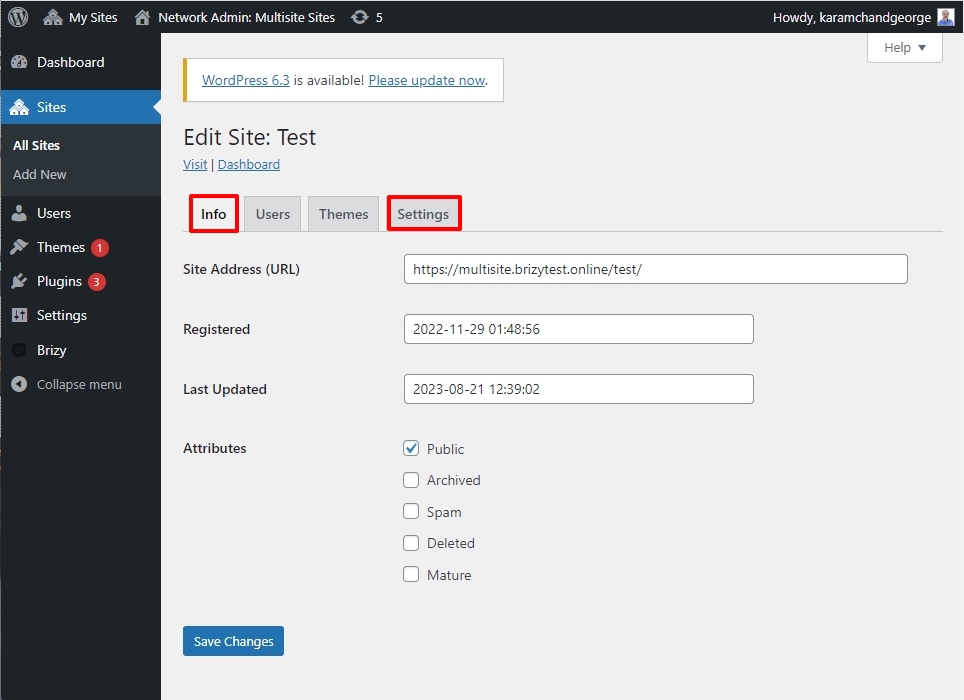
Under the Network Admin - Sites, please ensure that you have added the same Site Address URL under the 'Info' and 'Settings' tab.
 0
0 -
That was it! its working! Thank you KC you are magnificent!
I am so happy the client will now be able to add her own blog and images.
I will make note of this and make sure all subsites when adding alias will have site url updated in site settings.
can't thank you enough.
0 -
well.. after a second now in the browser is saying to many redirect - and wont open
0 -
ok seems to working, I checked with host and mess with caching, some reason it fixed it.
thanks again for your hlep on this - I am able to edit amigos again. have a wonderful day
0


Please sign in to leave a comment.
Comments
13 comments