Pop-up is stretching out all elements on the page

Hi. Something in the pop-up code is making all the element containers on the page stretch out. We are seeing this issue on a few different sites.
Can you help me fix this? Is there a CSS fix or anything that can help?
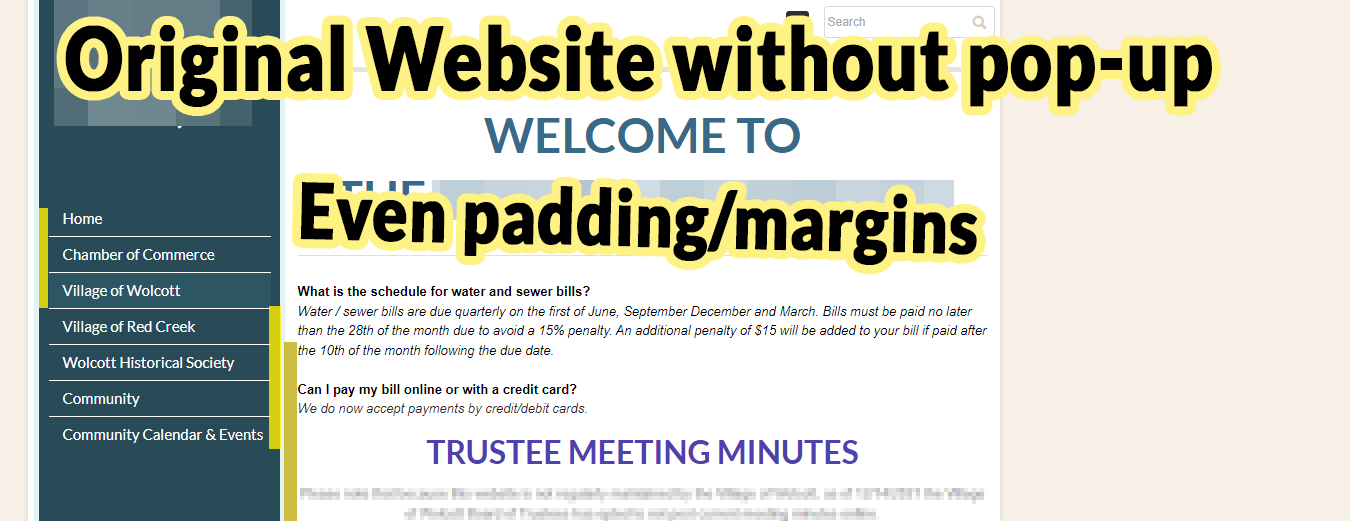
View the original page without the pop-up code here.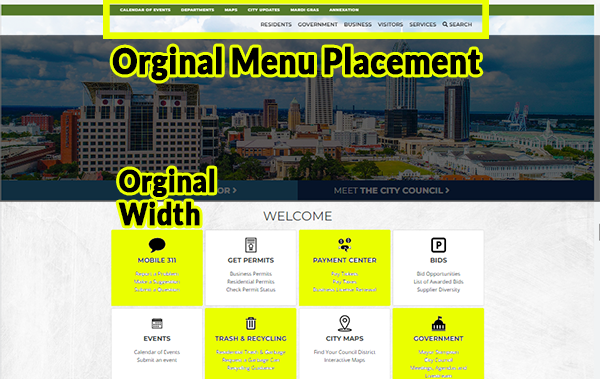
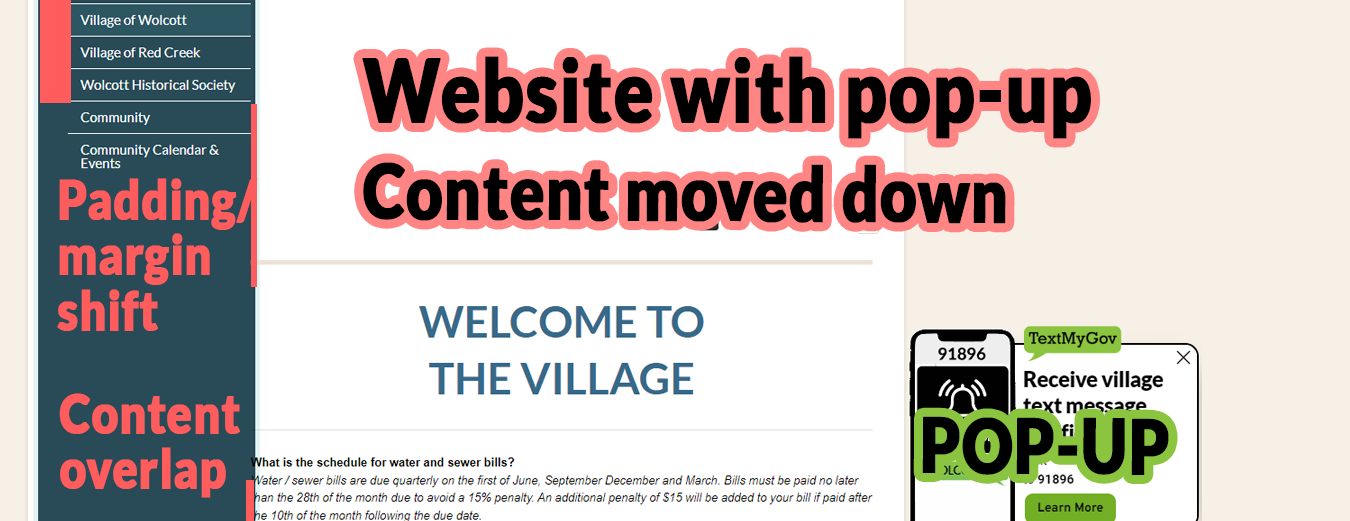
View page with the pop-up code here.

Pop-up referenced:
Popup Name: Brz-Mobile-Dual
Code:
<script>!function(p,n,o){if(!(o=n.getElementById("brz-external-popup")))return(o=n.createElement("script")).async=1,o.id="brz-external-popup",o.src="https://2d4bd1e243f43c90c8d937fcda13dbcf.s3.amazonaws.com/assets/popup/v2/popup.js",o.onload=e,void n.body.appendChild(o);function e(n,e){e="https://fig13324425.brizy.site",p.brzExternalPopup?p.brzExternalPopup(e):(n=o.onload,o.onload=function(){n(),p.brzExternalPopup(e)})}e()}(window,document);</script>-

Hi Shane,
Thank you for reaching out to us.The likely cause of this issue is due to a CSS conflict.To fix it, please try adding this CSS code. You may increase the width of the container as needed./* container fixed width */
.container {
width: 1140px;
}I've tested this CSS here - https://youtu.be/dwINK945Y98I hope this helps.Kind regards,Ariel H.0 -
Hi Ariel. I tried your fix. It worked great on desktop mode but on a mobile phone, it was problematic. It's extending the containers out of their bounds.

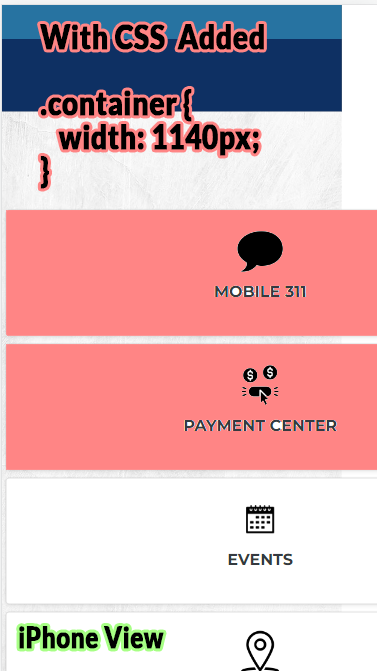
I then adjusted your fix to be a Max-Width. That seemed to get a better result. However, it stretches it differently within the tablet view and changes the margin of the available space.
Is there something with a generic class name being used on Brizy that is causing these to conflict with each other?
We are seeing this issue on other sites as well.
I'll post those examples below if that helps.
2nd pop-up reference:
Example 2 can be viewed on this page. You can see that the menu bar stretches out as soon as the page loads with the pop-up code on it.

Popup Name: Brz-StarValley-Simple
Code:<script>!function(p,n,o){if(!(o=n.getElementById("brz-external-popup")))return(o=n.createElement("script")).async=1,o.id="brz-external-popup",o.src="https://2d4bd1e243f43c90c8d937fcda13dbcf.s3.amazonaws.com/assets/popup/v2/popup.js",o.onload=e,void n.body.appendChild(o);function e(n,e){e="https://strawberry13051637.brizy.site",p.brzExternalPopup?p.brzExternalPopup(e):(n=o.onload,o.onload=function(){n(),p.brzExternalPopup(e)})}e()}(window,document);</script>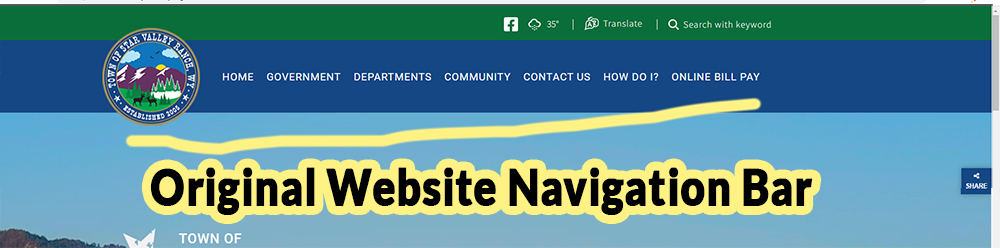
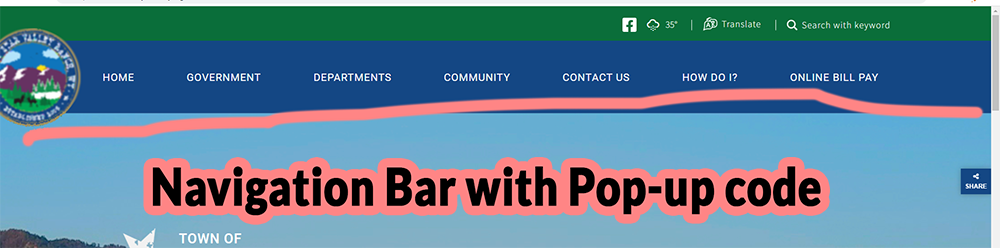
------------------------------------------------
3rd Pop-up reference:
Site Example 3 can be viewed here.

Popup Name: Brz-Wolcott-Simple
Code:<script>!function(p,n,o){if(!(o=n.getElementById("brz-external-popup")))return(o=n.createElement("script")).async=1,o.id="brz-external-popup",o.src="https://2d4bd1e243f43c90c8d937fcda13dbcf.s3.amazonaws.com/assets/popup/v2/popup.js",o.onload=e,void n.body.appendChild(o);function e(n,e){e="https://melon15344470.brizy.site",p.brzExternalPopup?p.brzExternalPopup(e):(n=o.onload,o.onload=function(){n(),p.brzExternalPopup(e)})}e()}(window,document);</script>In this instance, you can see that the code impairs the padding/margin on navigation and the content container. It shifts and stretches the content down and it loses its spacing and overlaps with the navigation bar.
 0
0 -
Hi Heylay,
Thank you for the update.
Please try using more specific class name: Instead of using .container, use a more specific class name that is less likely to conflict with the popup. For example, you could use .my-container instead in your HTML.
Please try this and let me know how it goes.
Best regards,
0 -
Ariel, we are seeing this effect on multiple websites.
Our pop-ups are added by our clients that don't always have the ability to restructure their sites.
- Is there something that can be done on the backend of Brizy to give the pop-up class a more unique name to not to affect every website we add it to?,
- or is there a CSS code I can add to Brizy that will force it to be a unique code on the popups themselves?
0 - Is there something that can be done on the backend of Brizy to give the pop-up class a more unique name to not to affect every website we add it to?,
-
Hi Hayley,
Thank you for your patience.
I have already notified our senior team about this issue, and I will get back to you as soon as I have an update.
Kind regards,
Ariel H.0 -
Hi Ariel, I just wanted to check in and see if you had any updates? We keep running into the same issue with generic classes used by the pop-ups impairing multiple websites.
Another one of our clients have reached out to us about their concerns with the issue. For reference their website can be viewed here. | Pop-up name: " Brz-Palmview-Dual " | View Brizy Pop-up
<script>!function(p,n,o){if(!(o=n.getElementById("brz-external-popup")))return(o=n.createElement("script")).async=1,o.id="brz-external-popup",o.src="https://2d4bd1e243f43c90c8d937fcda13dbcf.s3.amazonaws.com/assets/popup/v2/popup.js",o.onload=e,void n.body.appendChild(o);function e(n,e){e="https://blackcurrant14847912.brizy.site",p.brzExternalPopup?p.brzExternalPopup(e):(n=o.onload,o.onload=function(){n(),p.brzExternalPopup(e)})}e()}(window,document);</script>Some of the CSS in the pop-up targets the generic .container class. This class is used on multiple websites.
Best practice in the development of pop-ups like this would say that all of their CSS should be prefixed by .brz because that’s the main class around all the HTML used.
Instead of targeting .container, can the Brizy Development team use a rule that targets .brz .container?
---
UPDATE:I've added the following Custom CSS code to the pop-up example shown to temporarily solve the issue, but it would still be nice if CSS classes in Brizy could be prefixed by .brz or another unique class, as we keep running into this issue with multiple generic classes having a negative effect on our client's websites.
@media screen and (min-width: 768px) and (pointer: fine) {
    .container { width: 1024px !important; }}
0 -
Hi Hayley,
My apologies for the late response.
I'm glad that you managed to address the issue temporarily. Unfortunately, we don't have an update on this request; however, I will follow this up for you and get back to you as soon as I have an update.
Best regards,
Ariel H.0 -
Ariel,
I never heard back from you on this. I just wanted to confirm whether or not this issue has been resolved.
0 -
Hi Hayley,
I regret to inform you that I currently do not have an update regarding this issue. I will check with our senior support team and notify you as soon as new information becomes available.
Sorry for the inconvenience.
Best regards,
Ariel H.0
Please sign in to leave a comment.
Comments
9 comments