Custom Domain

I've connected my custom domain and it shows up in the cname part but its red. The A one shows up and its in green. I'm wondering if something is wrong with it?
-

Hi,
Thank you for contacting us.
If the CNAME is marked with red then the SSL will not be generated. Please follow all the steps from this article in order to connect correctly the CNAME: https://support.brizy.io/hc/en-us/articles/360026046931-Custom-sub-domain-CNAME-Redirect-
Best regards,
Nelea
0 -
The link is to redirecting a subdomain but i'm trying to link my main domain. Why can't i link my custom domain?
0 -

Hi Zach,
We are sorry for the incorrect link. The correct procedure for setting up CNAME record is available in Step 5 of this article. https://support.brizy.io/hc/en-us/articles/360041764052-Custom-domain-A-Record-Redirect-
0 -
I've followed that. All of its correct. I've checked many times but its still red
0 -
Hi Zach,
Can you please share the custom domain of your project so that we can check?
0 -
writingyourownstory.com
0 -
Hi,
We have checked your project and you did not add correct the CNAME, as it is marked with red. Please see this screenshot from your project. Please see this article and set up correctly the CNAME from the DNS setting.
Best regards,
Nelea.
0 -
how do i change the redirect? i have google domains. Theres nothing i found when putting in my cname that has points to. All i've found is this and it won't let me put in my brizy project. It says the characters are not supported. When i click save here it brings me to another page that tells me i have to change something in my host platform.
0 -
Hi Zach,
Once you login to your Google Domains account
- Please select the domain writingyourownstory.com
- On the left sidebar, select the DNS option
- Ensure that the option "Use the Google Domains Nameservers" is selected
- Scroll down the page and under 'Custom Resource Records' you can add the CNAME record
This document has more detailed instructions https://help.instapage.com/hc/en-us/articles/115013755448-Creating-a-CNAME-record-on-Google-domains-google- You could also watch this video https://youtu.be/eqD-bAVGoZ8
Your record could look like this. Please let us know if you need further help.
 0
0 -
i don't understand. it is. it always has been. am i missing something here? I literally have everything setup just like you've told me to do. I've read and already have done all the articles you tell me to look at. Its all right here. I've always been using googles servers. i don't understand. But then i have to wait a full day just to receive a response over stuff thats already been setup. SPAM"
0 -

Hi Zach,
Thank you for the update, this is how it should look like in Google DNS Manager.
Please see the screenshot on the following link.
Please try this and let me know how it goes.
Kind regards,
Ariel H.
0 -
Oh, thank you so much for that. I thought i was supposed to put my domain name in there. Now is this good? SPAM"
0 -
so wait. will this go to my domain or what do i have to do now to get it to go to my domain? On 2/23/2023 9:39:11 AM, Zach wrote: Oh, thank you so much for that. I thought i was supposed to put my domain name in there. Now is this good? SPAM"
0 -
Hi,
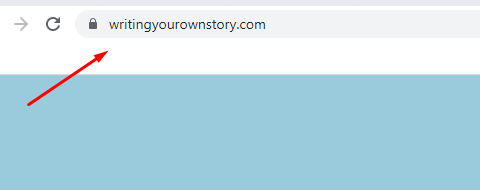
The SSL for the website was generated :
 0
0 -
excellent! so everything is taken care of? Sorry about the confusion on my part. I'm still learning. Thanks so much for all the help!
0
Please sign in to leave a comment.
Comments
15 comments