Brizy Cloud: Dynamic content limited with text

Hello. I'm trying to add the #username or #firstname as part of dynamic text. I followed the instructions but I do not see any user options (such as name, email, etc.) as options in the dropdown. Attached is a screenshot. As you can see, I'm limited to only Page Title, Publish Date, or Description. Please advise. 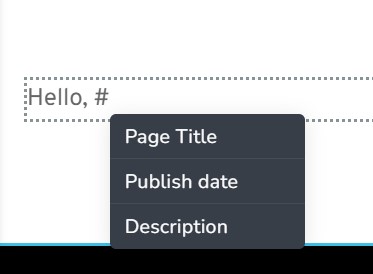
-

Hi
For First Name and Last Name of a registered user, please use the 'Login' element and then select the 'Authorized' Type
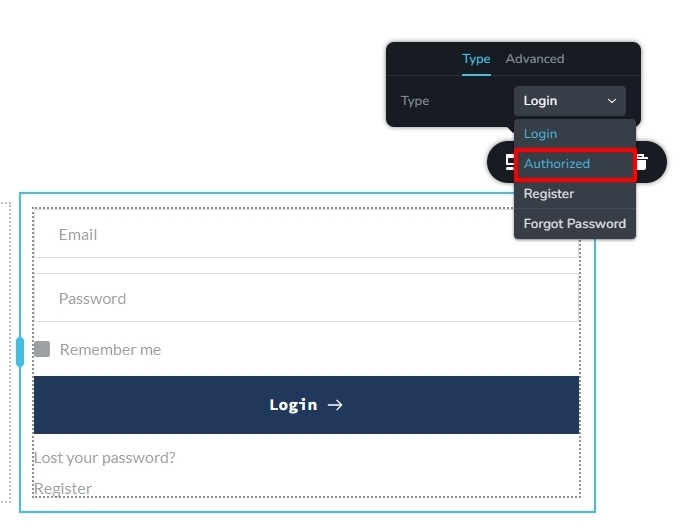
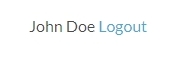
This element will display the user's name and Logout options next to each other
 0
0 -
Thank you! How do I change the text color of "Logout"? I have a dark background and the blue text color of "Logout" is difficult to see.
0 -

Hi,
Thank you for keeping in touch.
Unfortunately, there is no option in the editor to change it; however, you can use the following custom CSS - https://prnt.sc/jFXVsgZwMxMb
I have pasted it here, so you can copy it and place it in the custom CSS area.
.brz .brz-login__authorized span {
    cursor: pointer;
    color:red !important;
}
You may change the color as needed.
Please try this and let me know how it goes.
Best regards,
Ariel H.0 -
Thank you! That worked! :)
0
Please sign in to leave a comment.
Comments
4 comments