The top page has been rewritten!

Good afternoon.
I have just purchased the paid version, but when I installed the theme from Starter Te4mplates, the home page was rewritten by itself. I removed the theme, but it didn't revert back to the original.
Removing the plugin does not restore the original layout of the home page, leaving only a dirty, cluttered layout.
How can I revert to the original WordPress theme?
The original theme used is Fancie NOTE : Business Edition.
-

Hi Wataru,
The starter templates are typically deployed as a starting point for a new project on a fresh installation of WordPress. Installing a starter template on an existing project is not a recommended practice. This can result in loss of files.
Look through the list of pages in your WordPress Dashboard under Pages to see if you can find your former homepage. If any of the listed pages look like it could be your original homepage, hover your cursor over it and select the 'View' option to see a preview of the page.
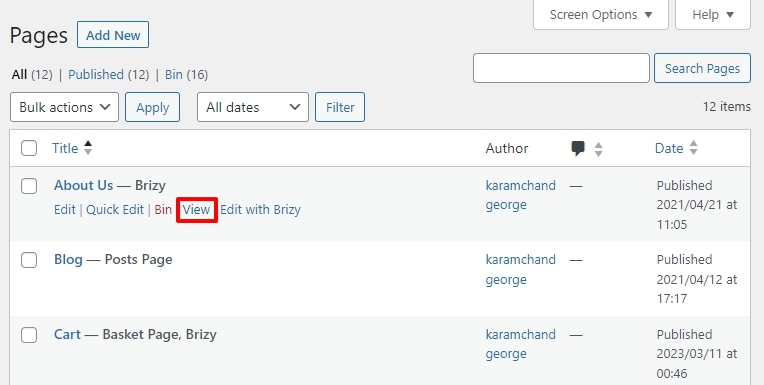
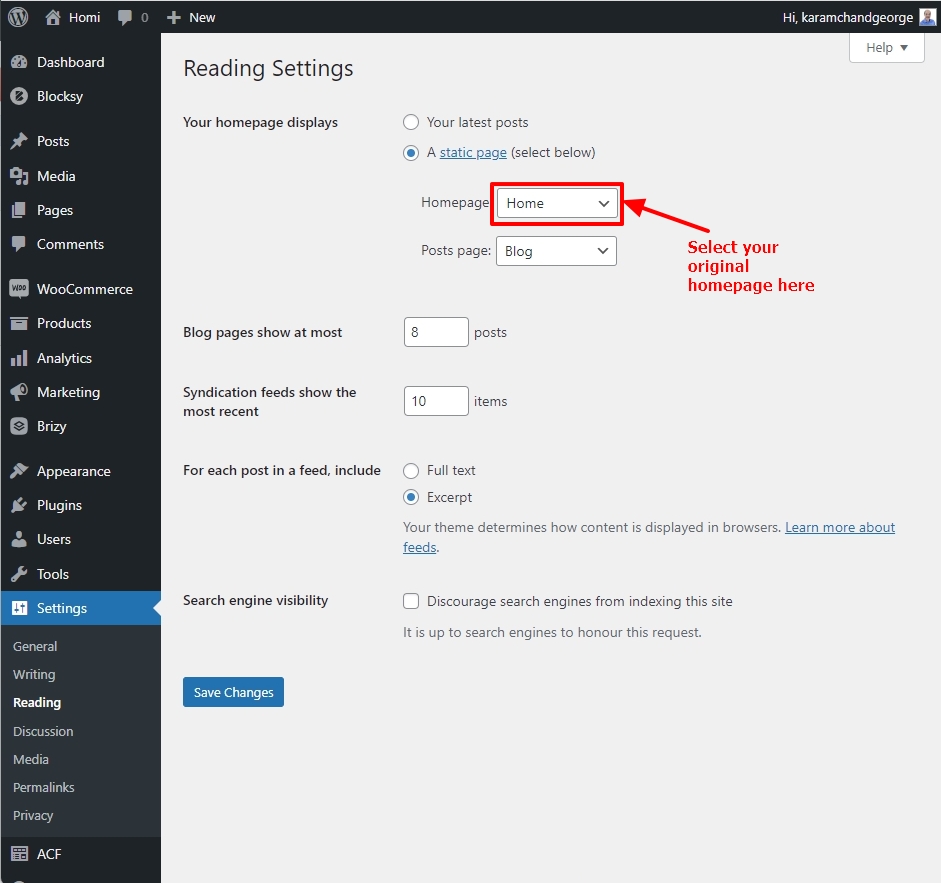
Repeat this procedure for each page that could be your homepage. If you find your original homepage, set it as your homepage under Settings - Reading and save your work.
If you cannot find your original homepage, please check if your website has backups and try to restore from a backup
0 -
Hello KC George.
Thank you!
When I reviewed the settings, the original homepage was not still there.
By setting the homepage to show as the most recent post, the original design was restored.
What we want to do is to make it look like the screenshot you gave us.
Change homepage to Brizy design.
https://oooooo.com
Change the top of the existing blog page to
https://oooooo.com/blog
Is it possible to do this?
Or would this be difficult if it is not set up in the initial stages?0 -
Hi Wataru,
Another page can be set as your homepage and your blog can be displayed on a blog page. This can be done in two steps.
- Add a new page, name it 'Home' and edit the page with Brizy and add your homepage design to this page. Set this page as your home page in your WordPress Dashboard by going to Settings - Reading as seen in the above screenshot.
- Create a new page, call it Blog. Set this page as your Posts Page under Settings - Reading as shown in the screenshot above
0
Please sign in to leave a comment.
Comments
3 comments