Upload File not working - C:\fakepath\file.docx

When using an upload field in a form, we notice that in the leads/entries, a fakepath is displayed instead of the link to the uploaded file. We have see this on various pages.
We have integrated Zapier with the form and we also want the link to the uploaded files to be sent to Zapier.
Can you help us?
How can I send a private message with all details? (link to webpages and login details)
Thx
-

Hi Jack,
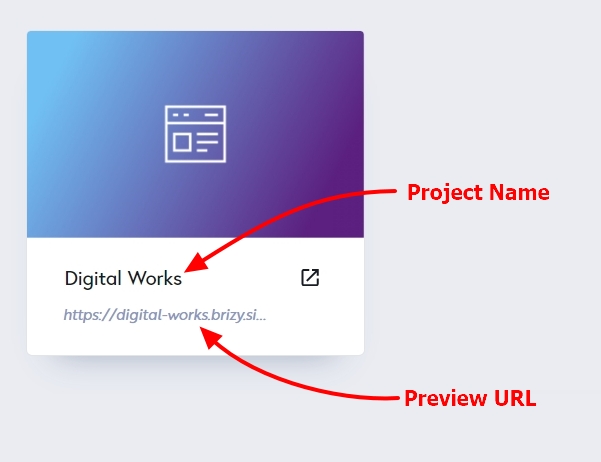
If the issue is on a Brizy Cloud website, we don't need login details. Please share with us these four details
- Workspace Name
- Project Name
- Preview URL
- The URL of the page where you are facing the issue
We will take a look at your project. If you want to send it by email, use this email address: communitysupport@brizy.io. Please let us know here after sending the details by email.
 0
0 -
Hi George,
I've send an email with all details.
Subject of the mail: Ref. details by mail: "Upload File not working - C:\fakepath\file.docx"0 -
Hi Jack,
I added my email to your form at https://jobs.favor-cool.be/ and tested it. Please see this screenshot for the email notification I received. https://jmp.sh/e4anrv9Z The path to the PDF file included in the email is not a fake URL. You can download the file by clicking here
I also tested the form at https://jobs.peetersramenendeuren.be/ and I received this email notification. https://jmp.sh/B8wAgR0m In this email, the path to the PDF file is not fake either. Please click here to download the file.
Please check your inbox for copies of these email notifications and check if you are able to download the files from your email.
0 -
Hi George,
It's working for both websites now, thank you for resolving the issue.
What went wrong? Or how can I prevent this from happening again in the future?
Thank you!
0 -
Hi Jack,
When I reviewed your website, I discovered that email notifications were working well and that I did not need to make any change.
I have no idea why the problem you mentioned occurred because I was unable reproduce it.
0 -
Hi George,
Strange that it didn't work for me on 2 different projects.
Could it have something to do with the browser itself? I usually work in Safari on Mac.For now, it works so it's fixed. Hopefully it won't happen again.
Thanks!
Jack0 -
Hi Jack,
If it happens again, please record your screen so that we can take a look at it. Please also specify your browser version number. We will attempt to replicate the issue at our end.
You could use a service like https://www.loom.com/ to record your computer screen.
0
Please sign in to leave a comment.
Comments
7 comments