Words split on mobile

Hello Brizy team,
Thank you for the release of so many amazing new layouts! It's really exciting to see these :)
I have a question that has happened to me ever since I use Brizy, which is words slipping between lines on mobile. I noticed the same happen in some of your layouts (examples below). My workaround has always been to reduce the font size. But of course this is not ideal because in different mobile phones things will look different depending on how wide the screen is, so even if I reduce the font and it works on my phone, I won't know how it looks on so many other types of phones....
Here's an example of what I mean:

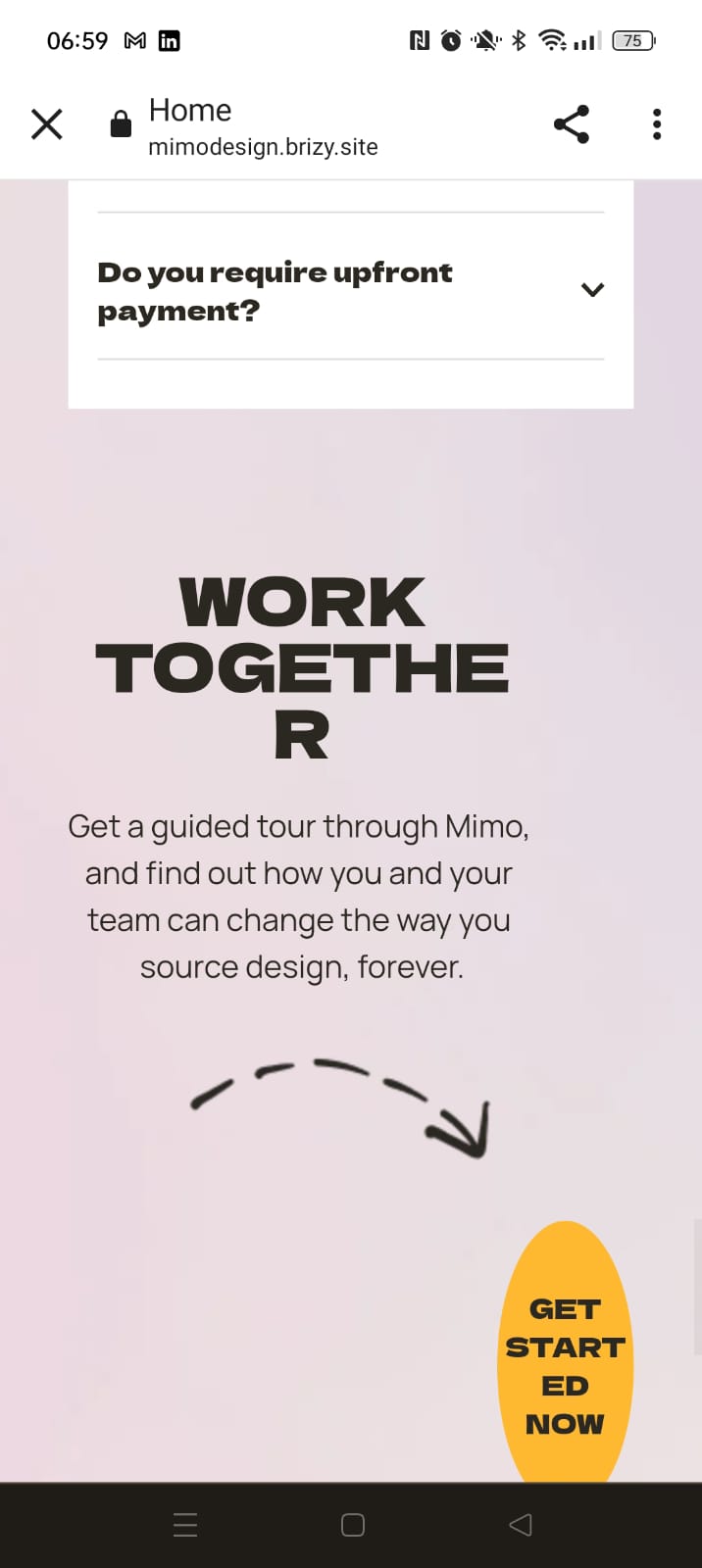
What suggestions do you have to make this more stable and professional?
Thank you very much, Sofia
-

Hi Sofia,
Thank you for reaching out to us.
Unfortunately, the only approach we can suggest is to reduce the text size for mobile view, which is a common approach used by other page builders as well. To increase the likelihood of your website displaying correctly across various mobile devices, we recommend that you test your website on a variety of mobile devices with different screen sizes to identify any potential issues.
You may also use emulators like Responsively App (https://prnt.sc/0gXgc56JJXCt) to simulate how your website appears on different devices.
https://responsively.app/downloadI hope this helps.
Best regards,
Ariel H.0
Please sign in to leave a comment.
Comments
1 comment