WooCommerce builder elements

Hi,
When I was developing my website for ecommerce last year, I was unable to use your WooCommerce builder because even after a lot of helpful tips from your support staff, it was still not giving me the look or the functionality I was after. So I stuck with the theme till I could fully utilize Brizy for all aspects of the website on a later date.
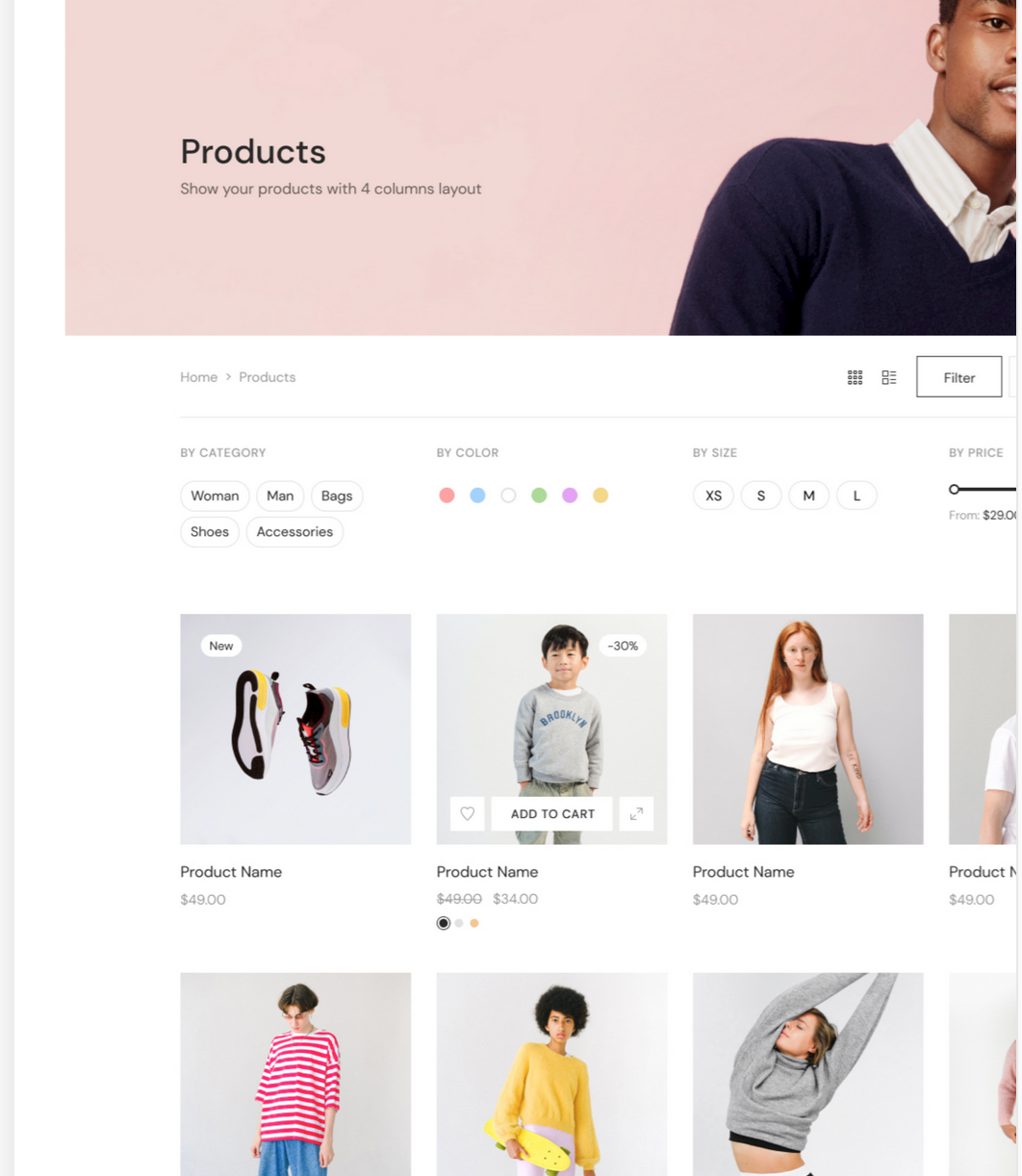
On your WC builder page (https://www.brizy.io/woocommerce-builder) you have aesthetically pleasing examples of the Shop page and Single Product page. But I still don't see those elements (e.g.: product title, product price, gallery, additional info, related, ...) listed under my Brizy WooCommerce builder.
Also the product archive (Shop) page shows many features I was looking for (e.g.: filtering options with colour, size, category...) but still not available.
Are these features still not available, or am I not doing something right to make those available? The webinar link on the page points to something from September 2020, and I couldn't find any resources on your tutorials to help with my cause.
It's greatly appreciated if you could update on WC builder and if they're available, point me towards resources explaining how I can make those pages like you have done.
Cheers
-

Hi Chinthaka,
The WooCommerce product filter feature is not yet available natively with Brizy. We are still working on it. https://trello.com/c/KXFxcg1H At the moment, the product filter needs to be implemented with the help of a product filter plugin. For example, https://vitacomfort.nl/ uses YITH WooCommerce Ajax Product Filter plugin.
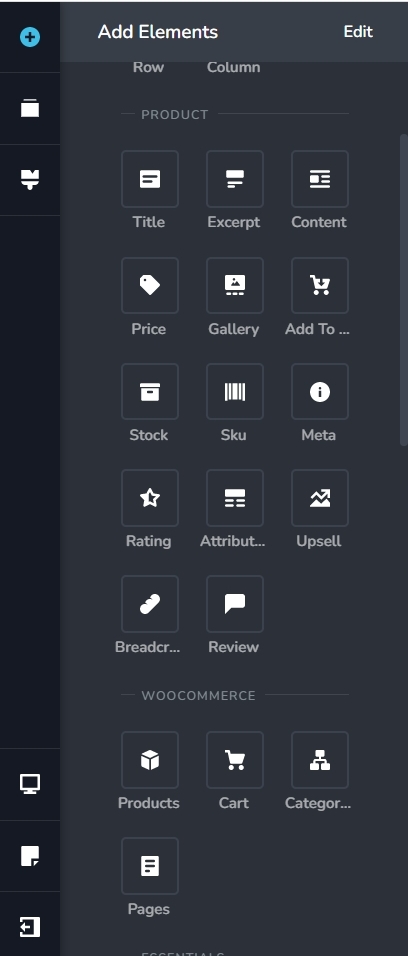
These are the product elements you can use for building the single product page. Product Title, Product Price, Gallery, Meta, Upsell etc are available. For an example of a shop you can build using Brizy, please have a look at https://glamboxtt.com/
We do not have a recent tutorial on setting up a shop using the Brizy WooCommerce builder. We will work on developing one. In the meantime, we can record videos for you if you have specific questions. We could also arrange a Zoom session where you can discuss multiple issues you are facing with WooCommerce setup.
0 -
Hi George,
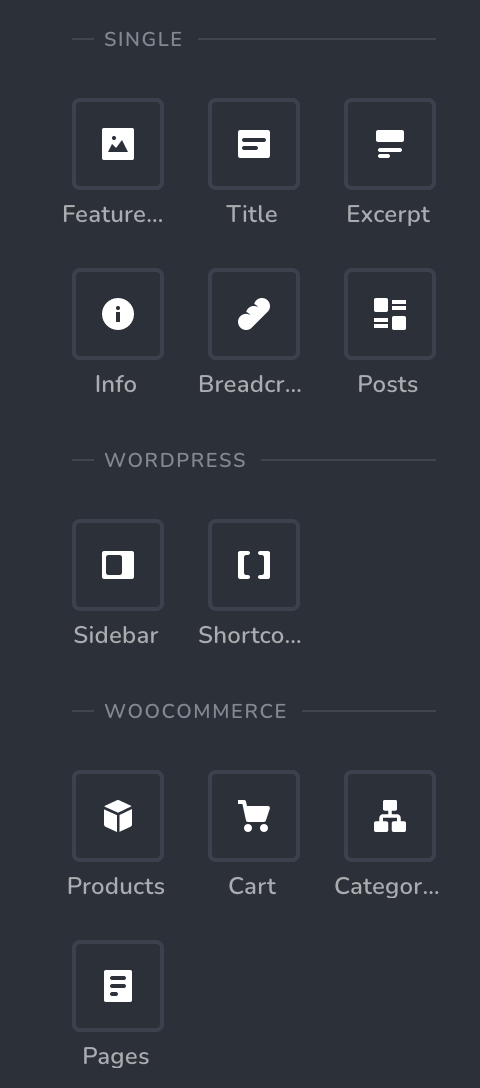
Thank you for your reply and for the offer of multiple ways to help. I don't see the elements you have listed available to me though (screenshot) and I have the pro version.
 0
0 -
Hi Chinthaka,
The WooCommerce Product elements are visible only when developing a single product Brizy template. To see the product related elements, in your WordPress Dashboard under Brizy - Templates, add a new template and select the Display Condition Include - Products - All and click on the 'Add' button. Please ensure that you see the 'Delete' option next to your Display Condition.
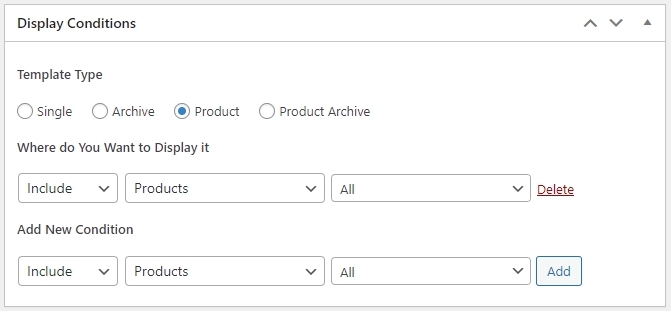
Publish the Brizy Template and then click on "Edit with Brizy" to design your single product page. In the blank page that opens up the product elements should be available. Please let us know if you are able to get access to the product related elements.
0 -
Hi George,
Thanks for your reply. That refreshed my memory of seeking your assistance on a previous occasion a while ago on a similar matter. Although I tried to achieve the look I was after with Brizy at the time, I couldn't get it close to what I wanted, so I ended up using the theme's product page template instead. Here's a product sample on the live site now: https://chinandannie.com/shop/alina-bra-in-soft-candy/
I added extra plugins for colour and size swatches and wishlist. But I always had the intention of getting this all done with Brizy and not with a theme. I see the example image you have on your WC builder page (https://www.brizy.io/woocommerce-builder), a single product page that looks very close to what I'm after. It has the gallery options, wishlist button, reviews, social media sharing and colour swatches formatted the way I would prefer to have.
Is it possible to make that exact page with Brizy in its current state? If so I would appreciate you could show me how I could achieve the look. Thanks.
0 -
Hi Chinthaka,
I think a design very close to what you have is possible with Brizy with some minor variations. Should I put together a design for you on your project and save it as draft? You can then fine tune the design and make it exactly like the way you like?
0 -
Hi George,
That's a great offer and thank you very much. It would be great if you could do that. Instead of my current set up though, will you be able to show how to achieve something closer to what you have on the Brizy site (image attached)?
 0
0 -
Hi Chinthaka,
Can you create a new user for me and send me these details to kc.george@brizy.io?
Community Post URL: https://support.brizy.io/hc/en-us/community/posts/12976060703249
WordPress Admin URL:
Username:
Password:Due to an upcoming travel tonight, I can work work on this on on Monday.
0 -
Hi George,
Thank you very much for your assistance, and the email was sent. Monday is fine. Safe travels!
0 -
Hi Chinthaka,
I have taken a look at your single product design using Brizy Template. Looks like you are able to design it well yourself. Please let us know specific areas of help you need. We can offer help in those areas.
0 -
Hi George,
I did manage to get a few things in there, but I would like to know,
- How the customer review section was made with a 2 column look
- Can I display the 'Gallery' similar to what's in the example, with large image thumbs?
- Do you have a Wishlist button?
0 -
Hi Chinthaka,
- With the Brizy Review element, it isn't possible to have a two column design for the reviews. I could not get a response from the person responsible for our website design.
- There are a few product gallery slider plugins. 7 Best WooCommerce Product Gallery Slider Plugins You could explore these plugins and hide the thumbnails to achieve a design similar to design on our website.
- The Wishlist plugin normally adds the wishlist icon to the Add To Cart button automatically. If the plugin you are using does not do it, you may need to explore other plugin options. 7 Best WooCommerce Wishlist Plugins to Choose in 2023
0
Please sign in to leave a comment.
Comments
11 comments