Live with Mindpoisepdx.com

Hey there! What am I doing wrong? Trying to go live with this site and it's not working. Can you help?
Thank you! Kris
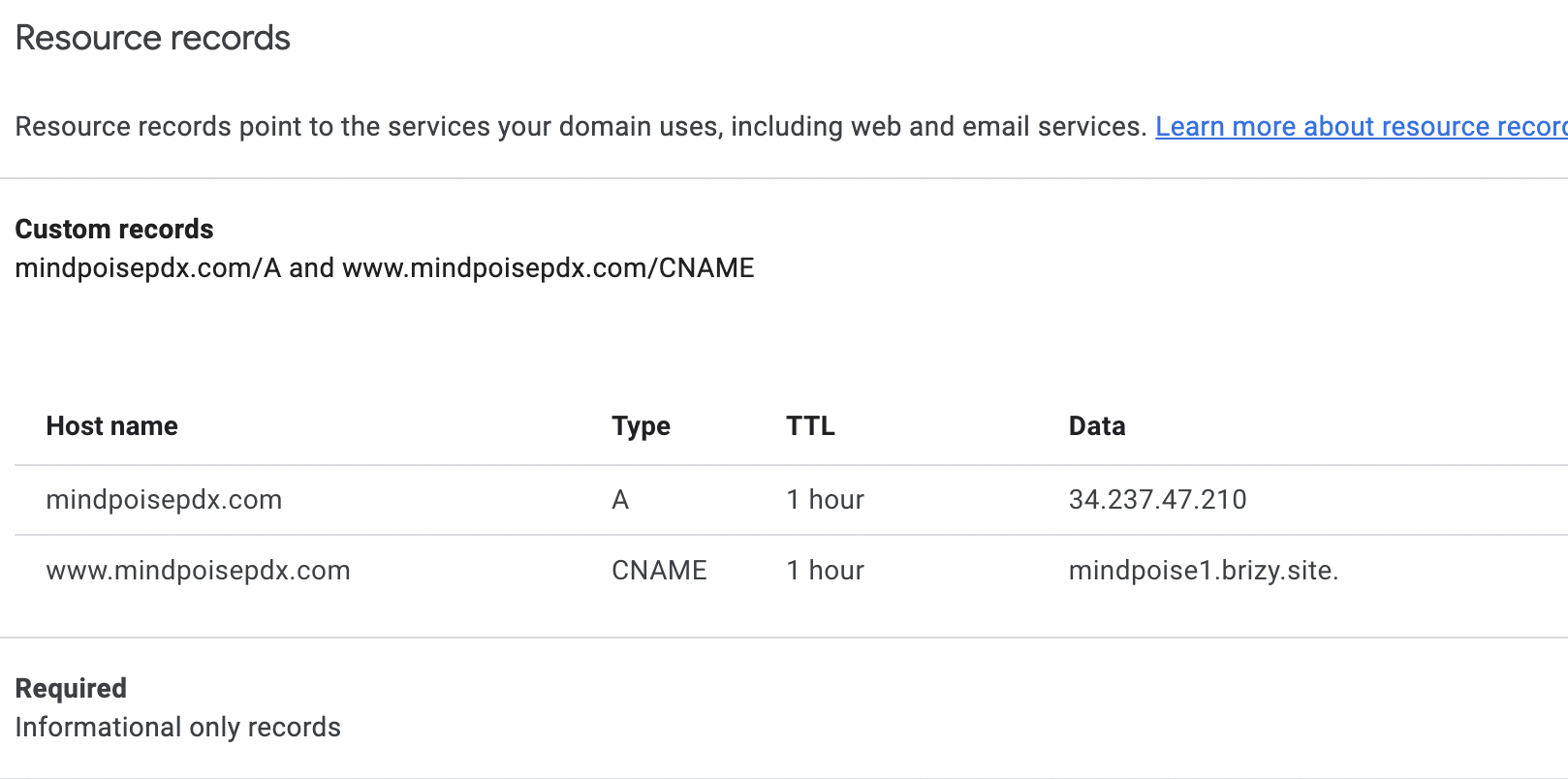
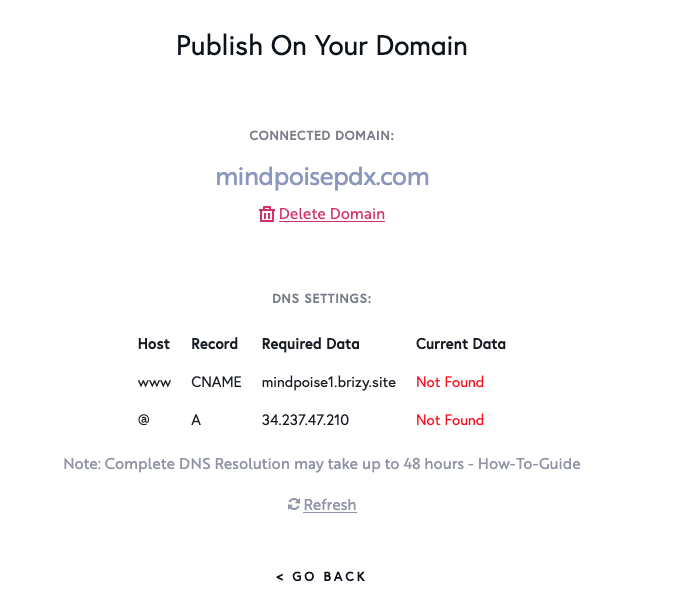
-

Hi,
From your screenshot, I see that you have not connected the Cname and the A record, as they are marked with red, see below:
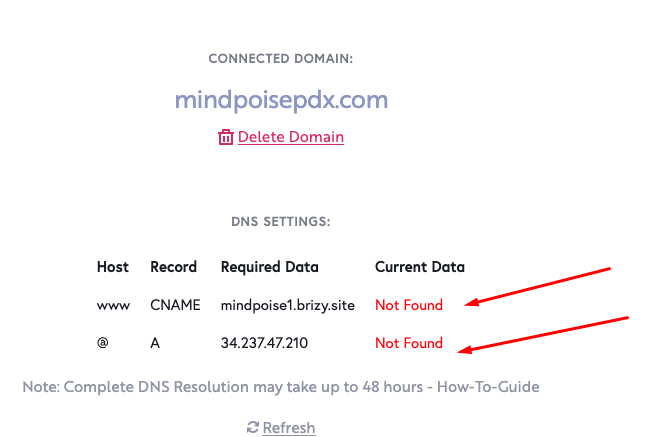
Please check these two articles in order to add the correct records:
A: https://support.brizy.io/hc/en-us/articles/360041764052-Custom-domain-A-Record-Redirect-
CNAME: https://support.brizy.io/hc/en-us/articles/360026046931-Custom-sub-domain-CNAME-Redirect-
After this, all the records in the project settings should bee green, this is an indicator that the configuration was done correctly.
Then, please login to Brizy Cloud Dashboard and please delete your Custom Domain and add it again and wait for half an hour for your SSL to be restored. See here : https://jumpshare.com/v/87WUJxMdoCYym84YU7bP
Best regards,
Nelea.
0 -
Yes - I realized that. The required data is set up correctly on both the domain side and the brizy side. No matter what I do it says "not found" -- even though the info is correct. How can I solve this problem?
0 -
Hi Kristin
In order to set up correctly the DNS settings please see this article and follow all the steps :
A: https://support.brizy.io/hc/en-us/articles/360041764052-Custom-domain-A-Record-Redirect-
CNAME: https://support.brizy.io/hc/en-us/articles/360026046931-Custom-sub-domain-CNAME-Redirect-
Best regards,
Nelea.
0 -
Nelea,
What I'm trying to say with these attached screen shots is that I've followed all the directions and for some reason, it's still not working. See attached.
The delay in response for help and inability to get this to work is frustrating for both me and my client. I've been developing websites for 20 years and have been using Brizy for about a year. I'd really appreciate some help that doesn't involve sending me a link to directions that I've already completed.
Thank you!
0 -

Hi Kristin
Can you please confirm if you have added the DNS records at your domain registrar Google Domains?
0 -
Yes, I confirm. This is a screenshot from the google domains page (See the CNAME record below) SPAM"
0 -

Hi Kristin,
Thank you for the update.
I checked and found that your domain name is currently on clientHold, as shown in this screenshot - https://prnt.sc/TafrFLAeLA50
When a domain name is on clientHold status, it means that the domain has been suspended or put on hold by the domain registrar, and DNS resolution has been disabled. This can happen for a variety of reasons, but it is typically due to issues with the domain's registration or renewal.
You will need to contact your domain registrar to resolve any outstanding issues and get the domain name back into a usable state.
Kind regards,
Ariel H.0 -
Thank you, Ariel. The domain is now unlocked and the site is still unable to go live. I've been troubleshooting this for months. Before replying, PLEASE look at the custom records (screen shots attached) and compare them with what I have in Brizy. It's exactly the same. I would really appreciate some personal support today that doesn't involve sending me a "How-To HyperLink". Thank you in advance :) Kris Acest Tiket a fost facut Recovery din Suspended Tickets. Trebuie editat si la final in PS. trebuei de zis la user "Please do not reply to noreplay email, pentru ca mesajele ajung in SPAM" 0 -
Hi Kristin,
Thank you for the update.
Sorry, that you're having a hard time with this issue.
It appears that no DNS records were found for your domain name (mindpoisepdx.com) when I checked using the Google Admin Toolbox - https://prnt.sc/8N9ezjEKuc2I
Please check this again with your domain registrar, there may be a delay in the DNS settings becoming enabled after the domain name is restored. It can take 24–48 hours for the DNS information to fully propagate.
Best regards,
Ariel H.
0
Please sign in to leave a comment.
Comments
9 comments