Contact Form Won't Work

I did a contact form on my site, https://takenterprisesgroup.com/ and it looks like it's set up, but when I test it on the live site, it doesn't work. Please help!
-

Hi Michael,
Thank you for reaching out to us.
When I checked, it appears that your domain name is currently blacklisted, which is one reason why you are not receiving emails from your contact form.
This information is confirmed by the online tool.
https://mxtoolbox.com/SuperTool.aspx?action=blacklist%3atakenterprisesgroup.com&run=toolpageScreenshot - https://jmp.sh/YAxWwcxZ
Please contact your hosting provider, so they can assist you with this issue.
You can also resolve this issue by using SMTP or Gmail to send out your emails from your website. - https://jmp.sh/JBxGK1fF
I hope this helps.
Best regards,
Ariel H.0 -
I tried to contact my hosting about this issue but it didn't seem like they could resolve it. At first they said contact you guys to whitelist it, then they said I could do it, but I didn't know how. So then they proceeded to try to do it, but it didn't seem to work. Thoughts?
0 -

Hi Michael,
Your email will be sent out through WordPress' PHP Mail feature, when you use the WordPress option to send out email notifications. Few webhosts like GoDaddy do not support PHP Mail. Please confirm that PHP Mail is supported by your web hosting company.
When you send out email notifications via a form, email servers are likely to mark messages sent this way as SPAM, so these messages may not reach the recipient. Please follow these best practices to avoid having your mail rejected by mail servers.
1. Subject: Please don't omit the subject line. Give a meaningful subject. You can include a subject, such as "Contact Form."
2. From Email: Make sure the 'From" Email' you use has the same domain as your website. The 'From Email' field on a form hosted at CNN.com can be form@cnn.com or info@cnn.com
3. From Name: This field must not be left empty. Give a meaningful 'From Name'You could also try the Gmail option
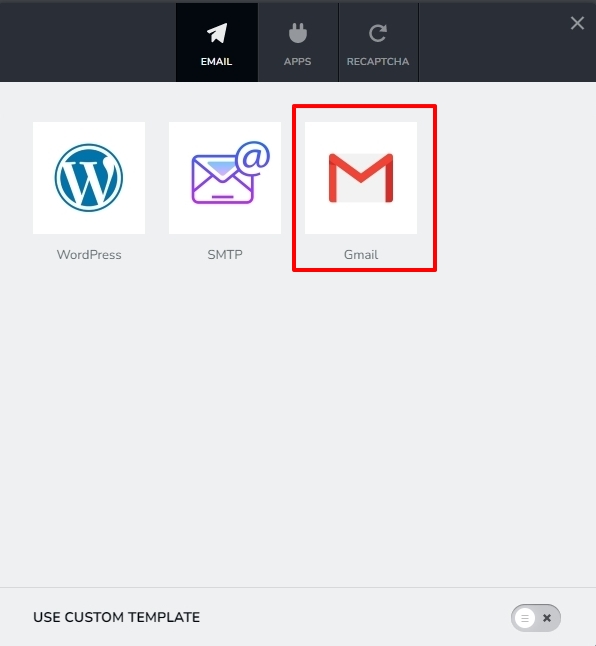
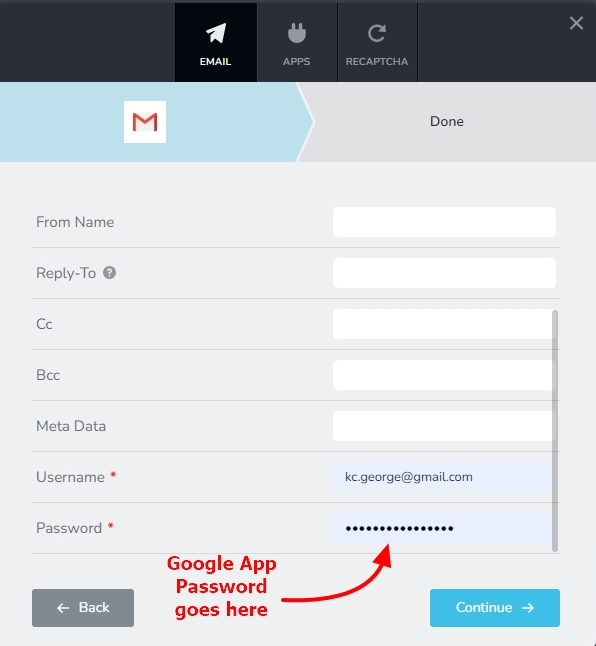
When using this option please use a Gmail address as your Username and Google App Password as your Password: Here is the procedure to generate Google App Password. https://jmp.sh/z6QIaX7S
 0
0
Please sign in to leave a comment.
Comments
3 comments