Failed to Connect to Brizy Cloud Issue

-
Update: It is also sometimes telling me that the SSL isn't enabled.
0 -

Hi Roger,
Thank you for contacting us.
Kindly log in to your Domain Registrar account at http://www.rjwdigital.com.au/ and review the A Records linked to the host WWW. Should you discover A Records with the IP addresses 76.223.88.217 and 13.248.211.84, please proceed to delete these records - https://i.imgur.com/pjFlwmR.png
Afterward, navigate to your Brizy Cloud Dashboard, remove your custom domain, and then add it back. Allow approximately half an hour for the SSL certificate to be automatically generated - https://i.imgur.com/gJwXmvz.png
https://support.brizy.io/hc/en-us/articles/360041764052-Custom-domain-A-Record-Redirect-
Please try this and let me know how it goes.Best regards,
Ariel H.0 -
Hi Ariel,
Thank You for the swift response.
I don't have any A records with the IP addresses that you have linked.
I also have deleted and reconnected my domain prior to reaching out to Brizy Support, with no luck. (I have since done it again).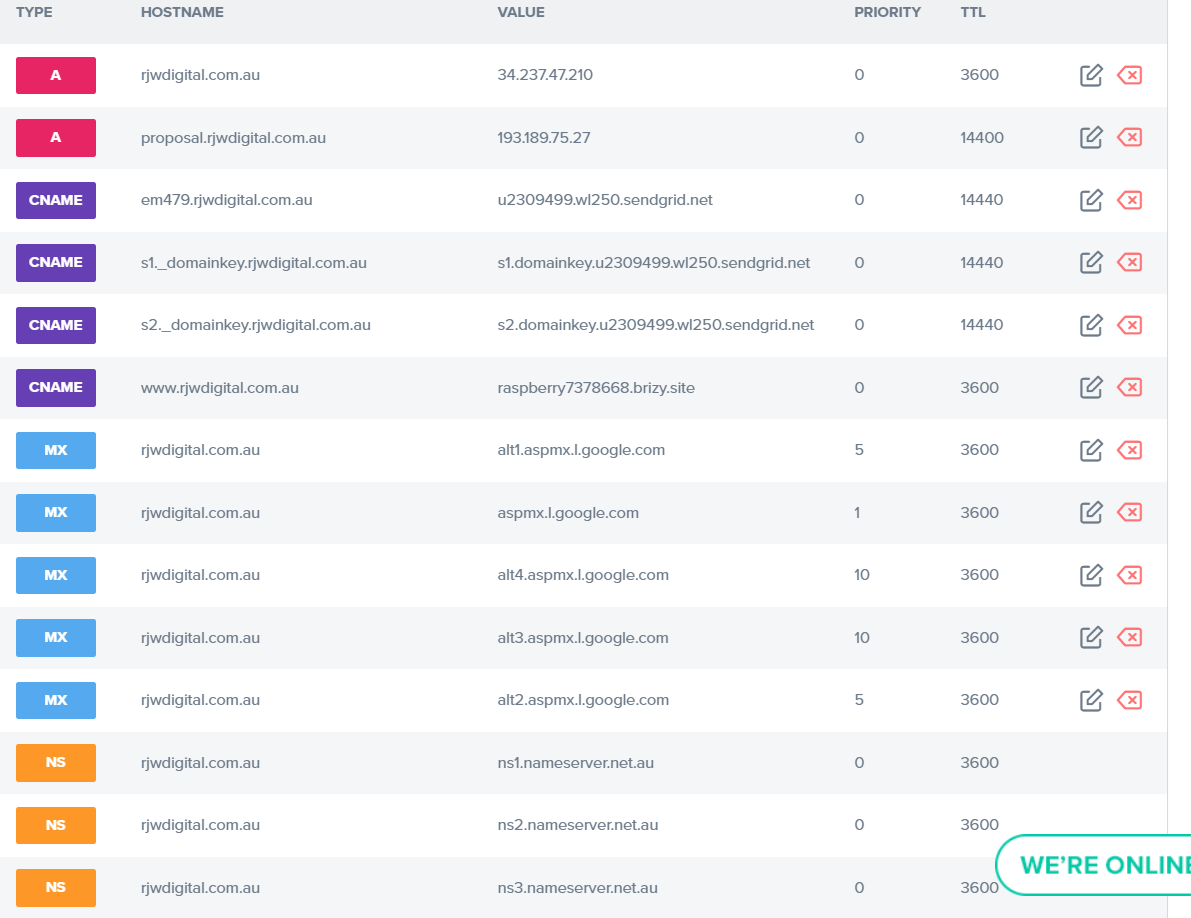 0
0 -
Hi Roger,
Thank you for the update.
This is how it looks like at my end - https://i.imgur.com/WFIBhyZ.png
In case you haven't seen the same message yet, consider clearing your browser cache or allowing some additional time for the changes to take effect.Once you see a similar message, please try publishing all your pages and let me know how it goes.
Best regards,
Ariel H.0 -
The issue is that the SSL isn't connecting...
I've republished my pages and have had no luck.
On my dashboard, my domain is not showing up as SSL enabled. (has http instead of https:// on the project dashboard).
0 -
As you can see from the screenshot I shared above. The DNS settings are correct. whatsmydns.com also shows that the DNS has propagated to the correct addresses, so I'm unsure as to why it would show up as not correct?
0 -

Hi Roger,
Natalia here, Brizy support team.
Let me give you some assistance on this case.
The SSL certificate is generated if 2 conditions are completed:
1. The cname and A record is correctly configured; A couple minutes ago, both records were not configured - https://jmp.sh/dFSem4Ig, so the page was not connected with your custom domain;
2. Both cname and a records are fully propagated. This process can take up to 48 hours, as it is mentioned in our article.
Now, your records are correct and we are waiting for the SSL certificate to be generated. A couple of minutes more...
Regards, Natalia
0 -

Hi Roger,
The SSL certificate is finally generated. Please check https://www.rjwdigital.com.au/ Please refresh the page by clicking on the 'Refresh' icon on your browser to see the latest changes.
Even though you have added the A Record and the CNAME records correctly, the website was still pointing to Netlify as the domain records were being propagated. Hence it took a while for us to generate the SSL certificate.
0 -
Amazing!
Thank you very much! I can confirm that this is working correctly!
Great support team!
0


Please sign in to leave a comment.
Comments
9 comments