FOR Vedio Element

I select Type = URL & Link = my copied link MP4 video from my microsoft 365
But it won't work, cannot view the linked video. Please advice
Jodie Loh
-

Hello,
Please, send me the mp4 link that you want to upload in your video element.
If will not make it public.
Thank you,
Natalia
0 -
【健康来了】 失眠.mp4 (https://1drv.ms/v/s!AvbWm6NEEZJTgeBa2hE5CfU-LgxEBA?e=Rj8dwj) The link I intend to add. JodieSPAM"
0 -

Hi LOH SIEW KEE,
Do you have some issues in Birzy builder, do you need help? Can you please give us more information about your problem?
Best regards,
Nelea.
0 -
Hi Nelea,
I have been using Brizy Builder for a while and have no problem to use Video Element for Youtube videos. Now I intend to insert videos from other sources for example to insert the copied link of my video from Microsoft 365, whereby I select Video from URL instead of Youtube, and try to insert the video, but it don't work. Anyway to solve it, please advise.I have just try to embed videos from my Microsoft 365 video files, and using Brizy Embed elements which it work to show the video when I run my website.
Thanks
Jodie Loh0 -

Hi Jodie,
Only the YouTube, Vimeo and Custom Video options work with the Brizy video element. The external URL option does not work; we are working on fixing this bug.
Until we are able to fix this issue, uploading your video to YouTube, Vimeo or your website may be the solution.
0 -
Thank you for your reply.
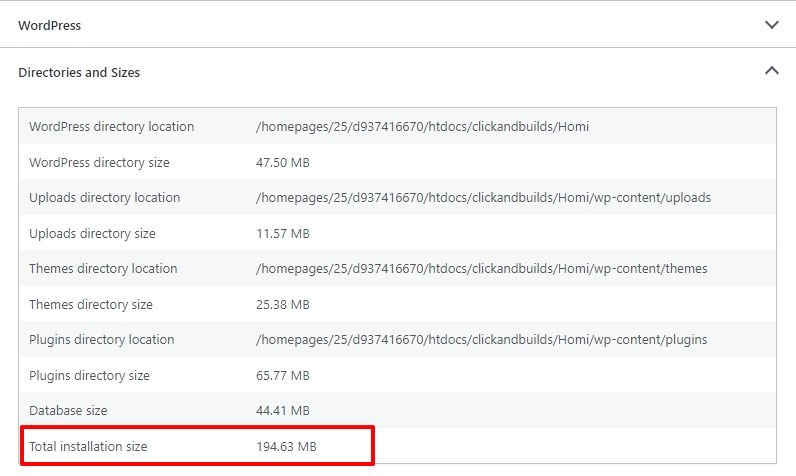
Please also advise me how to find the size of my website which is designed under Brizy.
Jodie
0 -
Hi Jodie,
In your WordPress Dashboard under Tools - Site Health - Info tab - 'Directories and Sizes' accordion, you can find website statistics. Please have a look at this screenshot https://jmp.sh/OdF5utH0
 0
0 -
Thank you. May I ask one more question. If I like to see the exact size of only one post, which one to look for, based on above infm.If my total installation size is not enough for me to use, how to upgrade so that I can post more pages /posts .
0 -
Hi
It may difficult to get the exact size of a single post or a page. You could have a look at the size of the Posts table in the WordPress database using the Advanced Database Cleaner plugin. If you divide the size of this table with the total number of posts, you can get an average post size. https://jmp.sh/0zo8ql21
0 -
Thank You. But how can I upgrade if my total posts/pages storages are not enough.
0 -
Hi LOH SIEW KEE,
You may need to upgrade to a hosting plan which allows higher storage space. Please have a look at available hosting plans with your host and discuss with them about upgrade options.
0
Please sign in to leave a comment.
Comments
11 comments