Contact Form Field Type Error

When I try and select the form field type - I don't get all the options (as you can see in the pic). How do I fix this?
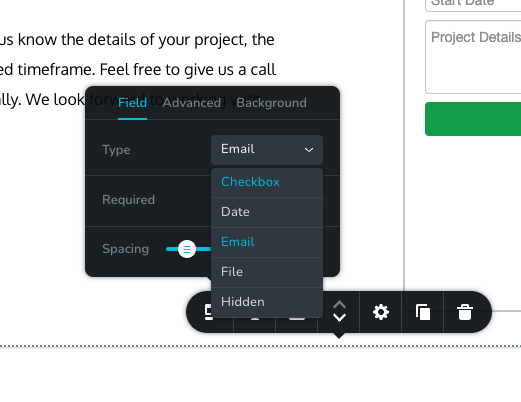
-
Hi there,
options? For the type? The ones you see in the image
I deleted it, but you can definitely go and add one on the same page I was working to see what it’s doing.
https://www.amadeoconstruction.com/contact-us
thanks so much!!
0 -

Hi,
My colleague already answered you in this post. Please let's keep the discussions in one post.
Best regards,
Nelea.
0 -
Ummm okay. This system is new to me and didn’t realize I posted in the same place. I thought one was support and the other was the community or something. I was seeing help from wherever I could get it. Thanks
0 -
Hi,
1. We have checked this website: https://www.amadeoconstruction.com/contact-us , you don't have any form here in this page, like in the screenshot you've sent above.
2. We have made some tests on your page, but we didn't save it and when we have added a new contact form element, from the left side, you have the scroll in the form https://jmp.sh/k6ZYxyye ;
Can you please check this issue in another browser?
Best regards,
Nelea.
0 -
Hi Nelea,
Sorry, it was almost 4 in the morning my time and I fell asleep ;-)
I restarted my computer, disabled plugins and tried multiple browsers (Chrome & Safari). I do not get the scrollbar to reveal other types. I re-added the contact form and will leave it in place.
Please see the video:
https://www.loom.com/share/b747d77993b545bca695ca9b14e1d6ed
Thanks for your help.
Marcos
0 -
I also went and tested from my iPad with an interesting result. I CAN scroll through the type list. Something isn't allowing that on my desktop. Everything else seems to work fine. I was on Chrome on my iPad.
Please see video:
https://www.loom.com/share/6003cb24851749f5aca59aeb948f28da
Thanks,
Marcos
0 -
For additional clarification... Neither scrolling (mouse) nor trying to use the up/down arrow keys are allowing me to scroll thru the list on my desktop.
Marcos
0 -
I got my contact form up and running. I still had to make my type selections on my iPad since they did not scroll on my computer. Something is not right with that, but I worked around it... Hoping it ultimately gets fixed. Thanks
0
Please sign in to leave a comment.
Comments
8 comments