When trying to edit a page the Brizy Editor Hangs - Circle of Doom!

Brizy page editor is not loading when trying to edit a page
1. Please try using another browser and see if this helps.
I've tried 3 different browsers and incognito/InPrivate
2. Deactivating one plugin at a time and checking if the problem resolves.
Tried deactivating all plugins
3. Temporarily switch to another theme and check if the issue goes away.
Temporarily Switched to Wordpress 2023 Theme
4. Also, try raising the PHP memory limit to at least 256MB or higher.
https://www.wpbeginner.com/wp-tutorials/fix-wordpress-memory-exhausted-error-increase-php-memory/
PHP Memory is set at 1024MB
Still no luck trying to use Brizy to edit the page.
And both Brizy and Brizy Pro are using the latest versions.
Any help would be appreciated, thanks.
-

Hi Ben,
Usually the looping pre-loader indicates that a software in your hosting server environment is interfering with Brizy editing. To fix the problem, please sign in to your hosting account and check if any of these software is enabled on your account. Disable these systems one at a time and see if that makes a difference.
- Security system
- Malware protection
- Firewall
- DDOS
Please also check if you have installed a security plugin in your WordPress Dashboard. Deactivate the plugin and check if the error disappears. Once you identify the interfering software, relax the security restrictions to allow Brizy editing, in consultation with your hosting company.
Please contact us again if you need assistance in identifying the interfering software. We will require access to your WordPress Dashboard to troubleshoot this for you.
0 -
Hi George
Thanks for getting back to me.
Could an older version of MySQL e.g. Maria 10.0 be causing the issue?
Thanks
0 -
Hi
My test websites are setup using MariaDB 10.5/10.6. Brizy and MariaDB are not incompatible, as far as we know. However, we are not aware of any Brizy user who is running MariaDB 10.0. Hence can't comment.
The looping pre-loader issue is typically indicative of an interfering software that prevents legitimate Brizy HTTP request interpreting it for a threat.
0 -
HI George
I'm still not having any luck after checking everything you have recommended.
Any chance you could take a look?
Thanks.
0 -

Hi Ben,
Thank you for the update.
Could you please provide us with the WordPress credentials to your website, so we can take a closer look? Please add us as a user to your WordPress Dashboard and send the following details to: communitysupport@brizy.io
Community Post link: https://support.brizy.io/hc/en-us/community/posts/12586050364178
WordPress Admin URL:
Username
PasswordPlease make a full backup of your website as a precaution.
Best regards,
Ariel H.0 -
I've just sent you an email.
Thanks
0 -
Hi Ben,
When trying to edit a Brizy page, you can see from this screenshot that admin-ajax.php file is being forbidden by your server with a 403 error. The HTTP 403 Forbidden response status code indicates that the server understands the request but refuses to authorize it. It is being perceived as "a potentially unsafe operation" by your security software.
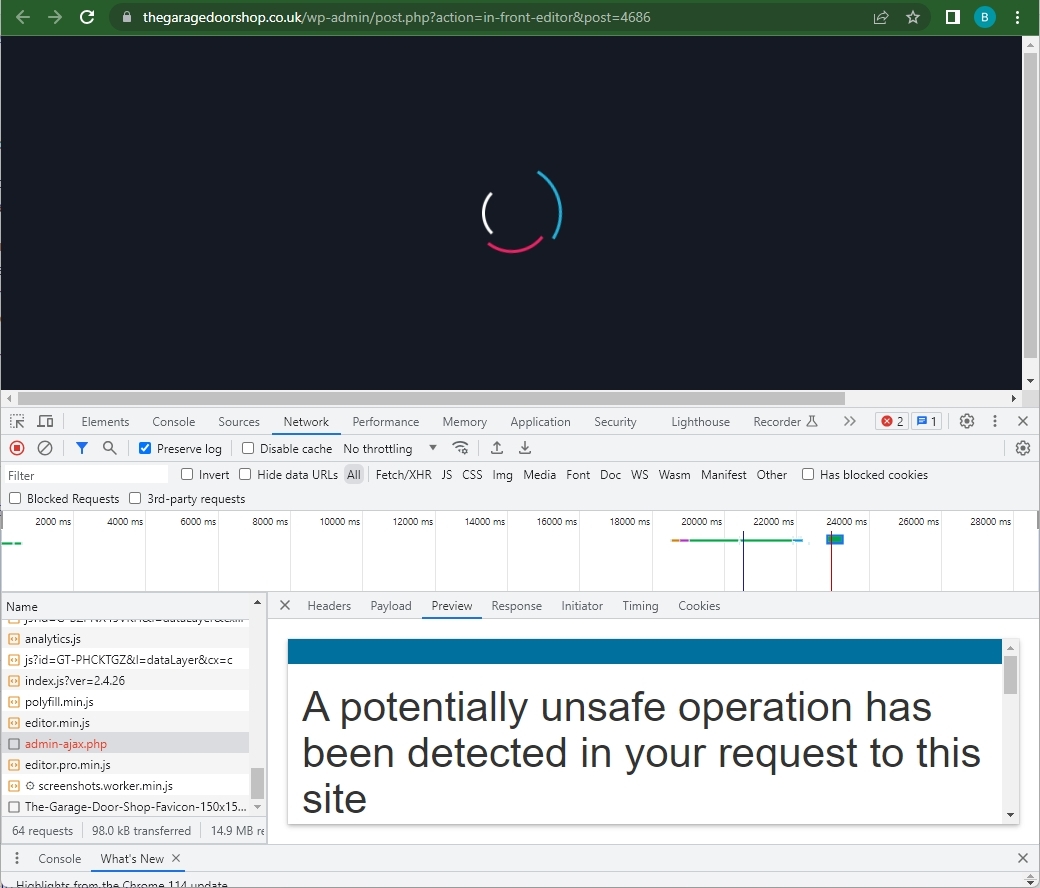
Please sign into your hosting account with https://www.iomart.com/ and check if you have enabled the cyber security systems and security operations centre mentioned in these articles
- https://www.iomart.com/cyber-security/
- https://www.iomart.com/cyber-security/security-operations-centre/
- https://www.iomart.com/iolearn/what-is-a-security-operations-centre/
If they allow you to disable these systems temporarily in your account, please do it and check if the issue gets resolved. Else, please check with your host if they can relax the security measures to allow Brizy editing.
0
Please sign in to leave a comment.
Comments
7 comments