Attachment stored locally instead brizy.cloud/customfile/*.pdf

I found all attachment/files I have added to the site are stored at https://www.brizy.cloud/customfile/*.pdf or https://a-cloud.b-cdn.net/media/*.jpg

I want all website element stored locally on my server, how I can get this done?
Thank you.
-

Hi Filip,
Denis here from Brizy Support department. Thank you for contacting us.
As you are working in Cloud, all files are stored on the server. There is no option to store files in different place.
Let us know if you will have any other questions.
Best regards,
Denis.0 -
Hi Denis,
Thank you for quick response.
When I click "Export the HTML files for your project" should I get all those files to upload somewhere else like my hosting?
0 -

Hi Filip,
As you can see on our pricing page at https://www.brizy.io/pricing-cloud, Export HTML option is available only with the Brizy Cloud Agency plan. Please have a look this screenshot https://jmp.sh/nGn40sKo
If you are a Brizy Cloud Agency user, you can export your project files to HTML and host it on an external server.
0 -
I have Agency Plan and I do have an Export HTML option, however only png and jpg assets are exported, pdf files are still linked to brizy.cloud/customfile/ folder.
0 -
Hi Filip,
You are right; this happens because of a bug with our HTML Export software. The fonts and the uploaded files like PDFs do not get included with the export file at the moment. We have reported this bug and are working on fixing it.
1 -
Hello,
Please let me know if the problem has been solved0 -
Hi Filip,
At the moment, Brizy Cloud sends out form data through its own SMTP server and it does not support an alternate means to send out form data. Since Brizy Cloud does not support external SMTP servers, saving attachments on a different server is not possible at the moment.
Please consider using an embed form instead of the Brizy form for the option to save attachments on a different server. For example, you could consider https://elfsight.com/online-form-builder/
0 -
This is not about the SMTP or online forms.
It is about exporting to HTML bug attachment.
It was a month ago, you said "We have reported this bug and are working on fixing it."
0 -
Hi Filip,
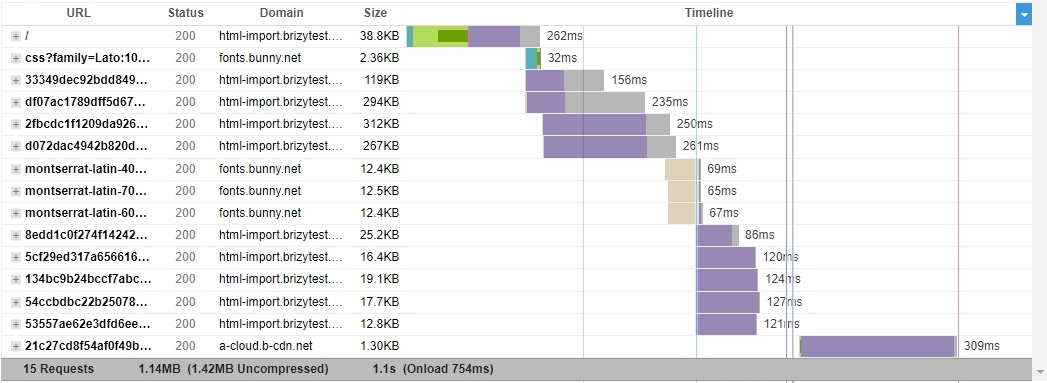
For the HTML Export, all images and other website files are located on your local server except these two
- Since the fonts are hosted with Bunny Fonts, the font files are loaded from fonts.bunny.net.
- The Favicon loads from Bunny CDN also
For example, you could take a look at this example:
- Original website: https://nectarine15529511.brizy.site/
- HTML Export: https://html-import.brizytest.online/
Please have a look at the waterfall of the website https://html-import.brizytest.online/ here. You can see that all files except the fonts and the Favicon comes from the local server. Here is the GT Metrix performance report where you can see the website waterfall https://gtmetrix.com/reports/html-import.brizytest.online/RXqF18uk/
 0
0 -
If you add PDF file this way and export to HTML, this PDF file will NOT be loaded from your local server.
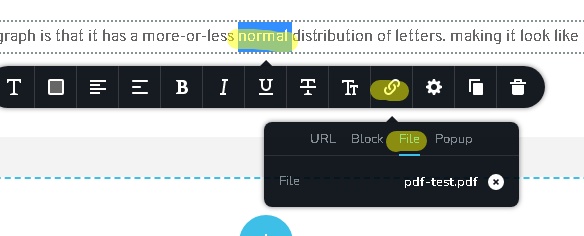
This is the sample page https://strawberry15217278.brizy.site/
0 -
Hi Filip,
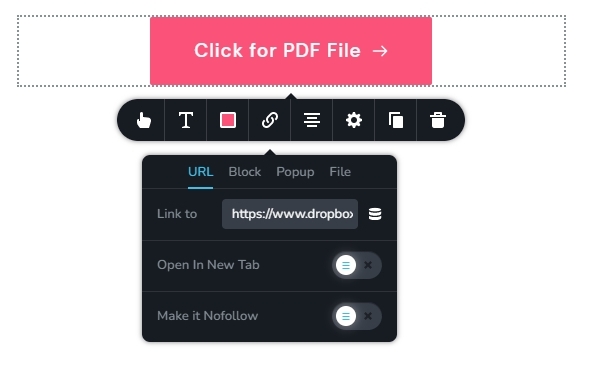
You are right; if you upload a file, it gets uploaded to Brizy Cloud. To overcome this issue, you can upload a file to any cloud storage and then link it to the file. Please click on the buttons on this page for an example. https://digital-works.brizy.site/pdf
Please paste the document link under the URL tab.
 0
0
Please sign in to leave a comment.
Comments
11 comments