Best plugin for multilingual website

-

Hi Sofia,
Brizy customers predominantly use these translation plugins
- WPML
- Polylang
- TranslatePress
We do not have direct experience in deploying these plugins on a live project and we don't have access to the premium versions of these plugins. Hence we can't make a commitment that it will work. Ongoing updates released by each plugin and Brizy makes it even more difficult to assess the compatibility.
You can deploy a multilingual WordPress website using Brizy and WPML. For instance, https://vitarights.de/ uses Brizy and WPML. The 'WPML Multilingual CMS' version supported different Brizy Templates for different languages in the past; however, not sure if it does now. The 'WPML Multilingual Blog' version did not support this feature. You will need to install the 'WPML String Translation plugin' for this feature to work. Please have a look at this page for a comparison of the two WPML plans. https://wpml.org/purchase/
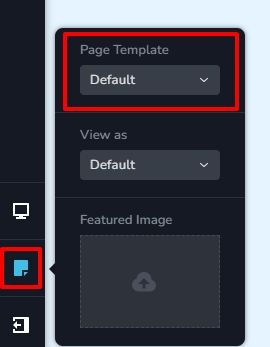
Translation plugins often manage language switching and the presentation of suitable navigational menus for different languages. You must use the 'Default Template' for your Brizy pages to take benefit of this automated feature. When you pick 'Default Template for a Brizy page, the theme header and footer will be used instead of the Brizy header and footer. To set the 'Default Template' for your pages, open a page in the Brizy Editor, click the 'Page' icon in the left sidebar, and click 'Default' under 'Page Template'. If you choose the Brizy Template, displaying relevant menus for different languages become more complicated and is hence not advised.
To the best of our knowledge, the 'Automatic Translation' of WPML does not work with Brizy. You must manually create each language page and translate language strings for each individual language.
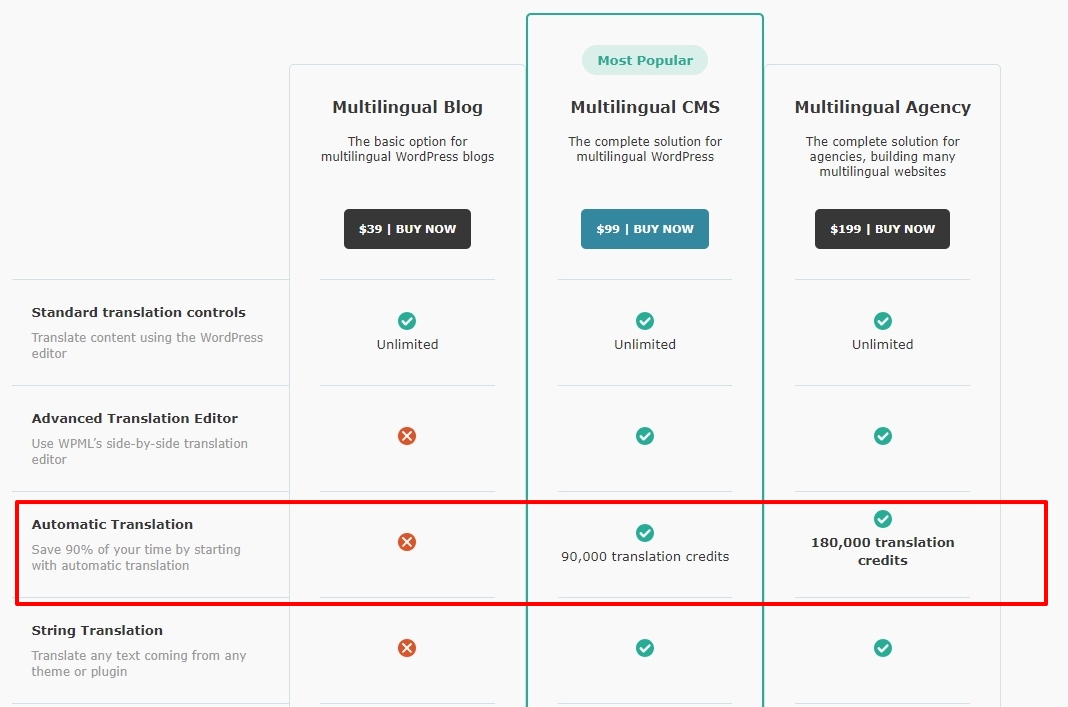
Since we can't make a commitment about how compatible these plugins are with Brizy, the best approach would be to setup a test server, install Brizy and buy the Multilingual CMS version of WPML and test it out for a month and make use of the 30 days money-back guarantee in case you could not make it work.
0 -
Hi KC! I just found another conversation from 6 months ago:
"Hi Max,
Please have a look at the comparison of the Polylang Free and Pro plans here. https://polylang.pro/downloads/polylang-pro/. Looks like you may not need any of the Pro features; hence Polylang free may be sufficient for your need.
However, Polylang does not support different Brizy blog Templates for different languages. Hence setting up a multi-lingual Brizy blog is not possible with Polylang. You may need the Multilingual CMS version of WPML in case you would like to set up a multilingual blog in the future. Assuming you don't have to setup a blog in the future, Polylang Free could be a goof choice for https://www.best-baueisen.at/"
I was wondering if this has changed? I used Polylang free on a website that doesn't have a blog but when I went into the Brizy templates are and looked at the drop-down, there was a condition to choose blog English or blog Spanish. Does this mean that Polylang free now supports Brizy completely? The only thing I noticed is that the 404 error didn't have that drop-down choice. Is there a workaround? Is 404 the only thing Polylang doesn't translate for Brizy? Would Polylang Pro be more recommended for any reason? Or would TranslatePress work better than these two? It's more expensive but I remember you had some kind of partnership in the past so if that's the solution please let me know. Do you still support each other?
Now, regarding WPML, will it be able to translate all parts of any type of website?
I think I read that WPML doesn't support translations like Polylang and pages need to be duplicated manually. So I could use a simple duplicate page plugin I guess? How would the pages have a connection between each other though? Because in Polylang they are related so if you click the flag for translations, you stay on the same page but see the translated text. How would that work in WPML?
And then you said that for any multilingual website regardless of the translation plugin, the header menu needs to come from a theme (let's say Blocky) instead of Brizy is that what you were saying?
Thanks in advance! If there are any videos to see how WPML is different from Polylang when using Brizy I'd appreciate if you could share.
Thank you,
Sofia0 -
Hi Sofia,
You are right; I now see the language option when adding a new Brizy template with Polylang. It is possible to add Brizy templates for different languages.
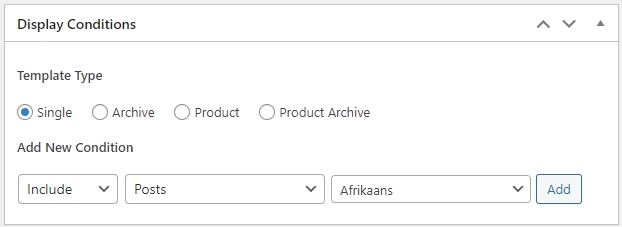
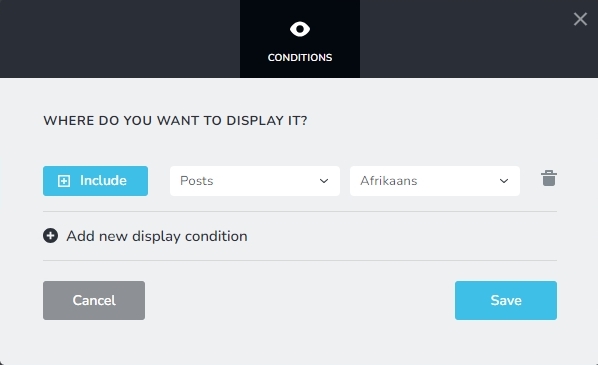
Hence you should be able to setup different blog post templates for different languages. In each Brizy Template you can also set language specific global conditions for headers and footers. For instance, when developing Afrikaans blog post template, you can add Afrikaans header and footer to the template and apply the following display condition.
As you rightly pointed out, the 404 template does not have the language option. You could consider the plugin Smart Custom 404 error page and setup a 404 page. You can then translate this page into multiple languages.
WPML allows you to create translations using either of the following options
- Classic Translation Editor: https://wpml.org/documentation/translating-your-contents/using-the-translation-editor/
- Advanced Translation Editor: https://wpml.org/documentation/translating-your-contents/advanced-translation-editor/
Setting up global header and footer for language pages is complex when using WPML; hence I suggested using the Default Page Template for your Brizy pages. With Polylang free, if the Brizy templates work well, you can probably use Brizy Page Template instead of Default Template.
0 -
Thank you for your quick response KC! I also connected with a few Brizy users over the weekend and they seem to be recommending TranslatePress. I also watched the webinar available on Brizy's YouTube channel. It seems to be a better option for ensuring all strings can be translated and also offer SEO features for meta tag translation. Is Brizy still actively "partnering" with them for updates and ongoing compatibility? Thanks again :)
0 -
Hi Sofia,
Yes, we have a good relationship with TranslatePress and can collaborate with them if compatibility concerns arise.
0
Please sign in to leave a comment.
Comments
5 comments