Multiple Errors in Seo reports due to pagination added to Blog listing

Hello,
We have recently revamped our website using the Brizy Pagebuilder. However, we have encountered some errors in our SEO reports that need immediate attention for resolution.
Specifically, our blog listing page includes pagination implemented through the Brizy tool. The URL generated by Brizy for this purpose is https://www.knowledgenile.com/blog/bpage/2. Fortunately, all the links on our website are functioning properly when using either https://www.knowledgenile.com/blog/bpage/2 or https://www.knowledgenile.com/blog/2
However, we have encountered errors regarding broken images for 897 pages that do not exist. Here is an example:
Page URL: https://www.knowledgenile.com/cloudtech/bpage/2
Image URL: https://www.knowledgenile.com/?brizy_media=17487&brizy_crop=iW=616&iH=338&oX=83&oY=0&cW=450&cH=338. ERROR: 404 (Not Found)
Unfortunately, this image does not exist, and we do not have access to this page. We kindly request your assistance in resolving this issue as soon as possible.
-

Hi Devashish,
I apologize; I am unable to comprehend the specific issue you are experiencing. When you say "We have encountered errors regarding broken images for 897 pages that do not exist" what exactly do you mean? If a page is non existent, how can it have broken images?
Can you elaborate a bit more?
0 -
These pages have been created by Brizy builder on its own, we didn't create bpage. It has been auto-generated by Brizy, when we added pagination to our blogs, and to my understanding it's using some image on these pages which are missing. So when we scan our pages for SEO it throws an error of 404 for broken images which are around 800 pages.
We are not able to access the page and check for the missing images as these are auto-generated by Brizy. If we can just remove these pages /links I think our problem will be solved.
Link Created by Brizy :
https://www.knowledgenile.com/edtech/bpage/2
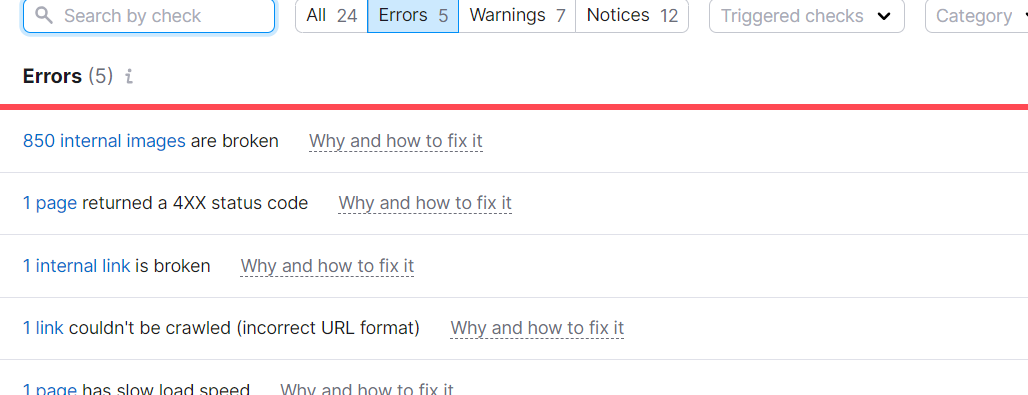
Error on the auto-generated pages (Some image being used which does not exist)
Our Site
If you click on the links, maybe you get an idea.
Error we get
Regards
0 -
Hi Devashish,
I wonder if it would be worth trying to get a better score on an SEO tool. Have you considered submitting your website to Google Search Console and receiving direct feedback from them, instead of using an SEO tool to find out how search engine friendly your website is?
If you find duplicate content errors on your Google Search Console, you can get back to us and we will help you fix it. What do you think about this approach?
0 -
Hi George,
Thanks for the mail. But it is a bug that needs to be rectified right. It is a difficult task for me to tell my team to ignore these bugs. Well, this was our pilot project to work with the Brizy Builder for creating websites. We have already been appreciating Brizy as it has been quite helpful for creating Landing pages that do not require SEO validation so much.
So requesting you to please help us to resolve this.
Regards
0 -

Hi Devashish,
Thank you for keeping in touch.
This issue could be related to cache. Caching plugins like WP Rocket store static copies of your website's pages and assets, including images, to improve page load times.
Can you please try to clear WP Rocket cache following the instructions on this link and see if this will help?
https://wp-rocket.me/wordpress-cache/clear-plugin-cache/#section-3Best regards,
Ariel H.0 -
Dear Ariel,
Thank you for your response. We encountered the pagination issue even before installing WP-Rocket. The purpose of installing WP-Rocket was to address and eliminate any errors. Despite following your suggestion to clear the cache, we are still experiencing the same problem.
If you could assist me in understanding why this URL is generated automatically, it may provide a solution to my issue. The URL in question is:
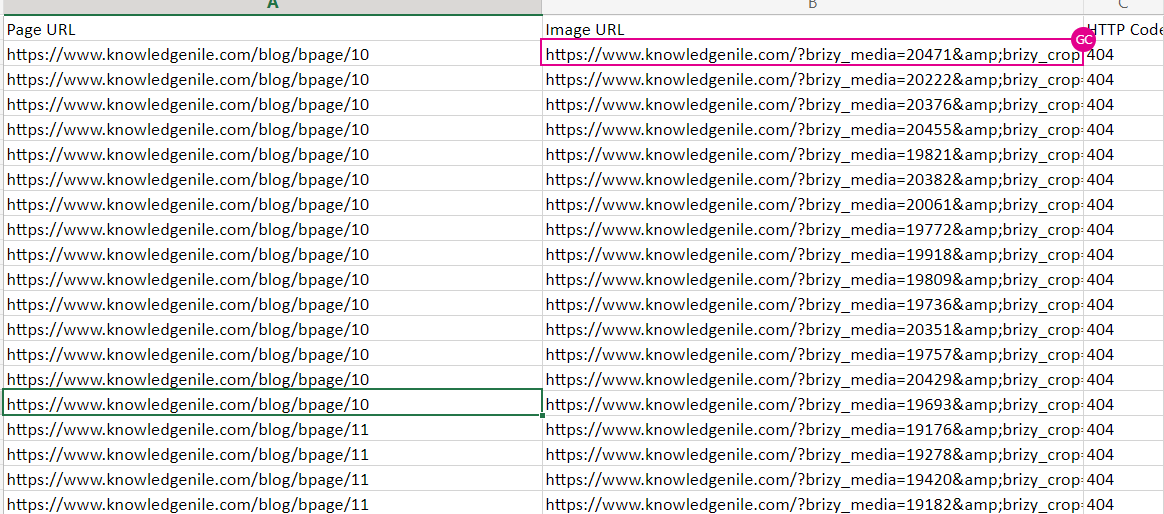
This unique URL is being generated for all the pages within the blog section.
I am just sharing the snapshot of the Error list which goes to 897pages
Regards
0 -
Hi Devashish,
While we respect the independent audit conducted by your SEO tool, a question remains. Would Google Search Console point out the same errors that this SEO tool highlighted? We do not know. If it does not, the effort you put in to resolve those errors will not give you any benefit.
A better approach would be to check with Google Search Console directly and invest time and effort in fixing the errors the console points out. Hence my recommendation is to
- Submit your website to Google Search Console
- Give it a week for Google to index your pages and look at the Indexing report in your Search Console
- Share with the us the indexing issues you are finding from Search Console
If any of your pages are not indexed, if Google shows duplicate content errors, or broken links, please get back to us with the Search Console report. We will help you resolve those errors.
0 -
Thanks, George! I will follow your instructions, and inform you of the results.
0
Please sign in to leave a comment.
Comments
8 comments