Brizy Theme and Gutenberg pages

I want Brizy to manage my Header and Footer / be my theme. But some of my pages are using a ecommerce plugin (Surecart) and are using their own special Gutenberg Blocks.
The way I understand it, Brizy Global Header or Footer won't show on pages that are not using Brizy to edit with. Even if you set the Condition to All for Header and Footer, and the Gutenberg Page has the Template of Brizy Template.
I can't edit the Shop Page, for example, with Brizy, because it wipes any content / Gutenberg content away and replaces it with Brizy.
How can I get the two to work together? Is there a way to keep Gutenberg Blocks working within a Brizy page? Or vice versa, get the Global Header and Footer to show up on standard Gutenberg pages?
Right now my only solution is to completely delete the Brizy header and footer and use another theme to manage it (Blocksy). Which kind of defeats the purpose of Global parts in Brizy / using Brizy for a full-site builder.
-

Hi Melissa,
I tested SureCart on a Brizy website. You can give the Shop and Checkout pages a Brizy header and a Brizy footer. For instance, see the shop page setup using SureCart here http://s937416667.onlinehome.us/shop. If you select a specific product and go to the Checkout page, you will notice that this page has a Brizy header and a Brizy footer as well.
However I could not find a way to add a Brizy header and footer to the Cart page and single product page. These are not setup as WordPress Pages.
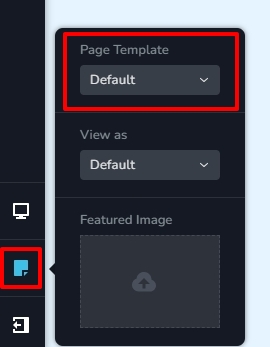
Let me suggest an alternate option. You can use Blocksy header and Blocksy footer for your Brizy pages. Open any page in the Brizy editor, and click on the 'Page' icon on the left sidebar and then under 'Page Template' select the 'Default' option. The Brizy page will refresh with the Blocksy header and the Blocksy footer. Now you can delete the Brizy header and footer from the page. You will need to recreate your header and footer using the Blocksy header footer builder if you follow this option.
 0
0 -

I think Brizy should have the option to be able to design the header and display it with the content coming from the core theme in Wordpress.
0 -
Hello P Bacon,
Are you referring to static content added using Gutenberg blocks or dynamic content as added using a plugin like SureCart when you say that "Brizy should have the option to be able to design the header and display it with the content coming from the core theme in WordPress"?
You can have the Brizy header and footer for pages that are created using Gutenberg. Please let us know if this is what you're looking for so we can show you the procedure in a screen capture.
0
Please sign in to leave a comment.
Comments
3 comments