Hotel Booking compatibility

Hi
I suspect that Brizy is non compatible with Hotel Booking by Motopress.
Here is the italian page of the website:
https://casavacanzeagnello.it/accommodation/rosso-antico/
Please try and select two dates (i.e: click on the 18th august and then the 20th august). It will work perfectly.
Now please do the same on the english page:
https://casavacanzeagnello.it/en/accommodation/ancient-red/
you will see that something is not working.
Now here are two pages created directly by Hotel Booking support:
https://casavacanzeagnello.it/accommodation/test-at-it/
https://casavacanzeagnello.it/en/accommodation/test-at-en/
both of them without Brizy template.
Hotel Booking support suggests that Brizy is not compatible with Hotel Booking.
Please can you let me know?
thanks
-

Hi Gianpietro,
Since the Brizy Template works for Italian and does not work for English, you may want to investigate if you have translated the 'Rosso Antico' and 'Ancient Red' accommodation types to English. Go to the Accommodation Types and select 'Rosso Antico' and 'Ancient Red' and check if each one has an English translation available. If English translations are missing, please add one for each and check if you are able to carry out booking on the English page as well.
If you take the example of the accommodation types created by Hotel Booking support, it has one accommodation type for Italian and another for English. They have translated the accommodation type to English.
0 -
Hi KC
thanks for the reply.
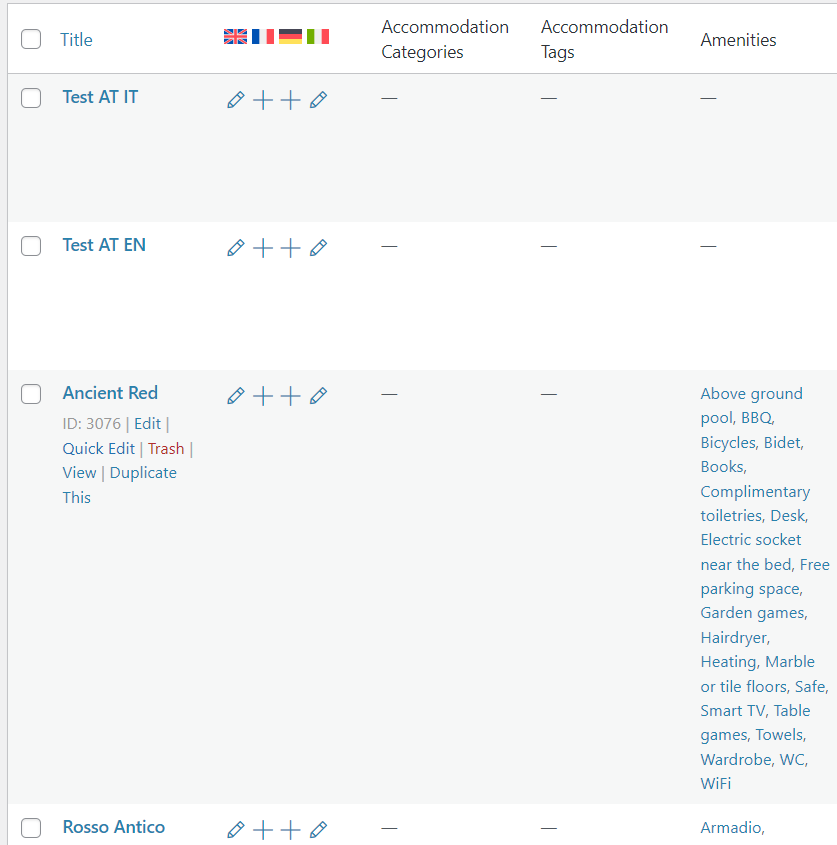
Yes, translation has been done into English and double checked by Hotel Booking support, and as said they have created the two test pages to show that their plugin does work, but without Brizy template.
 0
0 -
Hi Gianpietro,
I have looked at your WordPress Dashboard. While the translation for the accommodation type Test AT IT is appropriately configured by the Hotel Booking Support team, I see some inconsistencies in the configuration of the 'Ancient Red' and 'Rosso Antico' accommodation types. Have a look at this screen recording https://jmp.sh/LyZ41Zrn
- Despite the fact that you have provided translations for both, when you select English language in the WordPress Admin bar, 'Ancient Red' is present but 'Rosso Antico' is not. Similarly when you select Italian language in the admin bar, you see 'Rosso Antico' and 'Ancient Red' is missing.
- When you preview the 'Ancient Red' accommodation type and change the frontend language, it switches to 'Rosso Antico'.
These discrepancies indicate that the translations are not correctly setup for the above accommodation types. The accommodation type Test AT IT and its translation are correctly setup. Since we are not experienced in using Hotel Booking plugin and WPML, we could not pin point the exact deviation.
Could you kindly contact the Hotel Booking Support staff to resolve the issues with setting up translation for your accommodation types?
0 -
Hi KC
thank you for your reply.
I have seen your video and understood what you ask, but let me reply that Hotel Booking has already replied to your question by creating these two pages:
- https://casavacanzeagnello.it/accommodation/test-at-it/
- https://casavacanzeagnello.it/en/accommodation/test-at-en/
Hotel Booking is the one to say that Brizy is not compatible with Hotel Booking. To prove this, if you click on the URL of both pages you will see that with Default Template they work perfectly.
If you set Brizy Template (what I have done now) the Englis (of the page created by Hotel Booking support) stops working correctly.
Please do try and check. You have access to the Dashboard, so if you remove Brizy Template and set Default, you will notice that both pages will work perfectly. Once you set Brizy Template the English will not work anymore. And once again, I am using the two pages created by Hotel Booking support, so they have been translated correctly (as you have also stated in your video).
Please let me know
Thanks
0 -
Hi Gianpietro,
I am beginning to agree with your statement. Brizy looks incompatible with Hotel Booking by Motopress when used along with WPML translations.
In the English translation for the Accommodation Type, while the check-in date gets selected, it shows this error "Uncaught TypeError: this.roomTypeData.getNearestLockedCheckOutDate is not a function" in the browser console and the checkout date does not get selected. https://jmp.sh/dUjIreq6
0 -
Hi KC
that is not good news.
Is there anything you can do?
thanks
0 -
Hi Gianpietro,
Since room booking is a key component of your project and you want the website to be multilingual you may want to re-look at your project implementation strategy. Please think about this alternate approach.
- Use the booking plugin's default design for all room booking pages. Do not use Brizy to stylize these pages
- Stylize pages that are not generated by the booking plugin using Brizy (like Home, Our History, About Us, Who We Are etc)
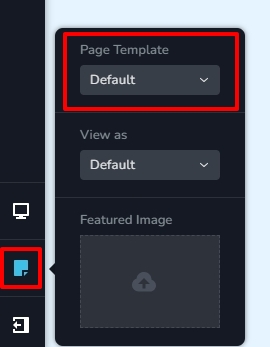
- Use the Default Page Template for Brizy pages to keep the Brizy pages consistent with the room booking pages. In the Brizy Editor on the left sidebar select the Page icon towards the bottom and select 'Default' option under 'Page Template'. The page will refresh with your theme header and the theme footer. If you want to take this route, you must redo your header and footer using your theme. For example, Brizy pages in my test website https://brizytest.online/ has Blocksy header and Blocksy footer.
Let me know your thoughts. If you want me to create a video to explain the above concept in more detail, please let me know. I am happy to record a video.
0 -
Hi KC
yes I do unterstand what you mean, and funny thing is I was just about to do so, and so I utilised Hotel Booking Support pages and deleted the other ones and magically it started working.
Please do check. To be honest, after so many attempts, and so many tickets with Hotel Booking and with you, and with the fact that both Hotel Booking support and you have checked the website, I honestly do not understand why it is working.
But please do have a look and if you understand why it is working, it might also be useful for someone else that is in my same situation. Good thing is that it looks like it is compatible with Brizy.
I have attempted to book and it woked. Another thing I do not understand is why the Booking-confirmation page (that is set to Brizy Template), does not accept the Brizy Template, but it looks like it has set it to the installed template that Embeds Brizy in it. I know it sounds strange but if you attempt to book a room (please go ahead, we haven't opened yet, I will then delete the booking, you can select Test Payment so no fee will be charged) you will see that the booking-confirmation page does not accept Brizy template.
Do let me know. I'm longing to hear from you.
Have a wonderful day.
0 -
Hi Gianpietro,
I do not understand either how it started working now.
You are right; irrespective of the the Page Template selected the 'Reservation Received' page always displays in the Default Template. I also tested the other available template options. Page Template changes do not take effect.
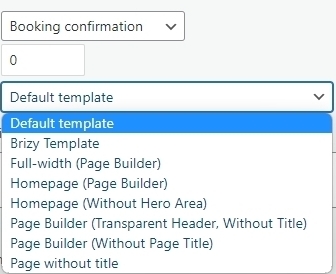
Since this issue is specific to 'Reservation Received' page, you may want to check with Hotel Booking Support if there is anything they can do to fix this. Please also try changing your theme and check if that makes a difference.
0
Please sign in to leave a comment.
Comments
9 comments