Embed on Brizy Cloud site doesn't show in any browser, flagged as unsafe.

Hello, I am using Fluent form embed code on Cloud. It doesn't show, security issue. Could you please help? Thanks
Websites (Contact pages):
https://www.barrhaventax.com/contact
https://www.simplifyqualitymatters.com/
https://www.theknowledgeexecutive.ca/
... more
Thanks
Anjum
-

Hi Anjum,
I see two errors on your pages. Please see this screenshot for the errors: https://jmp.sh/pawN4wQh
- Refused to display 'https://forms.designplexcanada.com/' in a frame because it set 'X-Frame-Options' to 'sameorigin'.
- Uncaught DOMException: Blocked a frame with origin "https://www.simplifyqualitymatters.com" from accessing a cross-origin frame. at HTMLIFrameElement.onload (https://www.simplifyqualitymatters.com/:347:70333)
Looks like the Fluent Form embed code has some conflict with Brizy. If the form embed code cannot work with Brizy Cloud, you may need to try implementing either Brizy form or another embed form. If you share the embed code with us, we can attempt to make it work with Brizy.
If you want to send the code privately, please send it to kc.george@brizy.io. You can also add it here and we can remove it before publishing your comment.
0 -
Hi Anjum,
The X-Frame-Options of your website https://forms.designplexcanada.com/ is set to 'sameorigin'. This means that your website does not allow iframe and other embeds outside of its own domain. Please consider these suggestions to allow iframe access outside of your domain.
- Please check if you are using the plugin HTTP headers. If you are, in your WordPress Dashboard under Settings - HTTP Headers - Security, if you have enabled the option 'Same Origin' for X-Frame-Options as in this screenshot https://jmp.sh/WEdobbXX please disable it.
- Please sign in to your Ionos hosting Dashboard, under Hosting - Webspace - click on Use Webspace button and select the root folder of your website https://forms.designplexcanada.com/ and open the .htaccess file. Look for the line Header set X-Frame-Options "SAMEORIGIN" and delete it and save the file. https://jmp.sh/2EO0Kmpc
Once you allow the iframe embeds to other domains please try embedding the code again.
0 -
I have send embed codes to your email address, kindly check.
Regards
Anjum0 -
Hi,
Please see attached .htaccess file for the website: https://forms.designplexcanada.com/ (where fluent form is installed).
- There is no HTTP Headers plugin installed.
- There is no line in the .htaccess file: "Header set X-Frame-Options "SAMEORIGIN".I have attached the .htaccess file so that you can examine. Thank you for your time.
Regards
Anjum0 -
Hi Anjum,
When you attach an image to your email, it does not show in our Community Forum. Please visit https://support.brizy.io/hc/en-us/community/posts/12362627267473 and add the image in the Forum directly.
Can you please copy paste the content of the .htaccess file to my email or paste it here? We can delete it before making your comment public. (Full content is better than a screenshot)
0 -
Hi Anjum,
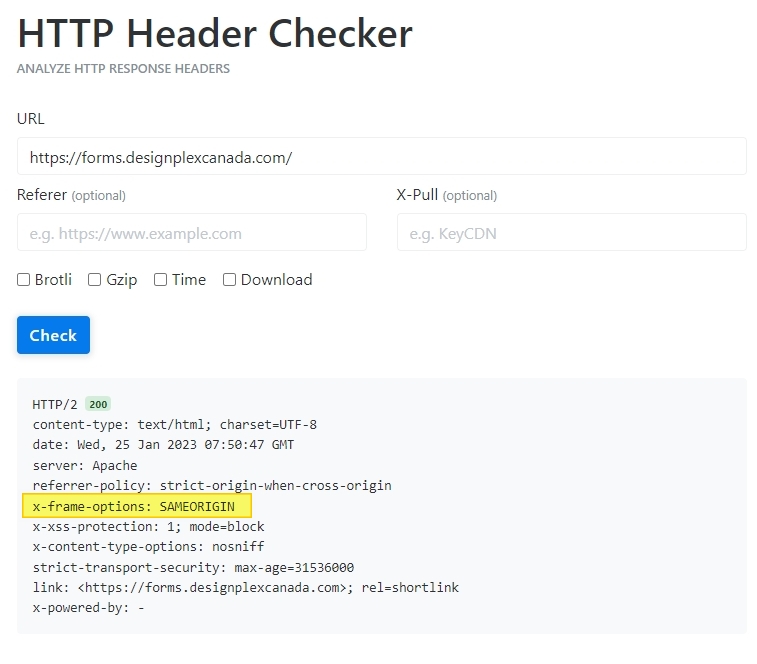
I have checked the .htaccess file you sent me. It does not mention Header set X-Frame-Options "SAMEORIGIN". However if you test your URL at https://tools.keycdn.com/curl you will see that your website is in fact restricting iframe access to the same origin.
Can you please work with your hosting company to remove this restriction? Please share this screenshot with them and ask how you can allow iframe embeds to other domains.
 0
0
Please sign in to leave a comment.
Comments
6 comments