Checkbox on Brizy forms

Hello! On my form I have two checkbox items:
- accept the privacy policy which is required. I know people have accepted because otherwise, the form wouldn't be sent.
- then I have an optional checkbox for them to tick if they want to join the newsletter.
The problem is that when I receive the email with the message, I can't tell if it has been ticked or not.
In the below example, I ticked the first but did not tick the second. However, it only shows me my own text so there's no difference in whether the visitor has ticked the boxes or not.
Message*-1: I have read and agreed to The Cat Sitter's privacy policy and terms.*
Message*-2: I would like to join The Cat Sitter's occasional newsletter.
How can I fix this?
Thank you! Sofia
-

Hi Sofia,
This could be due to a bug with the Brizy form. If a check box field has only a single option, you get incorrect email notification. If you share the URL of your contact form I can confirm it is due to this bug.
I have reported this issue. While we take time to fix this, you may need to explore these options
- Can you combine the two user selections as two options within a single Brizy checkbox?
- Recreate the form using a form builder plugin like WP Forms and embed the form using the Brizy Shortcode element.
0 -
Hi KC George,
This is the page, where we have 2 forms: https://thecatsitter.es/contact/
I only want to see the difference on the emails that we receive coming from the form, to see whether the box was checked or not. I can't combine the two because one is mandatory and the other isn't...
Thanks for having a look!
0 -
Hi Sofia,
With your current design, you should be able to get the right email notification. I set up a similar form at https://brizytest.online/form/ Please have a look at the Email Notification I have received when selecting only the mandatory option
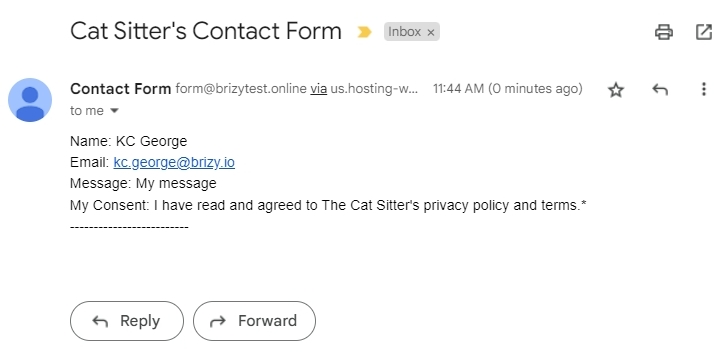
In this form, I have added these two options to a single Checkbox field and have made the first option mandatory while the second optional.
- I have read and agreed to The Cat Sitter's privacy policy and terms.*
- I would like to join The Cat Sitter's occasional newsletter
If you follow the same procedure, you should be able to receive the right email notification. Please let me know if you are able to set it up correctly.
 0
0 -

I think the question for us is how do you only make one of the two checkboxes manditory since it seems like the "required" lever in settings for the field seems to affect both checkboxes at the same time.
0 -
Hi,
You are right; all the options within the a checkbox field turns 'Required' when making one option Required. However, you will receive the right email notification when the user selects either one or both options.
0 -
Hi Profit Media! Thank you for jumping in!
Hi KC George! This doesn't make sense. If you're saying that the "required" applies to all checkbox fields, then how will the visitor be able to accept only one option?? Please help me because I am not really seeing how to do this.
Obviously, if one option is legal, it must be mandatory. So the user has to accept my privacy policy before sending me a message.
BUT the other option is for a newsletter so I cannot make the user accept to be part of it. But I would like to know if they do want to be a part of it.
Therefore, I need one box to be mandatory (if not ticked, the message isn't sent) and the other not to be mandatory.
And also, when I receive the email, I currently see this:
Message*-1: I have read and agreed to The Cat Sitter's privacy policy and terms.*
Message*-2: I would like to join The Cat Sitter's occasional newsletter.How do I configure the name of the field "Message*-1"? I see that on your screenshot you called it "My Consent"?
But also, this message that I receive, doesn't tell me anything. It doesn't tell me whether the options were accepted or not, it's just copying what I had written for each checkbox...
Looking forward to your comments, Sofia
0 -
Hi Sofia,
Please setup the form the way I have suggested above with the two options within a single Checkbox field. When you make the first option Required if the other option becomes Required as well, let it be. Save your work and in the website frontend, please test your form and see what Email Notifications you receive for these scenarios and share your finding.
- User has selected both the options
- User has selected only the Required option.
Here is how I have added 'My Consent' to the Checkbox field
- I enabled the 'Label' option under the Advanced tab
- Added the label 'My Consent' to the Checkbox field
- Disabled the label
 0
0
Please sign in to leave a comment.
Comments
7 comments