Unable to create a subcategory archive template that displays.

Hi,
I am using subcategories (or child categories).
Heres an example using fruit to simplify what I mean:
A parent category "Fruit" contains the subcategories:
"apple"
"orange"
"banana"
I create various posts assigned seperately to each of the subcategories "apple", "orange" and "banana".
An article named "green" in the apple subcategory displays when the URL https://site-domain.com/fruit/apple/green is entered.
I have an archive template called "fruit" template which displays an archive page when https://site-domain.com/fruit/ is entered. This page individually shows each of the subcategories and its posts.
The display conditions for this template are as follows:
Include Categories fruit.
All the above works fine.
However what I also want to do is when the user goes to one of the subcategories i.e. apple https://site-domain.com/fruit/apple/ an archive template is displayed that simply displays all the posts in the subcategory "apple".
I have created a template named "apple template" for this and tried the following display condition:
Include Categories apple.
However entering https://site-domain.com/fruit/apple/ displays a 404 page.
I also tried the following display conditions:
Include Categories Any child of category apple, this also returns a 404 page.
Is what I am wating to do i.e. create an archive template for each subcategories even possible, and if so how do I go about this?
Kind regards
Wayne
-

Hi Wayne,
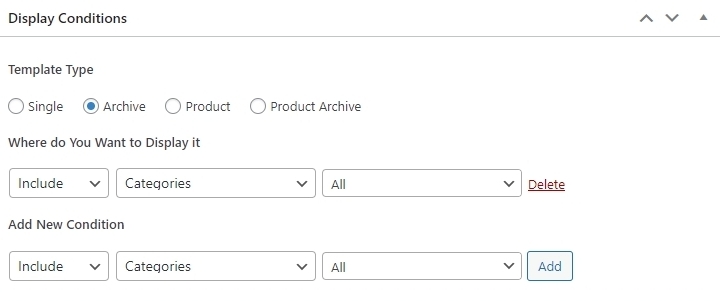
Can you please open the Fruit Category Archive Template and change your Display Condition from Include - Categories - Fruits to Include - Categories - All and check if the issue gets resolved?
When you add a Display Condition, you will see the 'Delete' option next to it. To confirm that you have added the display condition, please check if you see the 'Delete' option next to it.
 0
0 -
Hi,
Thank you for the response.
Unfortunately I may have over simplified with my example using fruit and only mentioning one parent category when I actually have three. As such I am unable to use "All" in the display conditions as this will relate to All THREE parent categories.
What I have is THREE parent categories "Email List Building", "First Level" and "How To".
The "How To" category is a parent category to three subcategories "Browser Basics", "Canva Basics" and "YouTube Basics":
The three categories:
Email List Building
First Level
How To
- Browser Basics (sucategory of How To)
- Canva Basics (sucategory of How To)
- YouTube Basics (sucategory of How To)
I have three archive templates for these parent categories:
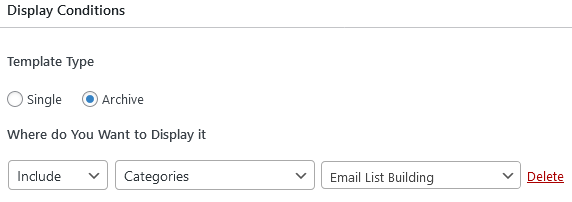
Email List Building Archive Template with these display conditions:
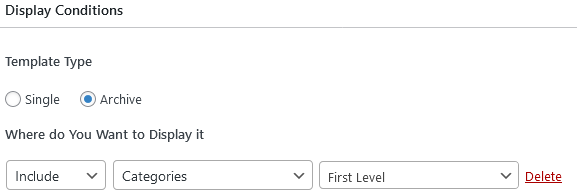
First Level Archive Template with these display conditions:
How To Archive Template with these display conditions:
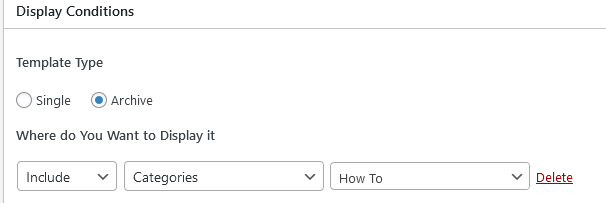
These conditions correctly show the relevent archive template i.e. when https://mydomain/email-list-building and https://mydomain/first-level are entered the appropriate Archive template is displayed which contains a post element containg all posts in that parent category. When https://mydomain/how-to is entered the HOW To Archive is correctly displayed which shows all posts contained within the subcategories of How To i.e. Browser Basics, Canva Basics and YouTube Basics - This part works no problem.
However what I require is to be able to have an Archive template for each of the subcategories, so if https://mydomain/how-to/canva-basics is entered an archive twmplate is displayed showing ONLY the posts contained within the "canva-basics" subcategory and NOT the other two subcategories.
I have tried creating a Canva Basics archive template with the display conditions "Include Categories Canva Basics" as follows:
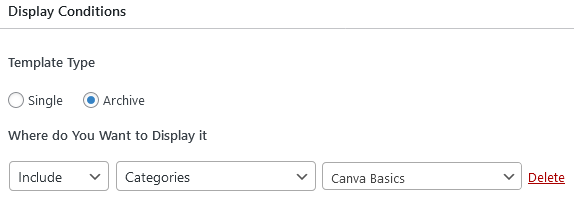
But when https://mydomain/how-to/canva-basics is entered a 404 error is returned. Please note when I link to an article in the canva-basics subcategory I can use either https://mydomain/how-to/canva-basics/article-name OR https://mydomain/how-to/article-name which I consider to be correct behaviour (and correct permalink setup) as the article exists in both the parent category (within the parents subcategory) and directly in the subcateory.
My permalink is set to "cutom" /%category%/%postname%/
Put simply, am I able to create a display condition that will sisplay the subcategory canva basics archive template when https://mydomain/how-to/canva-basics is enetered without returning a 404 error?
Kind regards
Wayne
0 -
Hi Wayne,
You will need to create 6 Brizy Templates for your project.
- 'Email List Building’ Category Archive
- ‘First Level’ Category Archive
- ‘How To’ Category Archive
- Sub Categories of ‘First Level’
- Sub Categories of ‘Email List Building’
- Sub Categories of ‘How To’
Let me explain these templates in a video. https://jmp.sh/pNYoYuQM Please let me know if you have questions
0 -
Hi KC George
Thank you so much for taking the time to provide the video it it is very much appreciated.
I followed your video to letter but unfortunatey I continued to receive the 404 error.
Knowing this should clearly work I concluded this must be an issue on my side so did some further research.
The only difference I could see was that your url structure included Category where as I dont.
For years I have always used a period in Category Base to remove Category from the permalink structure. Unfortunately I have discovered that this is now considered bad practice as it causes many issues including sub-category 404 errors! (and some paginantion 404 errors I have also experienced) and I clearly did not get the memo.
Suffice to say I have now ameneded my existing "hack" to achive the Categogoy base removal and every thing now works.
Maybe this may be beneficial if you see something similar with other Brizy users?
Once again thank you for your video answer I have learnt more about templates and display conditions.
Kind regards
Wayne
0
Please sign in to leave a comment.
Comments
4 comments