Global Footer and Rows Do Not Appear on Home Page Only

Hi
The bottom third of the home page https://cc-sg.org/ is missing two rows and the global footer (which appears on other pages).
Have a look: https://jmp.sh/WsuLXp7j
Thanks,
Albert
-

Hi Albert,
Can you please try these and see if it makes a difference?
- If you are using Cloudflare CDN, please purge the CDN cache
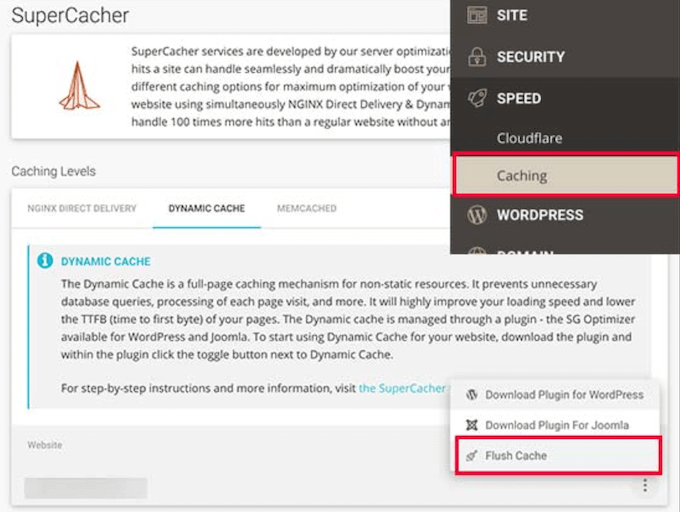
- Please sign into your hosting account and purge any server level cache. For example, if you are using SiteGround hosting, server level cache would look like the attached image.
If these two do not help, please get back to us and we will suggest the next steps.
 0
0 -
Hi KC,
Good to hear from you.
The two points you mentioned are not the issues (not on Cludflare and VPS server cache cleared). This issue (missing rows and global footer) is only on the home page.
Please help.
Thanks,
Albert
0 -
Hi Albert,
I can take a look at your project. Please add me as a user to your WordPress Dashboard if you need assistance with this. My email: kc.george@brizy.io. As shown in this screenshot: https://jmp.sh/sOSGGR3, please turn on the option "Send the new user an email about their account"
Please let me know here when you send me an invitation.
0 -
Many thanks, KC. I've added you. Blessings, Albert
0 -
Hi Albert,
I am having trouble signing into your WordPress Dashboard. I get this error.
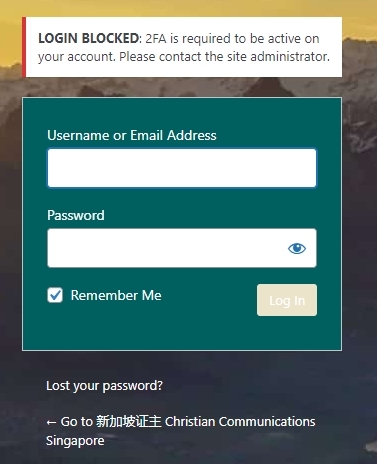
Please consider temporarily disabling the 2 Factor Authentication to allow me to sign in.
0 -
Hi KC,
Sorry; the grace period has been activated. You can log in now.
Blessings,
Albert
0 -
Hi Albert,
A YouTube embed code was causing some errors on your homepage. To fix the issue, I have replaced the embed code with the Brizy Video element. Now the missing blocks are visible on your homepage. Please check.
 0
0 -
Hey KC,
Well done and good catch! Thank you.
I noticed on the footer that "Privacy Policy" etc with urls now appear underlined. I saw that another user has already raised the matter. Looking forward to the fix in the next update.
Cheers!
Blessings,
Albert
0 -
Hi Albert,
You are right; hyperlinks links are underlined automatically in the latest Brizy versions. I will report this and we will work on fixing this.
0 -
Hi KC It's been several weeks. Any update on the underlined hyperlinks? Blessings, Albert
0 -
Hi Albert,
We have added a Feature Request to add a provision to set link formatting options (link normal color, link hover color and link decoration). It will take longer time to implement this feature.
0 -

Hi Albert,
Thank you for keeping in touch.
I'm sorry that we don't have any new updates to share at this time, as this is an ongoing issue.
We are aware of how important this is to you, and we appreciate your patience and understanding while we work towards a resolution.Sorry for the inconvenience.
Kind regards,
Ariel H.0
Please sign in to leave a comment.
Comments
12 comments