Lodiz template

Hi I cannot change the background or navigate changes to the portfolio section. Please assist.
-

Hi Edward,
Thank you for reaching out to us.
To assist you better, we kindly request that you create a short screencast demonstrating the issue you are facing. This will allow us to thoroughly investigate the problem and provide you with an accurate solution.
I am looking forward to your response.
Best regards,
Ariel H.0 -
Hi, sorry I cannot do that. I cannot change the background image e.g. the Muxin art museum background image to another. If you can please show me how to do that, I will be grateful as I cannot.
0 -
Hi Edward,
Thank you for keeping in touch.
To change the background of a specific block, click on the block properties, then choose “Background.” You can select an image from the media library or upload one from your computer. This is demonstrated on this screencast: https://youtu.be/yPdKprWH2XA
If you have any further questions, please let us know.
Best regards,
Ariel H.0 -
Hi Ariel, Thank you. I can change the background on the portfolio page but the image within, is currently not selectable. Please can you access your template and change the image within and show me where you selected it within the browser? Your example is one I am familiar with but the context here is specific. Thank you, Edward
0 -

Hi Edward,
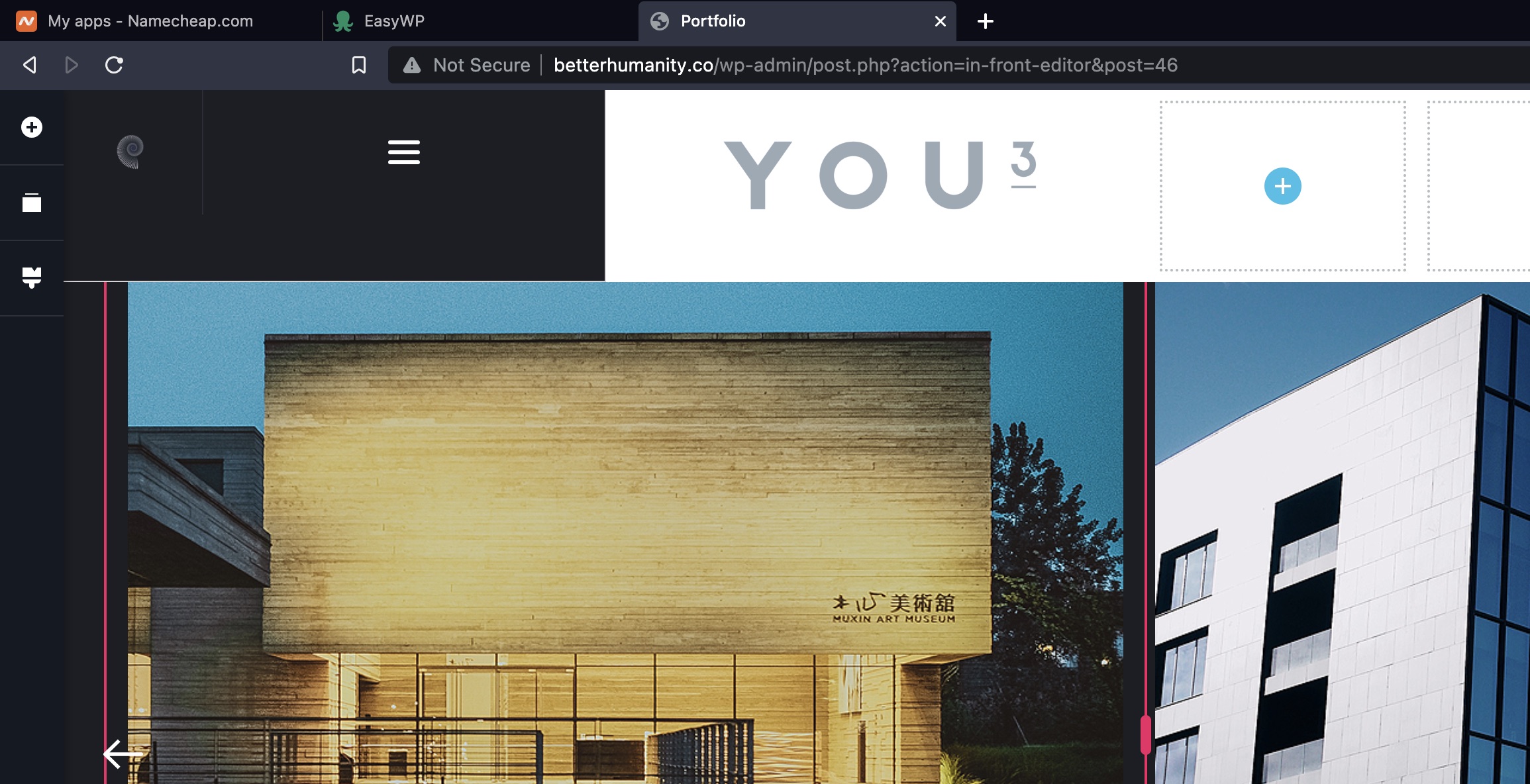
The Portfolio page is created using block sliders and each block slider has two columns and each column has a background image. To change the Portfolio images, please remove the column background image and upload a new image. For more detailed instructions, please watch this video. https://jmp.sh/qffWvE5U
0 -
 0
0 -
Hi thank you for your response, I have found a way to s shot this and my issue is that I cannot get to the top of the frame despite me seeking to change the header. Therefore I cannot click the arrow at the top and there is no arrow at the bottom of the red column....
0 -
Hi Edward,
To help you with this, we will need access to your project. Please add me as a user to your WordPress Dashboard and send the following details to our email: communitysupport@brizy.io
- Community Post link: https://support.brizy.io/hc/en-us/community/posts/12219698414994
- WordPress Admin URL:
- Username
- Password
Please let us know here when you send us the email.
0 -
Hi Edward,
I have logged into your project and made a small change in the Portfolio page. Now you can access the top right corner of the two columns and change its background images. Please watch this screen recording. https://jmp.sh/aERofXzO
0
Please sign in to leave a comment.
Comments
9 comments