Updating Pages Very Slow

Good morning,
When updating pages or posts with the Brizy WP editor, the time its taking to update has become very slow. Could you tell me how to fix this?
Thank you
-

Hi Chris,
In the Brizy editor, please right click on your mouse and select the 'Inspect' option on the Google Chrome browser.
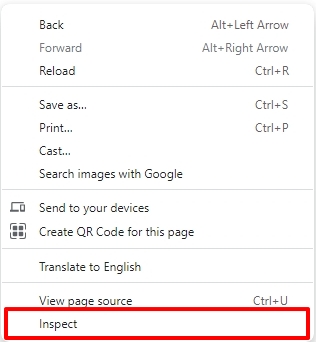
In the side panel that opens up, please select the 'Console' tab. Have a look at this screenshot https://jmp.sh/koPxnELx Check if there are errors that are highlighted in red in the Console. Please share with us the errors if you find any.
0 -
Hi KC, Thanks for the quick reply! Please find attached - it seems there are a few errors
 0
0 -
Hi Chris,
One of the errors highlighted in red shows that the admin-ajax.php file is being blocked by your server and returns the error '503 Service Unavailable'.
The admin-ajax.php file contains all the code for routing Ajax requests on WordPress. WordPress uses it to refresh content without reloading the page, thus making it dynamic and interactive to the users. For proper functioning of Brizy editor, access to this file is essential.
Please share the above screenshot with your hosting provider and ask them to investigate why their server blocks the admin-ajax.php file. They may need to relax a rule to allow access to this file.
1 -
Thank you KC. I've submitted a ticket with A2 hosting. I'll let you know what they say / how its fixed should you want the info.
0 -
Hi Chris,
Once A2 hosting fixes the admin-ajax.php issue, please see if the editor loads faster. If it does not load faster, please let us know; we may need to investigate the cause further.
0
Please sign in to leave a comment.
Comments
5 comments