A few Questions

Hello,
I am new to your program and I am using Brizy pro.
I am trying to figure out how your wordpress plugin works.
I have a few questions for now.
- I can not find any video playlist to customize without youtube or vimeo but my own videos.
- How to make a slideshow video with lightbox? let's say instead of pictures in light box with the next and previous narrows I would like to have videos. something similar to this web: https://www.aleali.com/ in the short film section. slide videos with lightbox.
- I confused the cloud and the one I am using now. I can login to the cloud when I am using your plugin with wordpress but what's the cloud for? If I want to use a login membership I have to use the cloud. Also one of your photography page training videos working with the cloud. What's the advantage and disadvantage of it when I am using Brizy in wordpress?
- Can I have a full-screen picture slideshow as my homepage?
- I can not see all 14 drag & drop visual elements for woocomerse in your elements!?
- What's the difference between Brizy Builder and Brizy wordpress? Can I use both?
- I am a photographer and filmmaker. I just want to make a creative portfolio with the option to sell(woocomerce) my artworks and also a blog with the comments to communicate with my followers. My current web aryanrian.com is very basic and it's not something creative that I want.
Best regards.
Aryan Arian
-

Hi Aryan,
Let me go over your questions one by one.
- You are right; the Brizy Playlist element does not allow custom videos; however the Video element does. You could possibly put together a playlist using the Rows and the Video elements
- You can't setup a video slider with lightbox effect with Brizy. You could consider Smart Slider 3 for this purpose. For example, have a look at this video slider template https://smartslider3.com/video-showcase/ You could also look at their other Video sliders here https://smartslider3.com/tag/video/ You may need to buy the premium version of the plugin for this purpose. You can embed a Smart Slider 3 slider on a Brizy page using the Brizy Shortcode element.
- Brizy Cloud is a cloud based website builder like Squarespace, Wix or Duda. Brizy Sync feature allows you to save Brizy blocks and layouts on the Cloud so that you can import to other WordPress or Brizy Cloud project.
- Yes; you can have a full screen image slideshow as your homepage hero block. Eg: https://drjohnkc.com/
- The elements in the Elements Panel can vary depending on the context. The elements associated with WooCommerce are available while creating the Brizy Product Template. You do not see those elements while creating normal pages or blog posts.
- Brizy for WordPress and Brizy Cloud are the two products we offer. The features that are developed once and reused on both products are referred to as the Brizy Builder.
If you have further questions, please get back to us.
0 -
Hello George,
Thanks for the response.
1- Do you have any example or template of a playlist with a raw option? In my previous program I used iFrame to make the playlist but I am not sure how Brizy works if I don't want to link to another page and stay in the same playlist page.
2- I know there are many plugins for video sliders but I bought Brizy to do everything in one plugin and not pay extra for another plugin. Just a question from a Brizy developer. If we have a photo slider in Brizy what's the difference to add video instead of photo?
3- That means I can make my web with the Brizy WordPress plugin and I can also make it in the cloud and sync it later? Is that any limited size in the cloud if I make it in there?
4- Maybe I didn't explain well about full screen. I mean when you open my home it's just a full screen picture and nothing else. something like my current web: aryanarian.com .I added an HTML code to my homepage. I am not familiar with HTML code at all. someone already made it and I just replaced it in my home page. Is there any option in Brizy to make a full screen picture as a home page or any option I can add HTML code to my home page?
5- Where to find product templates? I looked at your YouTube video here: https://www.youtube.com/watch?v=ke95gPZbi5g&t=488s and I couldn't see many options now. Maybe it's 2 years ago and many things have changed. Your new videos suggest installing the WordPress woocommerce plugin. Does that mean you don't have your own eCommerce template anymore?
I would like to have a portfolio to have my artworks with the option to sell. That means I don't want to create the store in the first place but have a store page in my portfolio. Is it possible to have these combinations?Best regards.Aryan0 -
Hi Aryan,
Please see my replies below
- We are sorry; we do not have a template for playlist created using columns and the video element. Iframes can slow down a page and hence not recommended. Uploading the videos to YouTube or Vimeo could be your best option.
- You can use the Brizy Carousel element as a video slider. Instead of images, you can add videos. Smart Slider 3 is useful for video carousel with the lightbox effect; videos within the Brizy Carousel element do not support the lightbox effect.
- You can use the Brizy Sync feature with a free Brizy Cloud account. However you can't edit the Pro features of your WordPress project using Brizy Cloud free account.
- Yes; you can build a website similar to https://aryanarian.com/ using Brizy. To implement a similar design, you can create a Brizy page with a single block and add a full width, full height slider to the block. You can also add a vertical menu navigation using the Brizy Menu element.
- Yes; Brizy integrates with WooCommerce. You need to setup a single product and archive product Brizy templates to setup a shop with WooCommerce. Unfortunately Brizy do not have shop/product templates.
Yes; you can setup a photography website with an option to sell your photos. Please have a look at https://scottholsteinphoto.com/ for an example; this website is developed using Brizy and WooCommerce.
0 -
Greetings George,
Thanks for your patience and clear answers.
Your photography example page is similar to what I have in my mind plus my film reels.I am wondering it was made by Brizy. I wish you had a similar template like that. seems I have to work more on Brizy to get more details. I am gonna start to watch all of your videos on YouTube and if there is anything to ask I will bother you.
Best Regards.0 -
Greetings George,
I would like to create just a coming soon and construction page until creating my website to publish.
I create the page and publish it but when I install a new template to work with, it replaces the current page even if I choose to keep existing content.how to keep a construction page and work with other templates?0 -
Hi Aryan,
If you have selected the option to keep the existing content, your previous homepage is likely to be available in your WordPress Dashboard under Pages. Please check if you see your previous homepage with the coming soon design under Pages. Under Settings - Reading, you can set this page as your homepage again. https://jmp.sh/YoRhNLVR In the list of pages in the drop-down, please select the page you want to set as your homepage.
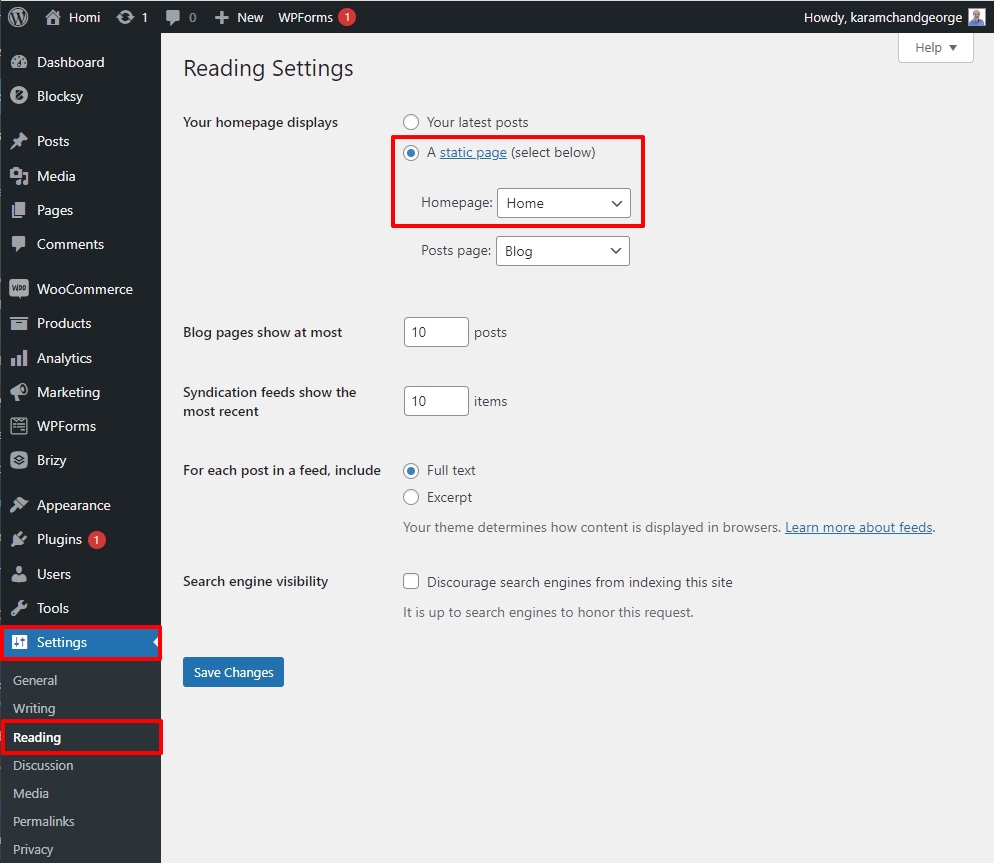 0
0 -
Hello George,
I would like to add my pictures series in one carousel and one column and the pictures pass like a slideshow (Auto play).
I also want to open each picture in a lightbox.
My problem is when I click on each picture, it opens in the lightbox but I can not see the arrows and also autoplay is still active in the carousel.
Is it possible to have a carousel or slideshow in one small column and when I open a picture in a lightbox to have narrows and the Autoplay stops in the carousel and when I am out of the lightbox the autoplay starts again?!
I see this option in many places but I don't know how to do it in Brizy.
Thanks in advance.0 -
Hi Aryan,
Here is how the Brizy Carousel is currently designed to work with auto play and lightbox effect. https://jmp.sh/QXT5rrtY If you prefer a different carousel implementation, you may need to explore carousel plugins. Here is a list you can you can look through https://blossomthemes.com/best-free-wordpress-slider-plugins/
0
Please sign in to leave a comment.
Comments
8 comments