Refresh Error ONLY in Tablet view, and only in one specific page

I'm using Brizy Pro 2.4.13
All plugins are updated. I've run WP Optimizer, cleaned cache etc. etc.
I DO NOT edit or open pages in more than one tab.
ONLY in TABLET view and only in one specific page, no changes will update. It always results in the same "Refresh" error that's plagued Brizy for years.
There are no console errors in Desktop view or Mobile view. The only errors that appear in Tablet view on this one page are:
Failed to load resource: the server responded with a status of 504 ()
Uncaught (in promise)
- l {name: 'Page', date: Mon Jan 02 2023 13:58:30 GMT+0200 (South Africa Standard Time), message: 'Failed to update page'}
- date: Mon Jan 02 2023 13:58:30 GMT+0200 (South Africa Standard Time)
- [[Prototype]]: Object
- message: "Failed to update page"
- name: "Page"
- [[Prototype]]: r
- constructor: class l
- length: 0
- name: "l"
- prototype: r {constructor: ƒ}
- arguments: (...)
- caller: (...)
- [[FunctionLocation]]: editor.js:1
- [[Prototype]]: class r
- [[Prototype]]: Object
That's it. This is incredibly annoying, especially since all other pages update with no problems in desktop, mobile, and tablet views.
Again, this ONLY happens on one page and ONLY in TABLET view.
-

Hi Kerry,
I would like to take a look at your WordPress Dashboard to troubleshoot this error. Please add me as a user to your WordPress Dashboard if you need assistance with this. My email: kc.george@brizy.io. As shown in this screenshot: https://jmp.sh/sOSGGR3, please turn on the option "Send the new user an email about their account"
Please let me know here when you send me an invitation.
0 -
Thank you for the response. I have sent the invitation.
0 -
To replicate the issue:
Pages --> Home --> Edit in Brizy --> Tablet view --> Make a few edits then click Update
It is only my "Home" page in Tablet view that has this issue.0 -
Hello KC George,
I have sent the invitation as requested.
Everything works except for the Home page in Tablet view. The Home page works fine in Desktop and Mobile views, but not in Tablet view (cannot update).
All other pages work fine in Tablet view.
Sincerely,
Kerry
0 -
Hi Kerry,
I have taken a look at your homepage. I am unable to replicate the issue. When switching to the tablet design view, I do not see any error message. Please have a look at this screen recording. https://jmp.sh/3p9KbNbX
How do I see the problem you are seeing?
0 -
Hi KC George,
You can replicate the issue as follows:
Open my homepage in Brizy --> Switch to tablet view --> Change the upper margin of the "We don't do ordinary" text line to zero --> try to update (it will just hang until the refresh error comes up)
--OR--
Try to resize the buttons on the homepage ("Browse", "View", "Contact") --> Click update --> wait for refresh error.
--OR--
Adjust the margins of the yellow vertical lines --> click update --> wait for refresh error.
Basically, you cannot save any changes you make to the homepage in tablet view. You can replicate the issue by making any edit to the homepage and then clicking update. After that, it will not update, only hang until the refresh error pops up.
Edit the margins of any text on the homepage and then try to update it. It won't update. It'll just keep trying for 5 minutes and then bring up the refresh error.0 -
@KC George
In your screen recording, you did not attempt to edit any elements in tablet view and then click update. Try doing that. Every change you make in desktop or mobile view will update perfectly, but trying to update any changes made to the homepage in tablet view will not work. It won't update.0 -
Hi Kerry,
Your homepage design has many nested rows and columns. For example, the below block has around 30 rows/columns. With every column/row that you add, the page design gets more and more complex.
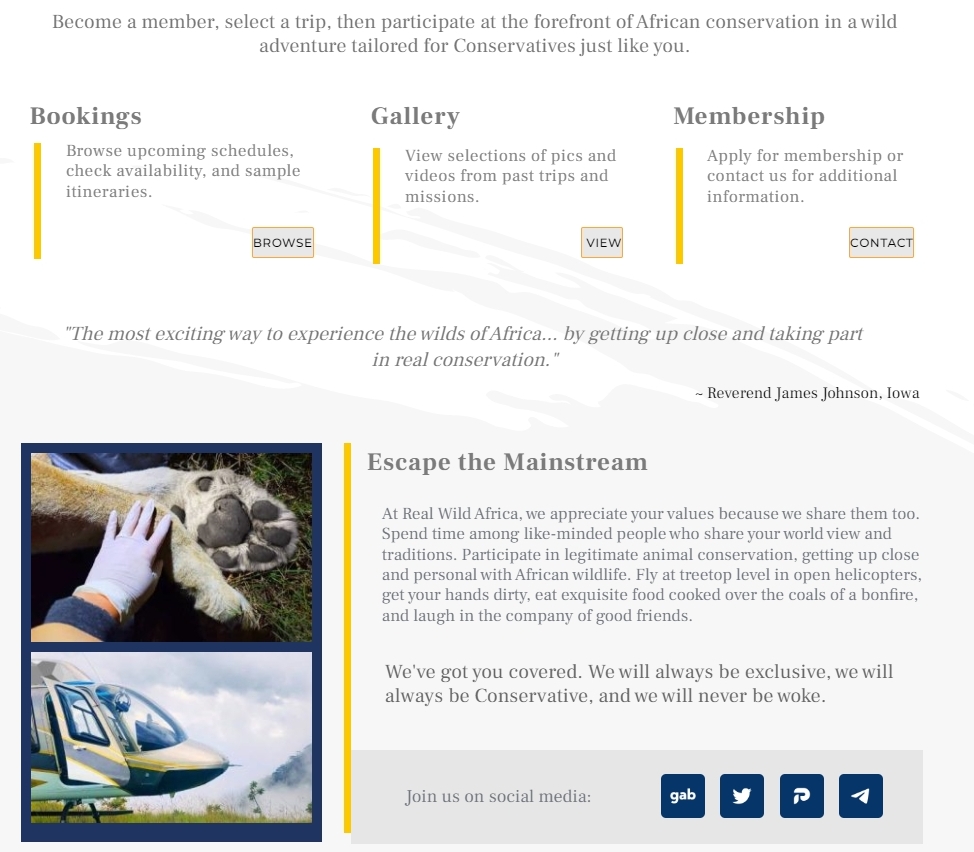
If a complex design like above is necessary for your project, one possible work around is to design each block on a separate page. I copied one of the homepage blocks to another page and I am able to edit the block and save it in desktop, tablet and mobile design views. (https://realwildafrica.com/brizy-test/) When you have three complex blocks on the same page, saving the page becomes difficult.
Here are the steps to implement this work around
- Save each block in your homepage to the blocks library
- Open a new page, import just one of the blocks, make all changes in the desktop, tablet and mobile design views and save the block again.
- Repeat this process for the all the three blocks on your homepage.
- Delete the current blocks from your homepage and add the newly saved blocks from the blocks library one by one.
0 -
Okay, thank you KC George. I will use the workaround. Or redesign the page to be less complex.
Thank you for the help!0 -
UPDATE:
I've made the layout far less complex (less rows and columns) and it's all working fine now. Thank you KC George!0
Please sign in to leave a comment.
Comments
10 comments