Rearrange mobile menu/header elements

My global header is a block (because Brizy doesn't allow for menus to be global...). Everything looks great with it on desktop & tablet, but on mobile (phones), the hamburger menu lines and the button look very smushed together. (Note the below is a LIVE view on my phone, it doesn't look this smushed in the Brizy editor.)
Also, I think it looks a bit odd that the "hamburger menu" is in the middle... I'm thinking it would look better if it's right?
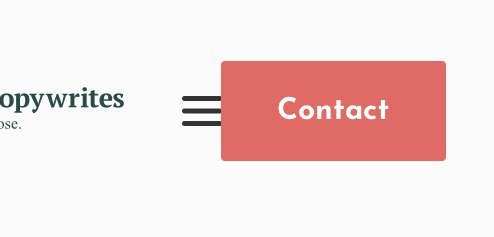
I've tried everything to switch these two but I cannot move them. (I've also tried - unsuccessfully - to recreate the whole header and columns etc - it just ended up a mess.)
How can I switch the location of these two OR/AND (in case the switched locations don't look good) how can I simply create more space between these two elements on mobile only? Is this possible?
Again, this is a GLOBAL BLOCK, so I don't want to mess with it too much either.
Thanks in advance!
-

Hi Jenna,
Thank you for contacting us.
You need to add the menu in one column and the contact button in another column, in this way you can move them in the mobile version, please see this video : https://jumpshare.com/v/91lJBVzEx0SsEGexFgc0
Best regards, Nelea.
0 -
Hi Nelea, thanks for answering and creating the video. This a global block that contains: site logo, menu (hamburger in the mobile version), and a button. How does this affect trying to create columns? It's also been created by my designer with the right distances etc etc, so I'd rather not mess with having to recreate it as columns...
(I actually tried it but it was very cumbersome and quite frankly, faulty. Like the "Contact" button kept changing its copy back to show "BUTTON" instead of "Contact". Yes, by itself... very frustrating and I gave up the "column solution" after 3 tries.)
Is there another way to move or switch these two elements?
0 -
Hi Jenna,
The header for my website is also global. I made a new video, where I have also a logo, menu, and a button. If you need to have space between the menu and the button then you should add the button in a column, in this way you can customize it. Please see this video. Or you can duplicate one column from the header in the desktop view and then add the button there.
Also, you can try to customize the header in the desktop view, and delete the space between the element. See please here: https://jumpshare.com/v/s9cdXdq2QGr1G7rTcxry
Best regards, Nelea.
0
Please sign in to leave a comment.
Comments
3 comments