Form Issue

Hello:
I have recently launched a new web site ... www.bestexcavating.ca and the Form I created has a problem.
The Email does send BUT the message only arrives in Brizy Leads and does not send to the designated Email address.
What is confusing is the form (I think) is no different than similar forms on other sites that work as they should.
Email is being sent via WordPress, reCapthca is set.
Any suggestions on how to get the Form to send to the designated EMail address as it should?
Thanks!
Jim
-

Hi Jim,
When you send out email notifications through the WordPress option, mail servers are likely to mark messages sent this way as SPAM, so these messages may not reach the recipient. Please follow these best practices to avoid having your mail rejected by mail servers.
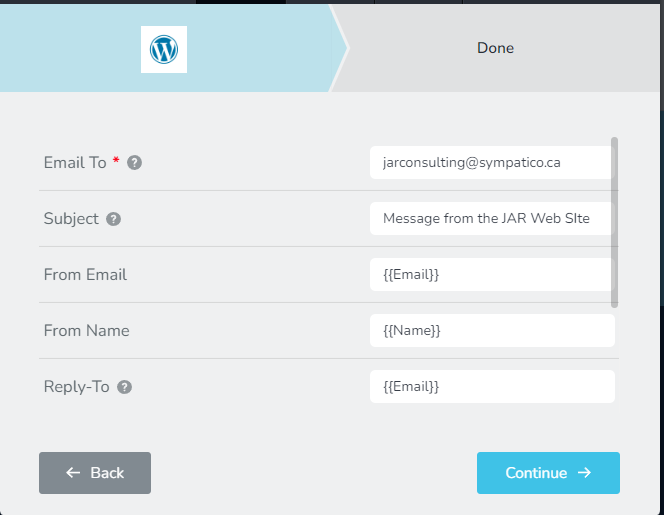
- Subject: Please don't omit the subject line. Give a meaningful subject. You can include a subject, such as "Contact Form."
- From Email: Make sure the 'From" Email' you use has the same domain as your website. The 'From Email' field on a form hosted at CNN.com can be form@cnn.com or info@cnn.com
- From Name: This field must not be left empty. Give a meaningful 'From Name'
Even after following the above, if you do not receive email notifications, please consider instructions in this article to send out email notifications through the SiteGround SMTP server. https://www.siteground.com/kb/fix-wordpress-not-sending-emails-issue/
Even though you set up your email notifications to be sent out through the SiteGround SMTP server, in your Brizy form, you must choose the WordPress option (and not the SMTP option). This is because the SMTP plugin replaces the default WordPress option with the SMTP option you add to the plugin.
Feel free to get back to us, if you have further questions on this.
0 -
Thanks and I will try your suggestions and let you know.
Below is what I have on another site and this works fine. I basically did the same with this new site which is why I am not understanding why it is not sending.
 0
0 -

Hi,
Please duplicate the form then, delete the old form, connect the new form again and follow all the steps that my colleague advise you. Also, please delete the browser cache.
Best regards, Nelea.
0
Please sign in to leave a comment.
Comments
3 comments