How To Change Active State On Mobile Menu Text

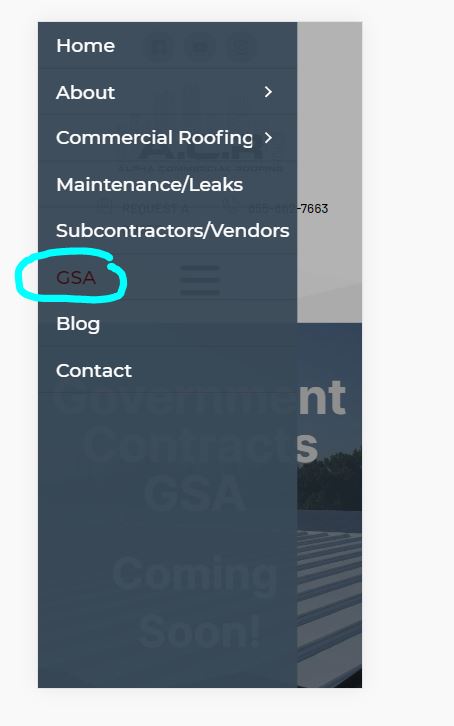
I've tried so many options on trying to get the active state on the mobile menu to change to a different color. Can you please let me know what the CSS is to change this?
This CSS seems like it would work but I'm not having any luck with this either.
@media (max-width: 767px) {
element .brz-mm-menu__item.brz-mm-menu__item--current:not(.brz-mm-menu__item.brz-mm-menu__item--current:active) {
color: #ffffff!important;
}
}
-

Hi Chad,
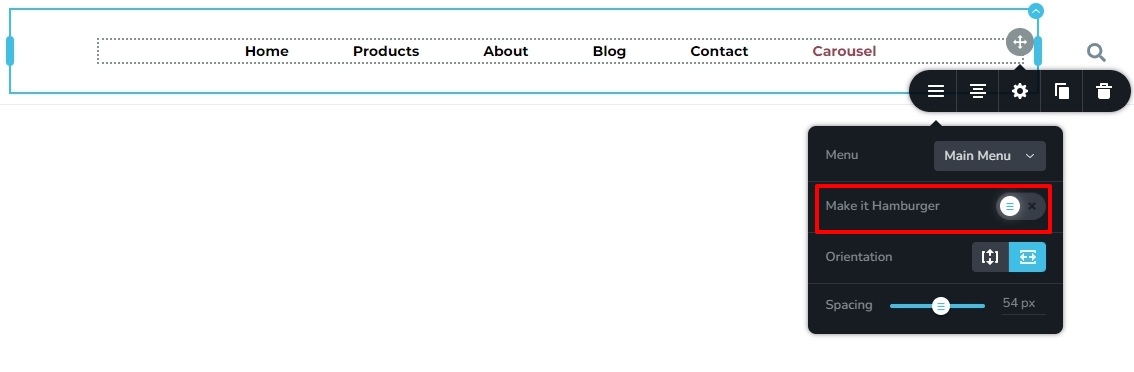
We are sorry for this inconvenience. The hover and active color settings are missing from the Mobile design view. As a work around, let me suggest these 3 steps.
- Temporarily enable hamburger menu for the Desktop (see the attached image)
- Set the Hover and Active colors for the hamburger menu in the Desktop design view and save your work.
- Disable hamburger menu for the Desktop.
These steps should set the hover and active colors for the mobile hamburger menu as well.
 0
0 -

Hi,
Also you can try to add this code
@media (max-width: 767px) {
.brz-menu.brz-menupreview .brz-mm-menuitem.brz-mm-menuitem--current:not(.brz-mm-menuitem.brz-mm-menu__item--current:active) {
  color: red !important;
}
}
0 -
Thanks for the help, everyone. Hopefully, Brizy will fix this issue in an upcoming version release.
1 -

Hopefully the fix is coming up soon!
0
Please sign in to leave a comment.
Comments
4 comments