weird URL after update

Hi, yesterday i've updated the site sanmartinolocanda.it
Before update, permalink where like sanmartinolocanda/page-name (as set on wp)
Now they appear in the browser (google chrome) like this
sanmartinolocanda.it/page-name/?_gl=1*k190jz*_up*MQ..*_ga*NTQxMDI4MDg5LjE2NzA5NDc2ODA.*_ga_EB80231F4Z*MTY3MDk0NzY3OS4xLjAuMTY3MDk0NzY3OS4wLjAuMA..
how can i resolve?
-

Hello,
Thank you for contacting us.
If you need to change the permalink structure in WordPress please follow all these steps :
1.Log in to your WordPress website. When you’re logged in, you will be in your ‘Dashboard’
2. Click on ‘Settings’.On the left-hand side, you will see a menu. In that menu, click on ‘Settings’.
Click on ‘Permalinks’.
The ‘Settings’ menu will expand providing you with additional options. Click on ‘Permalinks’.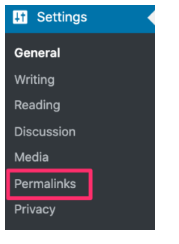
3. Select ‘Post name’, change it then save it. See here.
Also, please check this article too : https://www.wpbeginner.com/wp-tutorials/how-to-create-custom-permalinks-in-wordpress/
Best regards, Nelea.
0 -
Hi Nelea.
I know how to change the permalinks in wordpress, and the structure is already on post name, that's why i contacted you.
I was wondering if this was a brizy-related problem after update0 -
Hi,
This problem did not occur because of Brizy, but because during the update, some junk data got added to the permalinks. So, you need to change the permalinks and check the page name.
Best regards, Nelea.
0 -
Thank you Nelea,
i did it but problem is still there. I'll see if some plugin causes this issue
0
Please sign in to leave a comment.
Comments
4 comments