Image Names Changed

I am testing Brizy Cloud. I uploaded correctly named images. But when I downloaded the zip file all of the image names were changed.
Why does it do this? How can this be resolved?
Also there is no want to add alt tags.
Thanks
Sean
-

Hi Sean,
The images you upload to Brizy Cloud get added to a common pool of images for all projects. As you upload, images get assigned unique names. This helps identify all the images in the common pool.
You can add Alt tags to images you add using the image element. Please see this screenshot. https://jmp.sh/s5JuexLm
0 -
Hi KC,
This is terrible for SEO and managing a website, having these random file names. It might be a deal breaker for us.
Sliders. Do we have control over transitions and durations?
Thanks
Sean
0 -

why havent these issues been addressed yet I dont need my site just to look good I need it to be SEO ready as well
0 -
Hi Antario,
We are currently working on adding Media Library to Brizy Cloud projects. Please have a look at https://trello.com/c/BJgBX0Wj
Users will have more control over the images they upload to a project when we launch this feature. As you can see from the screenshot, image file names can be edited here.
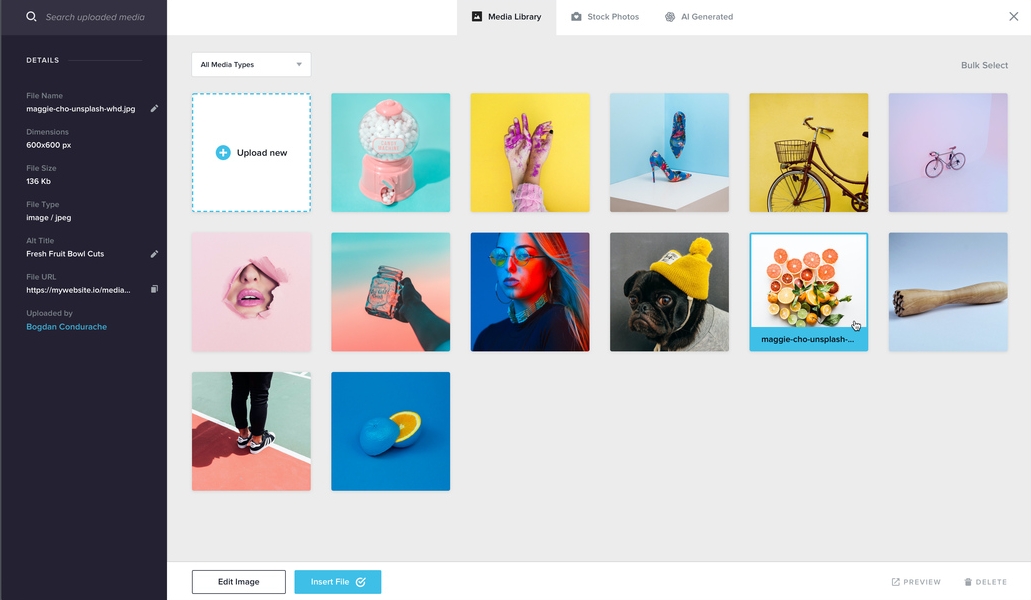 0
0
Please sign in to leave a comment.
Comments
4 comments