Can't edit my blog post template

Hi,
I'm following this - https://www.youtube.com/watch?v=cWJEetL4f-s&ab_channel=BrizyWebsiteBuilder
but I can't change the post template from Brizy. I'm not having Wordpress title and other options available.
Here's the screen recording - https://www.loom.com/share/4ff3337c92664a7f97b18a03fe06105b
-

Hi Vikrant,
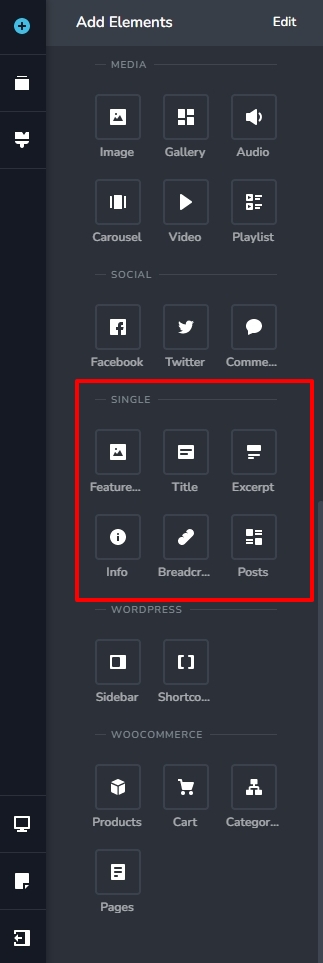
Please look for the elements required for developing single blog post template under the heading SINGLE in the elements panel. You could also watch this more recent tutorial for the procedure to create Brizy templates Creating Dynamic Templates | Brizy WordPress 101 | Lesson 19
 0
0 -
Hey KC,
I can't see these elements on my end. Please see recording - https://www.loom.com/share/53f8712cd8814463bfa42ef692159f110 -
Hi Vikrant,
We need to take a look at your WordPress Dashboard to offer further help. Please add me as a user to your WordPress Dashboard if you need assistance with this. My email: kc.george@brizy.io. As shown in this screenshot: https://jmp.sh/sOSGGR3, please turn on the option "Send the new user an email about their account"
Please let me know here when you send me an invitation.
0 -
Just done. Did you receive a notification?
0 -
Hi Vikrant,
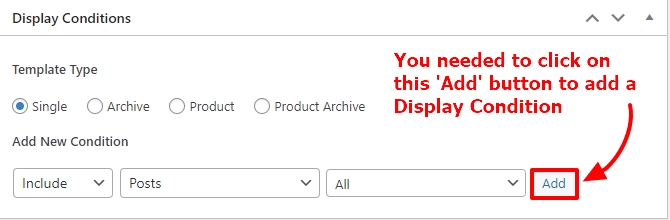
You had not added the Display Condition for the Blog post template. I have added it now. Please check if you see the blog related elements in your blog post template.
 0
0 -
Great thanks. I noticed that in my blog posts, hyperlinks are not in blue. How can I make it blue?
0 -
Hi Vikrant,
Brizy does not have a feature to add link color. You could try adding this to Additional CSS under Appearance -Customize in your WordPress Dashboard.
/*Add link normal and hover colors */

p a {
color: #3581e4 !important;
}

p a:hover {
    color: #fe4800 !important;
 }
0 -
Thanks
0
Please sign in to leave a comment.
Comments
8 comments