Brizy Popup Builder

I made a popup with the brizy popup builder. I used a template an just changed the picture and the text. The problem is, that the popup doesn't close when the background or the X is clicked. You always need to click to twice. Happens in every browser I tested. All used plugins are up to date, have the problem on multiple websites. I know that on some of these pages it used to work. Examples: https://www.das-baedle.de/ or https://www.arztpraxis-holzgerlingen.de/
-

Hi Martin,
This is a bug with the most recent versions of Brizy. We are working on fixing this. To fix the this issue on your project until then, you could consider rolling back to the previous versions. Here are the ZIP files to roll back to the previous versions.
- Brizy 2.4.12: https://jmp.sh/pJmV5bN6
- Brizy Pro 2.4.11 https://jmp.sh/eJNcm0Jn
Please follow this procedure to roll back.
- Deactivate and delete Brizy Pro
- Deactivate and delete Brizy
- Download Brizy 2.4.12 and in your WordPress Dashboard under Plugins - Add New - Upload Plugin, upload Brizy
- Download Brizy Pro 2.4.11 and under Plugins - Add New - Upload Plugin, upload Brizy Pro
0 -
Ok, thank you!
0 -
Still have this issue with new versions of briyz. When will this problem be solved?
0 -
Hi Martin,
It is difficult to predict a date for fixing this bug. We have a work around to fix this issue in the meantime. Looks like your popup is set to display only on the homepage. Your popup display condition may look like this
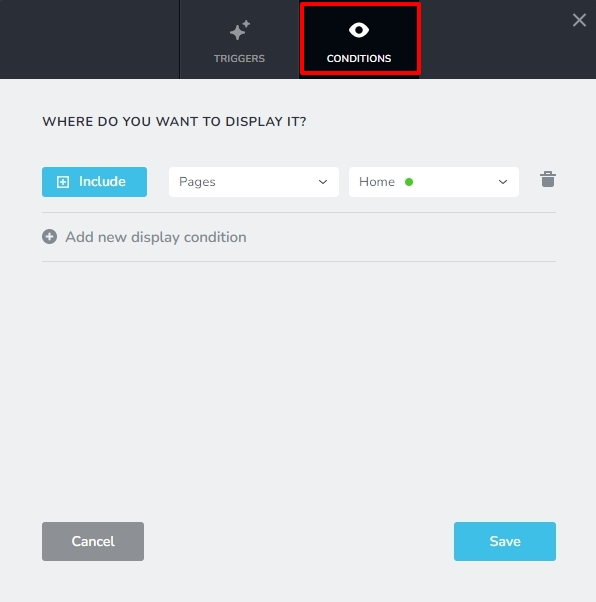
In the middle dropdown box, in place of Pages, select the option "Front page'

Once you make the selection, it should look like this
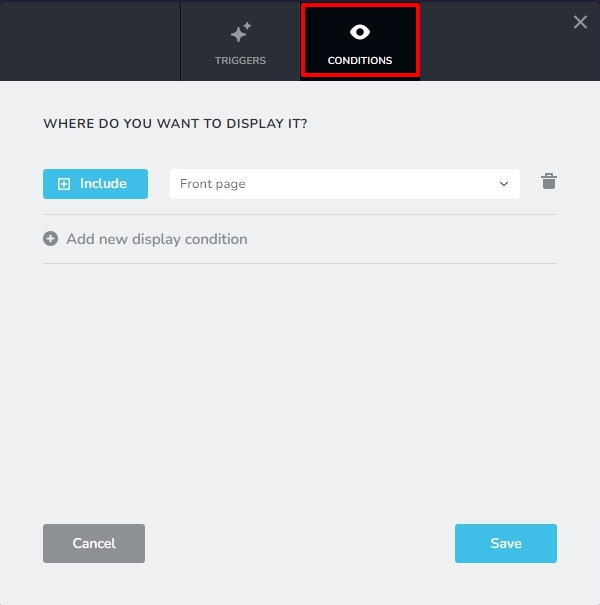
Save the settings and check if the issue gets resolved.
0
Please sign in to leave a comment.
Comments
4 comments