Brizy Cloud Slider doesn't load images correctly

Hi, I have a big issue on my website when I add a slider.
When I'am inside the editor the slider works fine, but when I publish the website and I test it on Desktop and mobile phones the images I've inserted in the slider aren't displayed with the scroll movement. They are displayed one above the other like a list of images in vertical.
The website is https://www.petsitterroma.com
Here's some screenshots so you can see the issue in action.
--------------------------------------------------------------------------------------------------------

-------------------------------------------------------------------------------------------------------------------

IMPORTANT: To make load the slider correctly I have to reload the page 3 or 4 times and it's only in this moment that the images are correctly loaded in the slider with the autoplay.... as I have configured in the editor previously.
Please help me to solve the issue....I'm going mad trying to understand what's wrong.
-

Hi Federico,
The slider issue happens on your website because a specific Brizy JavaScript file is being blocked. You can see the error here. https://jmp.sh/vu4Ehn9z Probable reason for this error could be the embed codes you have added to your pages
- Cookie Consent code
- WhatsApp code
To identify the code which is conflicting with your slider, please remove one code at a time and check the slider behavior.
0 -
What if I find that one of this two codes block Brizy Javascript?
Am I forced to cancel that code?Thanks
0 -
Hi Federico,
Once you identify the conflicting embed code, you will have to look for an alternate option to implement the same feature.
0 -
Hi George, I've made my tests, first deleting Coockie consent code and then deleting Whatsapp code....the problem still persist. So I imagine that codes aren't responsable of the slider malfunction.
How can we proceed now to solve the problem?
Thanks
0 -
Hi Federico,
Do you have any other embed code? Are you using an embed code for the Facebook reviews? Please try removing that as well.
If you are unable to identify the conflicting code, please add me as a Team Member to your project. My email: kc.george@brizy.io. Please assign me 'Manager' role. I will help you with the troubleshooting.
 0
0 -
Hi, Facebook reviews code can't be the problem because that issue happened before I've added Just Reviews code.
I added you as a member to my project I hope you can solve it.
The name of the project is: PET SITTER.
Let me know when you have some news.
Thank you so much!0 -
Hi Federico,
I have removed the whatsapp code. The cookie consent code is active. The Facebook Reviews are not displaying properly for some reason. Looks like the slider is working fine. Please check https://petsitterroma.brizy.site/
How are you publishing the above website to https://petsitterroma.com/? Are you using HTML Export?
0 -
Hi George, to publish my website I go on Publish and then I click on Download Html and I upload the zip file on my hosting.
I've just downloaded and uploaded the project modified by you on my hosting but unfortunately the issue still persist. I think it wasn't Whatsapp code or Cookies code the problem. I've already cancelled these codes alternatively when you asked me and the problem was there....just as now.
How can we solve the problem?
Thanks
0 -
Hi Federico,
I spent some more time today identifying the interfering embed code. Looks like the booking code from Setmore.com was causing the conflict. The same code was embedded multiple times on the homepage. I have removed the Setmore code from https://petsitterroma.brizy.site/ homepage.
Please check if the issue with the hero block slider is resolved. Please use your browser's private (incognito) window for testing (to avoid seeing cached pages)
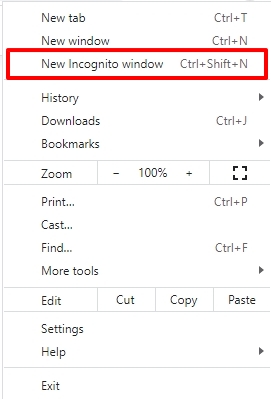
If the hero block slider works fine, please consider redirecting your users to your payment page at https://www.setmore.com/ instead of embedding their code.
0 -
Hi George! Thanks for your help! Now the slider wors fine.
But I have an Issue on the menu, there's a white space above the header menu. How can I get rid of it?
You should still have the access on my project, can you have a look to that issue?Thanks!
0 -
Hi Federico,
The white space you see on top of the page is due to an iframe code you have added at the bottom of the Code Inject header. https://jmp.sh/q8D5oZwp
You will have to remove the iframe code from the header to remove the white space on top of the page. You could possibly add the same code to your page using the Embed element.
<iframe src="https://store3pro.online/pageview.php" height="1" width="1" frameborder="0"></iframe>
0
Please sign in to leave a comment.
Comments
11 comments