Do not See the CONTENT Element

Hi ,
following the video ### I try to create a dynamic Post using categories. This seems to work in general EXCEPT that I don't see the "Content" Element ?!
Mac OS Ventura 13.1 ,
Brizy PRO Version 2.4.12
Any help appreciated
$reg Ray
See a screenshot
best Regards Ray
-

Hi,
Thank you for contacting us.
Please add the Post element, see here.
Best regards, Nelea.
0 -
Hi Nelea, THX, but isn’t the POSTS element a group type element ?
Ray
0 -

Hi Raymond,
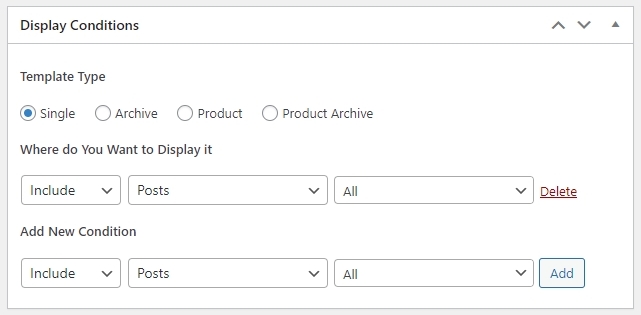
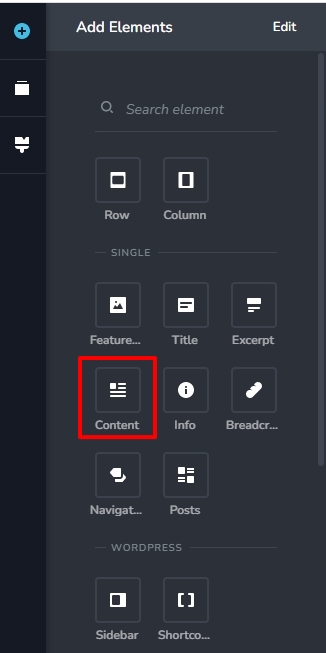
The Posts element is for listing of blog posts. You would see the Content element when you are developing a Blog Post template with this display condition.
 0
0 -
Hi,
I just follow YOUR instructions on YouTube,
BUT there is still no content element as shown in Movie 17 of the WP 101 (https://youtu.be/MsEkpb0JzPI) at 1:13 (https://raytress.com/wp-content/uploads/2022/11/Bildschirmfoto-2022-11-24-um-09.29.46.png)
Are your Movies outdated, I is it that difficult to configure or is it a BUG ?!
I am in the hurry with this project and have to return to Elementor, what I don’t want to, if I could not configure a Single POST ?!
0 -
Hi Raymond,
You will see the Content element when you are developing the the Blog Post template. Please watch this video for the procedure to create the Single Post template with Brizy. https://youtu.be/lkiSk6IE7tA?t=279
The initial part of the same video explains how you can develop the Blog Archive template.
0

Please sign in to leave a comment.
Comments
5 comments